Leaderboard




Popular Content
Showing content with the highest reputation since 10/06/2024 in all areas
-
A customer asked me to create a powerpoint explaining the advantages of LabVIEW. While putting together the practical rationales, just for grins I asked Chatgpt to create a presentation explaining the philosophy of LabVIEW in a Zen sort of way. Here is what it came up with. Zen_of_LabVIEW.pdf6 points
-
A is for Argumentative, right?5 points
-
I spent a long time online with YouTube support and finally got to the bottom of it. The Channel is back, and all the links work!4 points
-
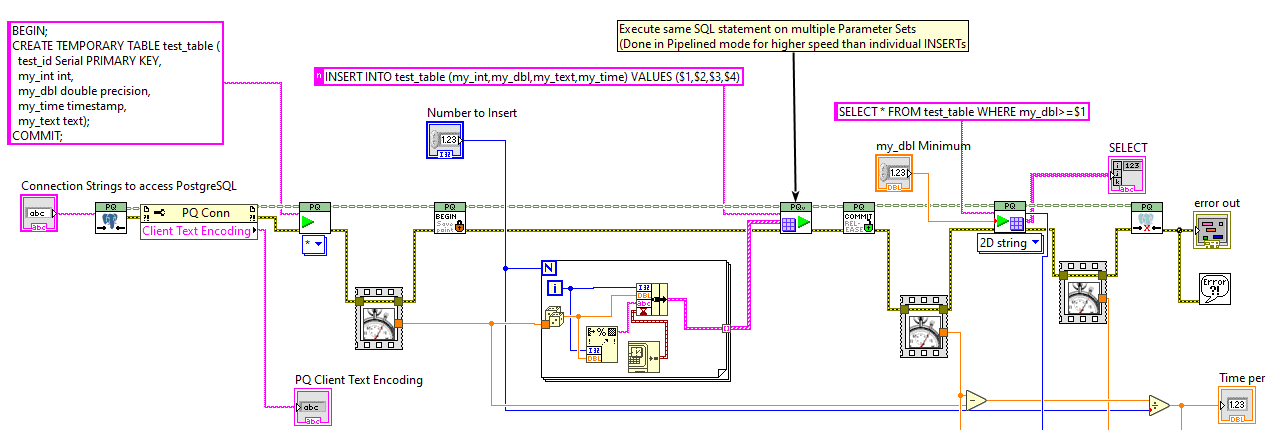
0.6.0 version now on VIPM: https://www.vipm.io/package/jdp_science_postgresql/ This involves significant improvements, as well as Examples that work with a public postgres server (and thus work without needing Postgres installed). I am hoping this is close to a 1.0 version.
 4 points
 -
Phew that is a pretty strong opinion! Although I personally am not a fan of the overall style of DQMH none of my problems are with the scripting/wizards or placeholder text. I think any framework that tries to do "a lot" will be complicated... your own personal framework (which you likely find trivial to use) is likely to be a bit weird to others. DQMH is extremely popular for a reason... To paraphrase the words of a wiser person than I, "please don't yuck someone elses yum"3 points
-
Many years ago I made a demo for myself on how to drag and drop clones of a graph. I wanted to show a transparent picture of the new graph window as soon as the drag started, to give the user immediate feedback of what the drag does and the window to be placed exactly where it is wanted. I think I found inspiration for that on ni.com or here back then, but now I cannot find my old demo, nor the examples that inspired me back then. Now I have an application where I want to spawn trends of a tag if you drag the tag out of listbox and I had to remake the code...(see video below). At first I tried to use mouse events to position the window, but I was unable to get a smooth movement that way. I searched the web for similar solutions and found one that used the Input device API to read mouse positions to move a window without a title and that seemed to be much smoother. The first demo I made for myself is attached here (run the demo and drag from the list...). It lacks a way to cancel the drag though; Once you start the drag you have a clone no matter what. dragtrends.mp4 Has anyone else made a similar feature? Perhaps where cancelling is handled too, and/or with a more generic design / framework? Drag window out of listbox - Saved in LV2018.zip3 points
-
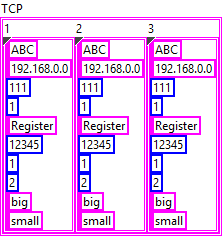
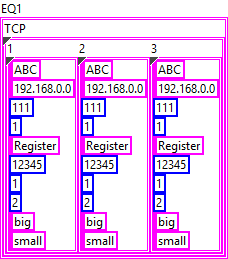
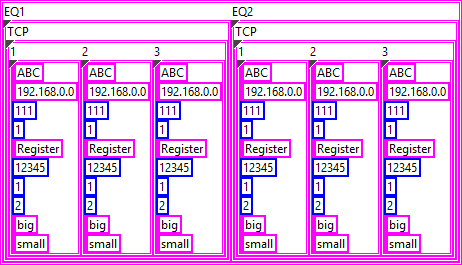
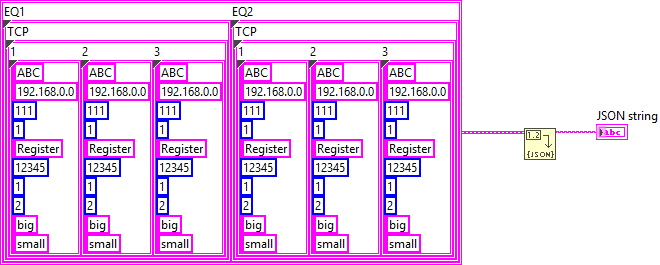
The examples you provide are invalid JSON, which makes it difficult to understand what you are actually trying to do. In your VI, the input data is a 2D array of string but the JSON output is completely different. Your first step should be to define the types you need to produce the expected JSON output. Afterwards you can map your input data to the output data and simply convert it to JSON. The structure of the inner-most object in your JSON appears to be the following: { "Type":"ABC", "IP":"192.168.0.0", "Port":111, "Still":1, "Register":"Register", "Address":12345, "SizeLength":1, "FET":2, "Size":"big", "Conversion":"small" } In LabVIEW, this can be represented by a cluster: When you convert this cluster to JSON, you'll get the output above. Now, the next level of your structure is a bit strange but can be solved in a similar manner. I assume that "1", "2", and "3" are instances of the object above: { "1": {}, "2": {}, "3": {} } So essentially, this is a cluster containing clusters: The approach for the next level is practically the same: { "TCP": {} } And finally, there can be multiple instances of that, which, again, works the same: { "EQ1": {}, "EQ2": {} } This is the final form as far as I can tell. Now you can use either JSONtext or LabVIEW's built-in Flatten To JSON function to convert it to JSON {"EQ1":{"TCP":{"1":{"Type":"ABC","IP":"192.168.0.0","Port":111,"Still":1,"Register":"Register","Address":12345,"SizeLength":1,"FET":2,"Size":"big","Conversion":"small"},"2":{"Type":"ABC","IP":"192.168.0.0","Port":111,"Still":1,"Register":"Register","Address":12345,"SizeLength":1,"FET":2,"Size":"big","Conversion":"small"},"3":{"Type":"ABC","IP":"192.168.0.0","Port":111,"Still":1,"Register":"Register","Address":12345,"SizeLength":1,"FET":2,"Size":"big","Conversion":"small"}}},"EQ2":{"TCP":{"1":{"Type":"ABC","IP":"192.168.0.0","Port":111,"Still":1,"Register":"Register","Address":12345,"SizeLength":1,"FET":2,"Size":"big","Conversion":"small"},"2":{"Type":"ABC","IP":"192.168.0.0","Port":111,"Still":1,"Register":"Register","Address":12345,"SizeLength":1,"FET":2,"Size":"big","Conversion":"small"},"3":{"Type":"ABC","IP":"192.168.0.0","Port":111,"Still":1,"Register":"Register","Address":12345,"SizeLength":1,"FET":2,"Size":"big","Conversion":"small"}}}} The mapping of your input data should be straight forward.
3 points
-
In a previous life, I used to teach a CLD level class using this book, and enjoyed it a lot -- Some of it is certainly outdated at this point, but I think it still has a lot of solid info / strategies in it. I've attached the files as a .zip file to this post. Good luck! Effective LabVIEW Programming Files.zip3 points
-
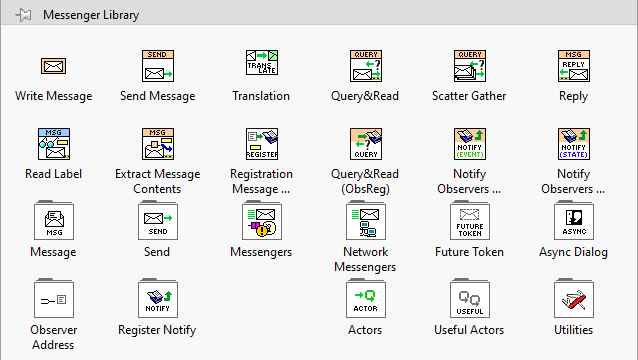
I have put some effort into improving the VI icons in Messenger Library, in hopes of making things clearer. I have particularly been trying to get rid of the magnifying glass icon, which was standing in for too many concepts. I have also tried to improve the Palettes by putting the standard VIs (that one would most commonly use) in the root-level palette: The 2.0 version also introduces Malleable API methods (the orange-coloured ones), which make code cleaner. If anyone could spare some time, it would help me to have feedback. Especially from people who have not used Messenger Library before, so I can get an idea if the key concepts come across. New 2.1.3 version is available here: https://forums.ni.com/t5/JDP-Science-Tools/New-icons-for-Messenger-Library/m-p/4412550#M192
3 points
-
Yes you can. The official form is at https://www.ni.com/en/forms/perpetual-software-licenses-labview.html Some things to keep in mind: There is a current promotion (valid till the end of December 2024) where those who used to have an SSP can renew it today as if the SSP never expired in the first place. That means you can get the latest version of LabVIEW, under a perpetual license, at a discounted price (compared to buying it "new"): https://forums.ni.com/t5/LabVIEW/LabVIEW-subscription-model-for-2022/m-p/4398958#M1296289 Quotes/sales are now handled by external distributors, rather than Emerson/NI. Lots of people have reported that they didn't get a response to their quote requests, or didn't get the expected discount applied. If that's the case, message Ahmed Eisawy, the Director of Test Software Commercialization (who wrote the forum post in my link above) and he'll get it sorted out.3 points
-
The 'Arrange VI Window' Quick Drop keyboard shortcut does this. With the diagram open, Press Ctrl-Space, then once Quick Drop appears, press Ctrl-F. If you want to look at the code that accomplishes this, see here... it should be a good resource for writing your own tool: [LabVIEW 20xx]\resource\dialog\QuickDrop\plugins\_Arrange VIWin SubVIs\Arrange VIWin - Arrange BD.vi3 points
-
You want an ability to override the Equality or Comparison operators? I'm unsure, whether it really existed in OpenG packages, but now you have those neat malleable VIs, that let you do that: Search Unsorted 1D Array , Sort 1D Array , Search Sorted 1D Array. They have an additional input to specify your own equals or less function in a form of a custom comparison class or a VI refnum. There's an article to help: Creating a Custom Sorting Function in LabVIEW2 points
-
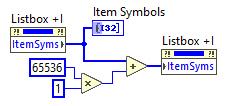
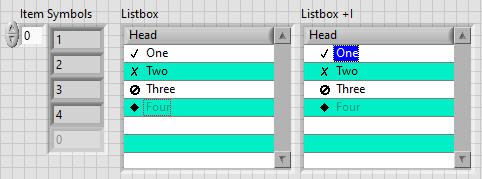
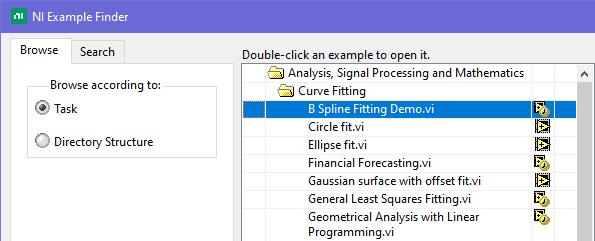
This is exactly what was said in that ancient thread: Tree control in labview. So if you add 65536*N to the Item Symbols property of the Listbox and have the "Enable Indentation" option activated, you shift the symbol/glyph and the text N levels to the right. Could be useful for simple 'parent-child' relationships, if you don't want to use a Tree. And still it's used in Find Examples / NI Example Finder window:
2 points
-
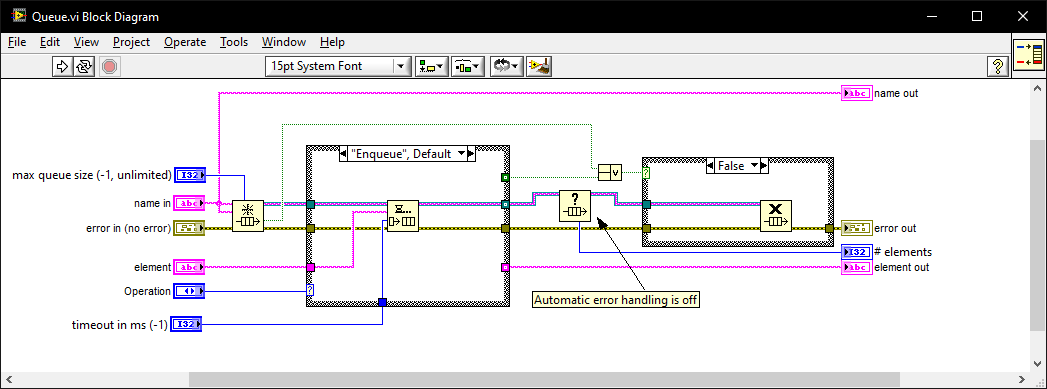
I once went for an interview where they gave me a coding test and asked me to modify it. It was a very long time ago so I don't remember the exact modification they wanted (nothing to do with memory leaks) but I do remember the obtain queue and read queue inside a while loop with the release queue outside. I asked if they wanted me to also fix the memory leak as well as the modifications and they were a little puzzled until I explained what you have just said. I must have seen (and fixed) this while-loop bug-pattern a thousand times since then in various code bases. I also created this VI which I generally use instead of the primitives as it intialises on first call, can be called from anywhere, and prevents most foot-shooting by rolling them all into a single VI and ensuring all references but 1 are closed after use. Queue.vi
2 points
-
Those aren't typo's and errors. They are tests to see if we are paying attention.2 points
-
In the past I have used the IMAQ drivers for getting the image, which on its own does not require any additional runtime license. It is one of those lesser known secrets that acquiring and saving the image is free, but any of the useful tools have a development, and deployment license associated with it. I've also had mild success with leveraging VLC. Here is the library I used in the past, and here is another one I haven't used but looks promising. With these you can have a live stream of a camera as long as VLC can talk to it, and then pretty easily save snapshots. EDIT: The NI software for getting images through IMAQ for free is called "NI Vision Common Resources". This LAVA thread is where I first learned about it.2 points
-
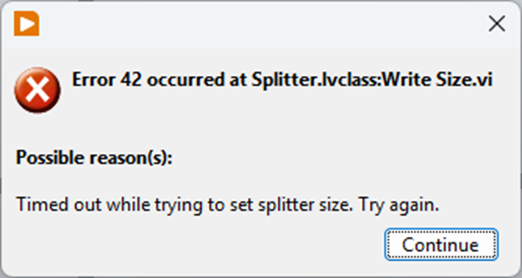
Just to share how I got around this: By deleting 1 front panel item at a time I found that one single control was causing PaneRelief to crash; an XY graph. Setting it temporarily to not scale and replacing it with a standard XY graph (the one I had had some colours set to transparent etc) was enough to avoid having PaneRelief crash LabVIEW, but it would now just present a timeout error: I found a way arund this too though: the VI in question was member of a DQMH lvlib that probably added a lot of complexity for PaneRelief. With a copy saved as a non-member it worked: I could replace the graph, edit the splitters with PaneRelief without the timeout error (even setting the size to 0), then copy back the original graph replacing the temporary one, and finally move the copy back into the lvlib and swap it with the original. Voila! What a Relief... 😉 I probably have to repeat this whole ordeal if I ever need to readjust the splitters in that VI with PaneRelief though 😮
2 points
-
I confirm that this license is nearly identical to the standard EULA we use for our commercial products. Some wording is not applicable to a distributed palette of VIs like this. Our intention was to share a few reusable tools, used internally, with the community. Ideally, we should have released them under a standard open-source license such as MIT or a similar option. These VIs have been released “as-is,” without support or any guarantee that they will function for your specific use case. You may need to troubleshoot or fix any issues on your own. Feel free to use them in any context. I’ll look into whether it's possible to update the packages on the tool network to replace the current license with a more standard open-source one.2 points
-
I put a temporary ban on inserting external links in posts (except from a safe list). We'll see what affect it has.2 points
-
This is the modern 2020's equivalent of "works for me".2 points
-
Your reporting of spam is helpful. And just like you are doing one report per user is enough since I ban the user and all their posts are deleted. If spam gets too frequent I notify Michael and he tweaks dials behind the scene to try to help. This might be by looking at and temporarily banning new accounts from IP blocks, countries, or banning key words in posts. He also will upgrade the forum's platform tools occasionally and it gets better at detecting and rejecting spam.2 points
-
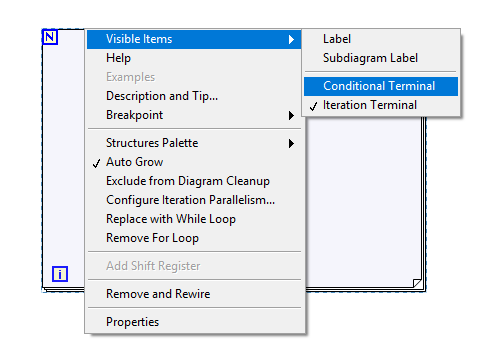
Apparently they moved it under Visible Items Edit: This also affects other types of structures.
2 points
-
Well, there are two aspects. The first is the technical one from hackers diving into the software and unhiding things that NI felt were not ready for prime time, to complicated for simple users, or possibly also to powerful. The main reason definitely always is however: if we release that, we have to spend a lot more effort to make it a finished feature (a feature for internal use where you can tell your users: "sorry that was not meant to be used in the way you just tried") is maybe 10 - 20% of development time than the finished feature for public use. There is also support required. That costs money in terms of substantial extra development, end user quality documentation (a simple notepad file doesn't cut it), maintenance and fixing things if something does not match the documented behaviour. And yes I'm aware they don't always fix bugs immediately (or ever) but the premise is, that releasing a feature causes a lot of additional costs and obligations, if you want to or not. The other aspect is, if someone who is an active partner and has active contacts with various people at NI, he is infinitely more likely to be able to influence decisions at NI than the greatest hacker doing his thing in his attic and never talking with anyone from NI. In that sense it is very likely that Jim having talked with a few people at NI has done a lot more to make NI release this feature eventually, than 20 hackers throwing every single "secret" about this feature on the street. In that sense the term "forcing NI's hands" is maybe a bit inaccurate. He didn't force them, but led them to see the light! Not out of pure selfless love, but to be able to officially use that feature for himself. The according Right-Click framework was a proof of concept to see how this feature can be used and mainly an example to other users how it can be used, and indeed once it worked it had fulfilled its purpose. That it was not maintained afterwards is not specifically JKI's fault. It is open source, so anyone could have picked up the baton, if they felt it was so valuable for them. The problem with many libraries is actually, if they are not open source and free, many complain about that, if it is open source and/or free, they still expect full support for it! In that sense I have seen a nice little remark recently:
2 points
-
Well, you are missing some important details in "The story of how this came about". So maybe indeed "it is worth a post of its own". It was LabVIEW 7.0 where they forgot to put a password on one of the VIs shipped with LabVIEW. And that VI had some node(s) on its block diagram including, I think, the BD reference property for the VI class. The community indeed got excited. But what did NI do? They tried to hide everything again in LabVIEW 7.1! I made a joke then that "our mother" NI must had had a PMS so she put the most interesting toys on a top shelf. So I made a"ladder" for us, kids, to get to them again and called it hviewlabs was me then, because that was a name of my company I used to sell my LabHSM Toolkit, an actor framework with actors controlled by hierarchical state machines (statecharts), long before the Statechart toolkit by NI, "THE Actor Framework", DQMH, and even before LVOOP. After PJM_Labview has published his private class generator http://forums.lavag.org/index.php?showtopic=307&hl=# and class hierarchies http://forums.lavag.org/index.php?showtopic=2161# and http://forums.lavag.org/index.php?showtopic=314&hl=hierarchy# (neither topic is available anymore) it became clear how to get access to private classes, properties and methods. However, it wasn't convenient enough. My PMS Assistant made it really easy. It gave back the access to those features to a much wider community of LabVIEW enthusiasts As you can see from the PMS topic discussion, by that time brian175 already had made his DataAct Class Browser. And he got really excited about the possibility not only browse but also to actually create objects, property and method nodes with the properties and method NI didn't want the users to see. By April of the same 2006 he figured out object creation too and incorporated the capabilities of PMS Assistant into DataAct Class Browser. At that point, I guess, NI decided that "the cat is out of the bag" and there is no point to resist. Nevertheless even after VI Scripting was made released by NI some classes, and even some properties and methods of public classes remain hidden even in LabVIEW 2024. I wonder why DataAct Class Browser is no longer available (as of January 2025) as well as original findings by PJM_Labview even here, on LavaG. Did NI "politely asked" admins to remove all that and just forgot about my PMS Assistant?2 points
-
Unfortunately, many of those are bots. I've disable user:pages long time ago, because of the spam. If there's anyone that deserves a lot of credit lately it's @LogMAN. He's doing amazing work cleaning up the pages and adding/editing content. There's a push recently from NI to support the Wiki and promote its use to the broader community and within NI internally as well. So, we should see more traffic and more activity than usual, which is great. This is one of the reasons for the recent stability updates. I encourage everyone here on LAVA to find whatever LabVIEW topic they are passionate about and start adding some pages or even fleshing out some existing content that needs improvement. One way to start would be to find some information that you always wish NI had easily available on their website but could never get easy access to. Then create that on the Wiki.2 points
-
I have had this in my toolbox for a long time to do what you are asking. It is part of a QuickDrop plugin I made to "fix up" a VI, similar to Darren's Nattify plugin. Size Diagram Window.vi2 points
-
Hello ladies and gentlemen! Prepare yourselves for a massive wall of text. Thank you in advance. First time poster, long time lurker. Over the last decade I have found answers to a myriad of Labview related questions I've had on these forums, and I'm hoping some of you can help me out with my current conundrum. I've a solo developer for a large labview based automation project. I have worked with other labview developers in the past, but we've always kept what we were working on very compartmentalized because nobody ever wanted to deal with LVMerge. At the time they all said Labview effectively had zero way to merge VIs. Since those old days (9 years ago) we've come a long way. Unfortunately like many engineers I am horrible about UI/UX design - I'm trying to fix basic functionality, I don't care that you can't find the button (at least I don't care right then). But because of how solid the software is getting we're finally in a good position to start dedicating time and effort into improving our UI flow and design. So in the run up to this, and knowing I had basically zero experience with LVMerge/Compare except that the previous developers considered it "impossible", I did a few tests. My goal was to continue some development in the block diagram of the main top level VI in my own git branch, while another developer worked on UX changes on a second git branch. Then when he was ready we'd merge everything back together. All of his changes were focused on the Front Panel - he never opened the block diagram once. He was moving things, resizing things, changing captions and boolean texts, but never labels, and then adding various decorations as he wanted for clarity and organization. My initial test merges worked flawlessly. I was surprised how easy my small merges worked. From there he tinkered away when he could over 4ish weeks on the UI and I kept my usual pace on the main top level working on various bugs. I tried to limit what I was doing in the top level - most of the block diagram changes I made were cosmetic. It needed some TLC. Anyway fast forward and now we're ready to merge everything back together and ... I can't. I cannot get it to work. I've tried so much stuff. At first the errors were almost always during the LVCompare phase, usually about an insane block diagram object on the "base" vi. I'm familiar with heap peak so after a crash I'd comb the error log as well as I could (wish that thing had some documentation) and then try to find the offending object and fix it. More often then not I wouldn't see an issue with the object at all, and lots of the advice online is "just delete and remake the object" but I hate that solution because it means I fundamentally don't understand the actual problem, and when I'm merging three different versions of a big VI that gets tough to do. I've been experimenting with the tools, and eventually turned off auto resolve. Okay cool that would get me through the compare stage and actually open LVMerge where I could select which versions of things I wanted. From here it became a game of cat and mouse where I go through changes one by one till I get a crash, investigate, fix, change something related to said crash, and then run it again. This has been time (and sanity) consuming. It never worked, and eventually I got stuck on a merge change that I couldn't even identify what it was changing between the three, but I know that no matter which I select it crashes. I've kept trying various things since then. Resizing the tab control positions to be exactly the same Deleting a few FP objects on the base and FP update versions that I had removed when making BP changes on my version Adding a few objects I created for the same reason Added all 3 versions of the VI to the main most up to date project, opening and running them all to make sure there are no serious insane objects that are breaking them. They all run. This is by no means an exhaustive list of everything I've tried, but its what comes to mind right now as the major tries. Currently the state I'm in is that when I run it with all 3 versions with all the changes from above made to them, I can't get through the Compare stage because it crashes with a insane object error about "undo.cpp" which makes zero sense to me. What is it undoing? I tried limiting the number of Undos in LV settings, that didnt help, I tried increasing the limit greatly, that also didn't work (maybe didn't increase enough? Trying that now). I'm really deep in the weeds on this one now, and I would love some fresh perspectives. What's probably going to happen is that I'm going to write it all off as a lesson, and we'll just have the UI dev make his changes again on my current most up to date version - but I would really love to figure out the compare and merge process, and best practices for using it. The documentation for these is abysmal. There's basically nothing. I could probably pay for NI's annual subscription and maybe get some direct help from them but I had it out pretty big with some NI sales guys a few years ago when they transitioned away from perpetual licenses to the subscription model, and I don't want to pay them on principle; but I will if needed. Ultimately even if we do the changes again, I'd still like some best practices on where we went wrong and how to avoid this in the future. We're growing fast, and I could see having another full time labview developer working with me in the future and would love to come away from this with as many answers as possible on how to work in a team on labview binary files. If you've made it this far all I can say is thank you. Now please send help. PS: some info I should of added we use Labview 2021. I don't think we're on SP1, I don't remember why not, and I am willing to try updating. also willing to pay the sub and just upgrade to 2025, but not without good reason like someone tells me all about how they solved so many issues with Compare/Merge in the last 4 years and its going to be so much better I'm attaching my most recent error log from the crash I had last night. Its a doozy, reporting a TON of objects on both the FP and BP as insane. lvlog2025-08-11-15-32-09.txt1 point
-
Thanks, I'll be honest, I'm allergic to Discord. Vehemently so. To the point where I refuse to use it. Just seems like a lot of unfiltered noise to this old man. I'm gonna play with NodeRed and see if it's the tool of choice. And oh, back in the day I was a National Instruments Alliance Member. Dunno if that's still a thing or not. Cheers,1 point
-
Some people might be tempted to use Obtain Queue and Obtain Notifier with a name and assume that since the queue is named each Obtain function returns the same refnum. That is however not true. Each Obtain returns a unique refnum that references a memory structure of a few 10s of bytes that references the actual Queue or Notifier. So the underlaying Queue or Notifier is indeed only existing once per name, BUT each refnum still consumes some memory. And to make matters more tricky, there is only a limited amount of refnum IDs of any sort that can be created. This number lies somewhere between 2^20 and 2^24. Basically for EVERY Obtain you also have to call a Release. Otherwise you leak memory and unique refnum IDs.1 point
-
If the child classes are statically linked in the code (via class constants, or whatever other mechanism you use), then this approach should always work, because the child classes will always be in memory.1 point
-
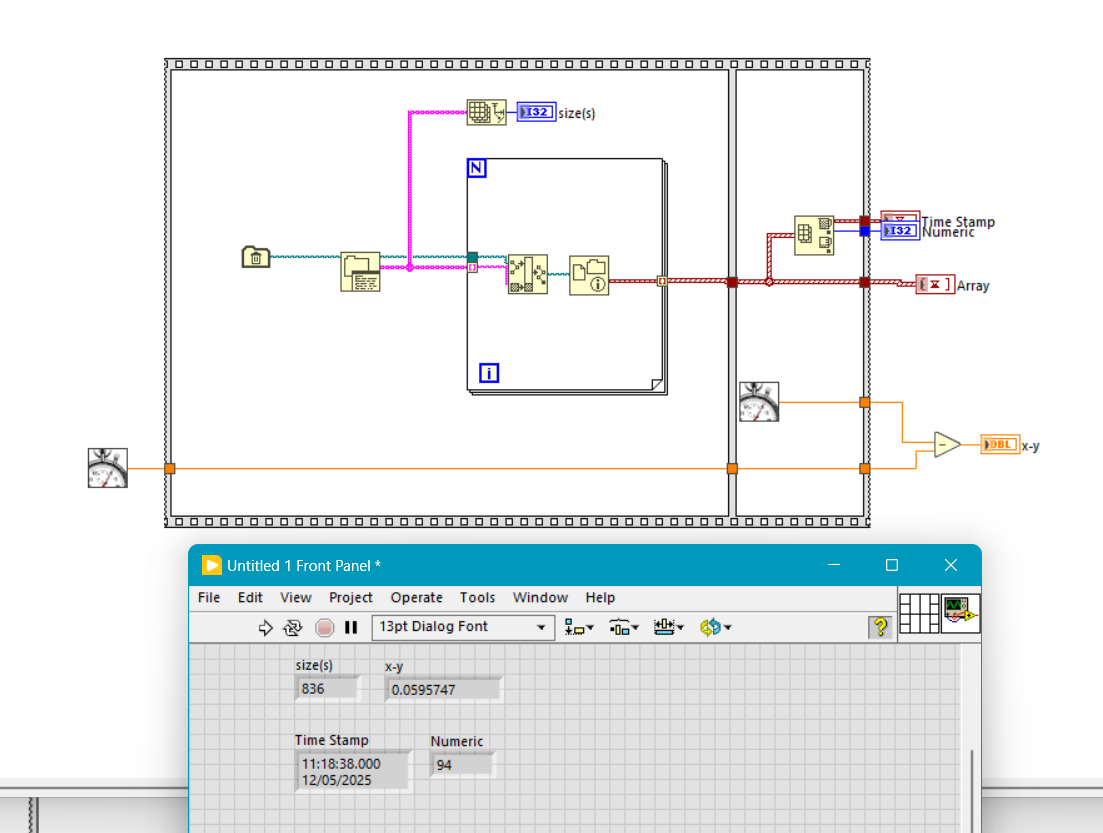
Done some simple testing. On a directory containing 838 files it took 60 ms.
1 point
-
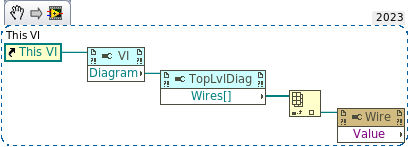
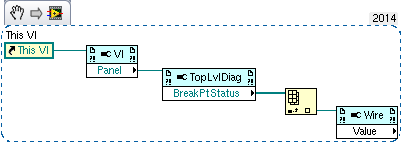
I can create it without problems in LabVIEW 2018 and 2020! So it is either that Scripting is not enabled in that LabVIEW installation or a bug in backsaving some of the scripting nodes to earlier LabVIEW versions. And I'm pretty sure that the Diagram property (called Block Diagram in the menu) is available since at least 2009 or thereabout. I can check this evening. My computer at work only has LabVIEW versions back to 2018 installed.1 point
-
Since you asked, here are my findings: LV23 - can create the attached snippet (don't know if it works), and save it for LV14 (also attached). All the pulldown menues show relevant properties LV21 and LV 19 - open the saved for LV14, show a correct image, but the first property node lacks the "Block Diagram" entry in the pulldown; further properties have no menu ETA - and show the relevant pulldown menues when "Show VI scripting" is checked. LV14 - the first property node menu *has* a "Block Diagram" entry, but the further properties don't match LV23 W14.vi W23.vi
1 point
-
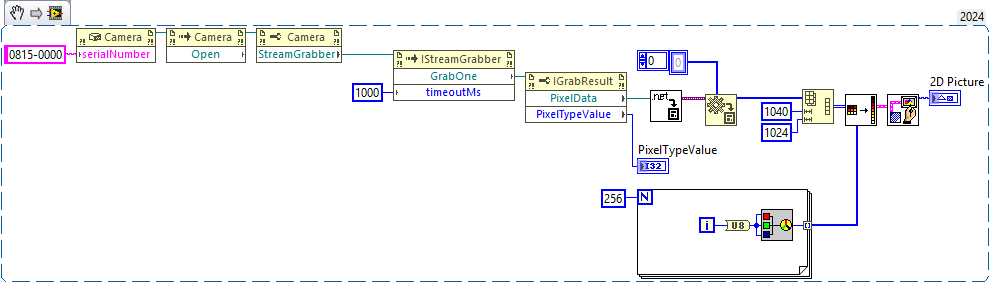
Example of camera grab using the Pylon .net API. (Credits: GrokAI)
1 point
-
Well regardless of the reason, what I was trying to say is that references opened in a VI, get closed when the VI that opens them goes idle.1 point
-
Indeed. It's not a full solution as it doesn't support multiple streams, audio or other encoding types. But if you want to get the audio then you need to add the decoding case (parse is the nomenclature used here) for the audio packets in the read payload case structure.
1 point
-
If you look at the actual array sizes, things will make a lot more sense. 1. The Build Array will add the number of expanded elements to the first dimension. The array size after the first Build Array is (2,0), which is still an empty array. 2. The Transpose Array will swap the array sizes. The array size after the Transpose Array is (0,2), which is still an empty array. 3. Again, the Build Array will add the number of expanded elements to the first dimension. In this case, it will add 1 to the first dimension, resulting in the array size being (1,2), which is no longer an empty array.
1 point
-
Makes sense. It just goes to show how ingrained workflows are and little things can trip you up. I was right-clicking over the N, over the I. Right clicking 2 pixels down/up from the edge. Top edge, bottom edge, left right.1 point
-
i can't really answer your question but I suggest you watch this presentation :1 point
-
Can you please provide an up-to-date solution to the question?1 point
-
Glad to hear you got it working! The reason it doesn't update is explained in the documentation: https://www.ni.com/docs/en-US/bundle/labview/page/loading-net-assemblies.html#d62572e601 point
-
There is a list of discord servers on the wiki: https://labviewwiki.org/wiki/LabVIEW_Community_Managed_Discord_Servers1 point
-
The comfyUI nodes are described by JSON in files called "Workflows" so we could import them and use scripting to create nodes. That's if we want parity. But we could support nesting which ComfUI wouldn't understand. The WebUI's are just interfaces to create REST requests which we can easily do already. I'm just trying to find a proper API specification or something that enables me to know the JSON format for the various requests. Like most of these things, there are just thousands of Github "apps" all doing something different because they use different plugins. Modern programmers can do wonderful things but it's all built on tribal knowledge which you are expected to reverse engineer. The only proper API documentation I have found so far is for the Web Services which isn't what I want - I'm running it locally.1 point
-
As of yesterday, November 18, the Perpetual licenses for LabVIEW and LabVIEW+ are officially back and should be directly orderable through the normal LabVIEW order page . But yes compared to before when the subscription was pushed down our throat the costs have significantly increased. I would say it is almost a 2.5* price increase if I remember correctly. The current Professional Developer price is higher than what the Developer Suite used to be back then, which also included LabVIEW Realtime and LabVIEW FPGA and just about any possible toolkit there was.1 point
-
My derived clock only goes as low as 4.69 MHz. My device is CRIO-90431 point
-
@hooovahh Is still weeding out the spam. I think he's in the eastern US time zone so he's 3 hrs. ahead of me ☺️. Much thanks to him. But I'm also improving the filters. Unfortunately, I think there are some sleeper accounts that were created before the changes that are starting to post. But, yes, I think it's getting much better. BTW, I just discovered that if you ctrl+right click a posted image you can set its' size! neat.
1 point
-
I am glad that didn't ve time to install NXG 😀1 point
-
I used scripting and low-level VI editing to generate a VI with every single decoration object in LabVIEW, at least those with ID's 0 to -4096. There may be some out of that range (and many in that range don't have a valid image associated with them) but this range contains a lot of them. 0 to -4096.vi1 point
-
I think that's what the function does behind the scene. A rectangle is simply one case of any number of geometries you can make with this function's inputs. NI Vision rotation algorithm is more complete because it will interpolate colours when the rotated pixel positions are not integers, but otherwise it's the same. The rotation matrix in 2D is exactly what you state above. Rotation of points.vi
1 point
.thumb.jpg.5d2ee2fea691c9fe3fab4270ba8e531d.jpg)