
Submitter
SUPPORT TOPIC File Information
- Submitted: May 17 2012 10:02 AM
- Last Updated: Jul 12 2012 05:43 AM
- File Size: 170.04K
- Views: 9677
- Downloads: 6,667
- LabVIEW Version: 2010
- License Type: BSD (Most common)
Previous Versions
Download Create_UDL_File_LV2010 1.0
4 Votes
Create_UDL_File_LV2010 v1.0.0
Copyright © 2009, Prabhakant Patil
All rights reserved.
Author: Prabhakant Patil
LAVA Name: Prabhakant Patil
Contact Info: Contact via PM on lavag.org
LabVIEW Versions: 2010
Dependencies:
1. NI Database connectivity Toolkit
2. OpenG Application Control
Description:
The Microsoft Data Access Components (MDAC) provide the Data Link Properties dialog box as the common user interface for specifying connection information to a data provider on Windows 2000 and later operating systems.
You can use the Data Link Properties dialog box to save connection information in a universal data link (.udl) file.
Universal data link files (or '.udl files') provide a common user interface for specifying connection attributes.
A user can use a Data Link Properties dialog box to save connection information in a .udl file as an alternative to directly specifying them by hand in a connection string.
Consequently, these files provide a convenient level of indirection.
Additionally, the dialog box specifies a number of alternate OLE DB data providers for a variety of target applications
This example is used to generate UDL File. This file is used to connect SQL database.
Installation and instructions:
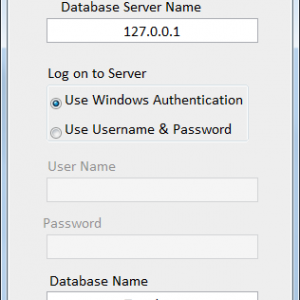
1. Run Create UDl_SQL. VI
2. Enter Database server name and password
3. Enter Database name and click OK button.
Then it will try to connect database using entered information
Version History: v1.0.0: Initial release of the code.
License:BSD
Distributed under the Creative Commons Attribution 3.0 (http://creativecommo.../about/licenses)
See link for a full description of the license.
Support: If you have any problems with this code or want to suggest features:
please go to lavag.org and Navigate to LAVA > Resources > Code Repository (Certified) and
search for the "Create_UDL_File_LV2010" support page.
Distribution: This code was downloaded from the LAVA Code Repository found at lavag.org
Copyright © 2009, Prabhakant Patil
All rights reserved.
Author: Prabhakant Patil
LAVA Name: Prabhakant Patil
Contact Info: Contact via PM on lavag.org
LabVIEW Versions: 2010
Dependencies:
1. NI Database connectivity Toolkit
2. OpenG Application Control
Description:
The Microsoft Data Access Components (MDAC) provide the Data Link Properties dialog box as the common user interface for specifying connection information to a data provider on Windows 2000 and later operating systems.
You can use the Data Link Properties dialog box to save connection information in a universal data link (.udl) file.
Universal data link files (or '.udl files') provide a common user interface for specifying connection attributes.
A user can use a Data Link Properties dialog box to save connection information in a .udl file as an alternative to directly specifying them by hand in a connection string.
Consequently, these files provide a convenient level of indirection.
Additionally, the dialog box specifies a number of alternate OLE DB data providers for a variety of target applications
This example is used to generate UDL File. This file is used to connect SQL database.
Installation and instructions:
1. Run Create UDl_SQL. VI
2. Enter Database server name and password
3. Enter Database name and click OK button.
Then it will try to connect database using entered information
Version History: v1.0.0: Initial release of the code.
License:BSD
Distributed under the Creative Commons Attribution 3.0 (http://creativecommo.../about/licenses)
See link for a full description of the license.
Support: If you have any problems with this code or want to suggest features:
please go to lavag.org and Navigate to LAVA > Resources > Code Repository (Certified) and
search for the "Create_UDL_File_LV2010" support page.
Distribution: This code was downloaded from the LAVA Code Repository found at lavag.org
What's New in Version 1.0 (See full changelog)
- Password is Removed
- 181 Total Files
- 17 Total Categories
- 68 Total Authors
- 355,999 Total Downloads
- SQLite LabVIEW Latest Submission
- drjdpowell Latest Submitter
3 user(s) are online (in the past 30 minutes)
0 members, 3 guests, 0 anonymous users


