


Rolf Kalbermatter
-
Posts
3,987 -
Joined
-
Last visited
-
Days Won
283
Content Type
Profiles
Forums
Downloads
Gallery
Posts posted by Rolf Kalbermatter
-
-
6 hours ago, ShaunR said:
Really? Wow. I hope you don't leave. Is it that you find it hard to identify them?
No, they are pretty obvious even when reading half of the first sentence (If they even have more than one sentence). But it simply feels completely senseless and a waste of energy, also for the AI CPU cycles as well as the server on which the Forum software runs but also my own energy to even read it. While not every single AI use is completely stupid, a lot is and that just is something I do not want to constantly be confronted with. So if LavaG is going to have near 99% of AI slop traffic anyways, I just will skip it completely and instead enjoy a nice beer or aperitive. 🍺
You seem to have more tolerance for AI slop and more inclined to try to see possible positive use cases than me. That's your right, but I have my own decisions and they tend to be very uncompromising as far as AI is concerned.
-
10 minutes ago, hooovahh said:
The LabVIEW Fundementals thread is one for sure that gets confusing. Realistically it is probably 8 bots all talking to each other. But what they say makes sense, and some are points I could see a human making on these forums. One account got the most likes in 24 hours (at one), and I assume that was from an actual human. I apologize to any humans caught in the cross fire.
Yeah that one I found hard to judge. A lot of the comments were not entirely bad although still a bit wishy washy many times. But that is not something that humans wouldn't do sometimes. 😁
But if it is from a two hit wonder using LabVIEW 2020 and since 2015, it's still a strong hint to be an AI bot at this point. Of course I'm sure they will fix that soon.
-
7 minutes ago, hooovahh said:
As is the case with most of these things, it is easy to tear down, but hard to build up. AI slop can cause problems to a forum, that take much more effort to clean up. Ever reported post pings me. I then need to review the thread, then evaluate how likely the member is spam, and decide what to do. Then repeat that many times.
I'm one of the last person wanting to cause you trouble. It is simply very frustrating.
I felt sad about the dwindling interest here on LavaG but still felt the desire to regularly check it. But this AI slop simply is not good for my blood pressure and it will mean that I won't visit here anymore. I suspect it will be the same with many others. At this rate closing the forum for any new accounts would not have a worse effect. I would hate to see the accumulated wisdom of this forum disappear completely. The Wayback machine is a sort of archive for internet content but it is rather unreliable and tends to loose information after a while.
-
On 10/2/2026 at 1:33 PM, dusty_magpie said:
A curated wiki could outlast both chat logs and forum search, especially for those recurring LV gotchas. Discord is great for speed, but useful answers disappear into the scroll pretty fast.
AI generated slop commenting on a thread about AI generated slop really starts to get into infinity recursion.
At this rate, LAVAG is going to be a useless resource for real people wanting some help and real people wanting to help.
It makes me simply not wanting to even visit here anymore. It was depressing to see the low traffic here before, but this simply is killing everything.
Soon to be an AI slop echo chamber????
Still the same characteristics apply as mentioned in my initial post. They all use the same LabVIEW version, started in the same year, have one or now 2 posts generated shortly after each other on the day of account creation and are in a way on topic, from extracting the right context from the thread, but simply say about as much as "The earth is round". Total bullshit, sounding on topic but saying nothing. They are simply useless, but don't quite cross the limit for real spam advertisement since they don't include any links as far as I can see.
But I think I start to report them anyways as spam from now on, at least for when I still happen to come here.
-
I'm a bit surprised that there is such a strong activity in recent days on this forum. On one side we should be happy but on the other, they all share similar traits:
- They are all from new accounts created within the last ~24 hours or so with names that look quite made up
- They all tend to be one hit or two hit wonders, which is still questionable
- Their answer is kind of on topic but also at the same time rather generic in some ways
- They all claim to use LabVIEW 2020 and working with LabVIEW since 2015
Are we witnessing a new wave of AI generated spam posts? What could be the purpose?
-
1 hour ago, Neil Pate said:
IRC? Wow there is a blast from the past. Thank you for digging up some good old memories of many well spent nights spent at my university computer lab arguing with other randos on the internet about alien activity and other tin foil hat stuff 🤣
I never did the IRC thing, but started with mailing lists as the main support channel. I have quite fond memories of the Info-LabVIEW mailing list started by Tom Coradeschi and currently maintained by Scott Hannahs for posterity. Back when you had to actually connect a modem through your main telephone line in order to go onto the big, friendly (back then at least) internet, mailing lists were very handy as one could respond to the mails offline and then connect to the internet provider to send off all the mails in one batch.
-
On 9/14/2026 at 4:20 PM, Neil Pate said:
Because of the people on Discord or because of NI's implementation of EtherCAT? 😉
Both! NI's implementation of EtherCAT leaves a lot to be desired. As to Discord, it's not really the people on there but I just can't seem to manage and keep an overview on the various threads in Discord. Partly that is because I mostly look at it on mobile, but in a webbrowser on the PC it's not that much better, despite the bigger screen.
-
Shauns code is more robust than just scanning the lines. But you should NOT use Bytes at Serial Port ever (with a few very rare exceptions that you are unlikely to ever encounter)!
This is the default presentation that everybody should watch who is trying to implement serial port communication in LabVIEW: https://labviewwiki.org/wiki/VIWeek_2020/Proper_way_to_communicate_over_serial
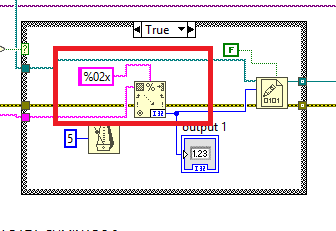
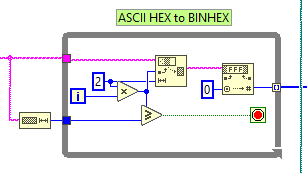
Once you fixed the serial port communication, by using the termination character properly that you already enabled in the Serial Port Init by default, and simply removing the Byte at Port completely and instead wire a large number like 512 to the byte to read input, your main problem is this part of your code.

You should replace this with this part of Shaun's code:
Your code currently only converts the first two hex parameters of every received byte sequence and with your Bytes at Serial Port function you frequently won't receive an entire line, so only convert part of it. The remainder will be read in the next iteration but totally throw the Match Regular Expression function off the tracks as it does not see the expected line header.
-
On 9/3/2026 at 2:16 AM, jro1952 said:
Hola, necesito AYUDA, soy entusiasta de temas técnicos, autodidacta, jubilado, pero con la mente intentando hacer cosas nuevas para mi conocimiento. El asunto es asi: desde un arduino controlo una placa Esp32 Cam, a la cual le ordenó sacar una foto y enviármela al serial port, la cual recibo correctamente, con su encabezado EB91 (ADJUNTO ARCHIVO).
Genere un .vi con el cual pretendo primero, leer la trama, filtrar y guardar en un archivo binario con extensión. jpg. Aquí empieza mi problema; veo la trama correctamente filtrada pero no logro guardarla, a pesar de varios intentos.(Adjunto el vi).
Genere un .vi para guardar como texto y lo hace correctamente. (Adjunto el .vi y su trama adquirida).
Si alguien puede ayudarme será bienvenida su mano. Espero este claro el planteo. Gracias por su tiempo. Labview version 10, con windows vista, ya se del siglo pasado..bue es lo que hay...jajterminal.txtRECEPCIONFOTOTet.viterminalTrama.txtRECEPCIONFOTOBin.vi
I haven't looked at the VIs yet but could it be that you use the Write to Text File node and have not disabled the convert EOL option on it? If you want to write binary data, it is usually better to use the according Write to Binary File instead, but here you must not forget to wire a FALSE to the prepend array of string size input if the binary data is already the final format you need in the file.
-
30 minutes ago, ShaunR said:
I think the main issue (and probably the reason for the question originally) is the Cyber Resilience Act which basically makes everybody legally responsible for software they use. There are carve-outs for opensource but the only real way forward is through what they call "Software Stewards". I wouldn't stick your head above the parapet for OpenG. The next question will be "where's the SBOM and CVD Policy"
 The way forward would be for NI or JKI to name themselves as "Software Stewards" for OpenG but it's a big ask for American companies.
Ohh well, I guess I will post all releases from now on with a disclaimer: Use at your own risk! 😁
"But nobody will be using them anymore after that!"
Maybe, but it's not like a huge difference. The feedback one received in the past was virtually zero anyways, so not sure there were many people using it at all. 🙃
-
I'm actually maintaining the LabVIEW ZIP library in this repository: https://github.com/Open-G
The other projects in there are not active as far as I can see.
After Sourceforge more or less succumbed to the Gods of advertisement under Slashdot ownership, the OpenG project on there was relocated to different repositories by different people. I happened getting involved by the person who did the OpenG Github repository and relocated my own copy of the LabVIEW ZIP library in my Github repository to that location. But the OpenG Github repository does not seem to have any other activity unfortunately.
The package for the library is however posted to vipm.io on each release.
I would not be opposed to spend some time on real bug fixes for other libraries but don't see much beef in adding new features to them. So far they work still surprisingly well for me after more than 20 years of existence with very little trouble. The most serious is probably the missing support for Maps and Sets in the Variant Data Library, but that is something I haven't really needed until yet.
-
On 7/23/2026 at 6:45 PM, Bryan said:
I know that LabVIEW 2022Q3 is the earliest version that supports W11 based on NI's website. However, I'd like to know from others in here what is the most stable/recommended W11 compatible version.
We're currently using LabVIEW 2020 for development on some older W11 machines, but new machines that we're being given for some reason are giving us problems when we try to install the development environment (Forces Windows into a recovery loop after installation). So, we figured it's about time to migrate to a newer version.
We don't 'upgrade' very often, so we want to make sure that whatever version we pick will work for us for as long as possible until we must upgrade again.
The recovery loop forcing is most likely related to the installation of DAQmx and other NI driver software that make under the hood use of NI-PAL and friends which is really part of the NI-PXI driver software stack. This driver goes fairly deep into the Windows PCI hardware driver stack and newer Windows versions tend to enable the newest features in the PCI chipsets. Some of these features did not even exist in the standard when DAQmx and NI-PAL that come with the standard install of LabVIEW 2020 were released.
So if you want to install an older version of LabVIEW on a recent hardware, it is actually best to choose a custom install and disable installation of all hardware drivers and then install the latest version of the drivers you actually need that are still compatible with your LabVIEW version. That's of course cumbersome and the long term solution is indeed to move to a newer LabVIEW version altogether. But be aware that this problem will keep occurring. The times where hardware improvements were automatically always fully backwards compatible are definitely over. The PCI standard got so complicated over the years, and covers much more than just the traditional PCI slots that are almost unseen in modern computers. Pretty much every modern bus from USB3 and higher to Thunderbolt, all kinds of memory interfaces, and many more is nowadays using PCI technologies in one way or the other. Improving that without causing potential backwards compatibility problems got an almost impossible task. And each of the software component manufacturers from hardware firmware, to BIOS and chipset firmware to Windows drivers and vendor drivers such as NI-PAL would need to test their thing with everything else to be sure it still works. Which of course is impossible, so you end up with these issues.
For LabVIEW itself I managed to install and use LabVIEW 2009 on Windows 11 without any real problems. I'm convinced that even LabVIEW 7.1 would be possible, although that most likely would require some careful hand holding and sweet talking to the installer to convince it to go fully through with it. And it might show some visual artefacts when running it under Windows 11. Hardware drivers on the other hand are a different story. The NI drivers go fairly deep into the system to allow high performance data acquisition and similar things and that has a big potential to run into compatibility trouble on newer hardware than what was available at the release date of the driver.
-
 1
1
-
 1
1
-
-
On 7/15/2026 at 12:28 AM, John Welch said:
Hi! I want to try the community version on Linux. I am running Ubuntu on ARM. I tried what I downloaded and got an error that said the file type was unsupported and I think I am trying to install an x86 version.
Is there a Linux based ARM version and if so is there anything special?As Shaun pointed out to you in the other thread you posted in, no that is unfortunately not really an option. In theory you could try to install an emulator like qemu, box64 or FEX or something similar and try to run it inside that but, chances are small that you get it to work if you are not a true low level tinkerer and can compile Linux with one hand while balancing half a dozen balls with your other. LabVIEW is also not your average spreadsheet application nor a game engine, for which these emulators usually are optimized and debugged. It has its own very specific low level details in conjunction about being a compiler, execution system, platform abstraction and what else, that these emulators were never tested with. Even its graphical interface is quite unique despite being fundamentally only a 2D graphics system with a few additions like alpha shading for certain types of controls. It's far from the complexities of a 3D game engine but implements the whole graphical interface itself using low level 2D primitives from the underlaying OS graphics interface. This is an approach that very few frameworks chose and sometimes exercises functionality in low level drivers that are neither well tested nor often used.
-
If I had to do it static at compile time my choice would be to have a Create xxx vi for every class that needs to be creatable. I don't like the class constant on the diagram at all.
-
1
-
-
5 hours ago, hooovahh said:
If I want to avoid always include, and if I want the code to have to be brought as a dependency, I think there are only one of two options for forcing the library to be in memory, so the dependencies are brought along. Either have a class constant somewhere, or a class specific VI. It must be one of those two options right? That was my original question of which design do people prefer and use to force some code to be dependent on that class?
Yes, you can't eat the cake and have it too. That is the same in fact for DLLs and other dynamic libraries in any other environment. Full dynamic call means the compiler/linker and any package builder doesn't and can't know about these dependencies automatically. You have to tell it somehow.
But I find it debatable if it is really easier for a user to obligate him to use some explicit class constant somewhere in his program or have him make sure to add a class file to the always included section of a build specification. Both need to be documented and explained and the class constant needs to be added in every place again every time. The Build Specification is usually created once for an application and not touched much ever after that.
There is of course the point that your API simply won't run (correctly) without class constant so the user is forced to look for the reason. You can even make the according input "always needed" although I tend to implement a minimal simulation in the base class itself. So the user is at some point forced to find out that it is needed. With the Build Specification its a little more involved. You can build the app just fine and only notice that it doesn't work correctly after you run the build executable. But with some good error handling in the Initialize VI you can detect that the implementation is missing and create an according error message.
-
4 hours ago, ShaunR said:
Hooovahh is using the static binding for deployment though. Rather than abstract the transport he wants to abstract the device as a proxy for the transport because then platform specific deployment is automatic.
You use VISA for the hardware abstraction and configure the transport with a string. Hooovahh is attempting to configure the transport by not installing a device so that when it's deployed only the platform classes are deployed. I think he will run in to trouble if he has a device that has multiple transports but that doesn't seem an issue right now.
Actually VISA is only one of the possible transports. Each device can implement its own as the addressing and device selection is both a string.
I also have done at some point a dual abstraction basically a stream transport layer and higher protocol layer. The protocol layer uses the stream layer through composition. It works but gets rather involved very quickly.
-
Rather than sending VI after VI here for downconverting, it may be a better idea to install the Community Edition of a recent LabVIEW version somewhere and do the converting yourself. The Community Edition is for free, so there is no good reason why you couldn't do that.
And you may discover that the newer LabVIEW versions do have quite a few improvements in comparison to a 16 year old version and may feel comfortable to move to this.
-
I solved that in the past a little bit different. When using classes you can fairly easily instantiate child classes dynamically with the Get LV Class Default Value.
The idea is that instead of just passing the VISA Resource name, I use a string that identifies both the desired class name and the VISA Resource name (or TCP IP address and port or whatever is needed). Something like "VCP Chamber::COM1" for instance. How you formalize the syntax to map the name identifier to the actual class implementation is another detail that needs some deliberation, but it can be as complex or as simple as you prefer.
My Initialize VI from the Base class then parses the string identifier into its parts, builds the path to the VI class file (either just statically or it can even do enumeration of the according class files on disk and try to map them correctly) and then calls Get LV Class Default Value with that path to instantiate the actual class implementation, typecasting it into the base class to call the internal (protected) and dynamic dispatch Initialize Class method which gets the actual VISA Resource name (also as string to stay flexible for other potential interfaces that may not be based on VISA) to open the resource and do whatever the specific device requires.
It's very flexible and does not require a static constant that needs to be installed somewhere and explicitly added to the caller in order to instantiate new device types. But it's not exactly a panacea solution. You need to think about the directory structure and how the various class files will be installed in respect to the base class so the Initialize function can find and use them dynamically.
It's basically one way to implement the class factory pattern without the base class having to know all possible future child classes beforehand, nor the user having to wire the explicit class constant somewhere.
And yes it has the problem about build applications. The LabVIEW application builder doesn't know that the dynamic class is used since there is no direct linker reference to it anywhere. But the whole idea is to make it dynamic to avoid hard-wired dependencies. I usually solved it by adding the according classes explicitly as always included. It felt like the smaller evil of either having a static hierarchy that makes later installations of new child classes a serious problem and the explicit addition of the class file to the build specification. It's basically a documentation issue but we all know of course that users don't read the documentation. 😁
-
I think there is a future and NI has significantly increased their activity and promotion for it (I guess one could be sarcastic and say that considering that NI's promotion of LabVIEW and active support of the community was pretty much zero just 3 years ago, anything more than zero is significant).
It will however not reach the stage that Dr. T once optimistically proposed as "LabVIEW everywhere". But that is not necessary. LabVIEW has still some interesting features and advantages and there won't be any programming environment ever that suits everybody.
The license change is welcome but not to significant, I think, as the new(old) perpetual license is basically quite beyond reasonable in my opinion. LabVIEW was expensive in the old days already but the new perpetual license cost is in my opinion simply to high (it's more than double of what it was before they tried to force feed the subscription). If I had to pay it myself, I would most likely stop with LabVIEW and simply use the Community Edition as a hobby.
However, you should anyhow never build your future on just one leg. LabVIEW can be an interesting and even viable option, but with LabVIEW alone you never could and never will be able to earn a keeping. You need additional expertise. LabVIEW shines in combination with hardware control, so having a good understanding on electronics, electricity, communication protocols, interoperability with other systems is what makes you stand apart in a world of other programmers. The actual world doesn't run on blockchain, LLMs, marketing and stock exchange, even if that seems what a large amount of people believe, since it promises quick profits. But the hype of today is the old story of tomorrow, since there is already another hype to chase then. Almost all the AI hypers on social media today, were trying to peddle their cr*pto hype a few years ago, and will all quickly move to the next hype once AI has been falling down from the hype (which it actually has done already more than once in the past, but most people seem to have a short memory or simply haven't been around long enough to remember).
Of course, I have about 10 more years I need to look forward too, so for me it is quite easy. There is enough of LabVIEW around to keep me full time busy with that until then, (but I like to also do some hardware and luckily can do that too). For someone younger, you definitely need to have some options open.
-
1
-
-
6 hours ago, ShaunR said:
For C/C++ I always use MingW (sometimes in MSYS2, sometimes in Codeblocks) but I prefer Pascal (Free Pascal compiler). Is this something you encounter mainly in MSVC?
Not sure what you mean exactly. In terms of LabVIEW there are not many variations possible:
Windows 16-bit: __pascal + __cdecl
Windows 32-bit: __stdcall + __cdecl
Windows 64-bit: __fastcall, 4 registers for first 4 parameters (shadowed on the stack) + remaining on stack
Everything else uses whatever is the the system default calling convention (not sure about Mac 68k here).
So basically only Windows 16-bit and 32-bit let you choose between 2 calling conventions, everything else was whatever is the platform default for them, usually either __cdecl or something with a number of registers and the remainder on the stack on RISC like CPUs such as Sparc, PPC, PA Risc and ARM.
As to compiler supporting various calling conventions, gcc is probably the most varied. You can get into pretty involved things there depending on platform and version. MSVC also knows a few more than what is mentioned above, but they either apply to kernel driver programming or C++ programming.
-
1 minute ago, ShaunR said:
The main difference is who cleans up the stack after a function. But again, I have avoided name mangling/decoration because it makes it difficult to figure out what to call. I guess being a mid-wit has saved me again

Depends what compiler you use. Some are more difficult to force into compliance with your preferences than others.😁
All my DLLs are always cdecl or whatever the preferred calling convention is (Windows 64-bit abandoned with cdecl in favor of fastcall, and trying to force a compiler to do cdecl there, while possible in some compilers, is pretty much doomed for anyone else who is going to have to use that DLL).
For Windows APIs however you can't choose, that decision has been made by Microsoft when defining the API. For user DLLs I don't see why anyone ever would have decided to go by stdcall, unless they use a programming environment that could not deal with cdecl.
-
3 hours ago, ShaunR said:
I disagree it is ill advised protection. One of the reasons I chose LabVIEW to start programming in was because it was bullet proof. I think we have had a conversation before that I never encountered crashes in the early days and it would have been because of ant foot-shooting boots like this.
I consider it ill advised since that name decoration is simply a Microsoft convention. Other compilers did in the past not create such names when linking a DLL. So as summary:
1) It's not mandated by Microsoft that a stdcall function should be decorated like that, but simply a convention by their linker. It's also not mandated that a non-stdcall function can't be named that way.
2) So it is not a mechanism to reliably avoid Call Library Node misconfiguration.
3) More importantly, it makes it impossible to call a function that was intentionally named that way but compiled as cdecl.
Why would someone create such a function? Well, I have no idea even if you beat me, but obviously someone did, otherwise NI would not have removed that anti-foot-shooter hack.
-
1 hour ago, ShaunR said:
I would probably never have been able to resolve an issue like that. What kind of monster removes anti foot-shooting boots?
It's highly likely it was just me misconfiguring some CLFN's. It's obviously been fixed in later versions. I still use the API so would have known if there was an issue with 5.0.0. I think version 1.3 was about 2010 so that version is over 16 years old - an amazing testament to LabVIEW's compatibility really.
There are posts on the NI forum about this, the earliest probably around 2012 or 2013 and I was involved in finding the issue. It's not so difficult when you look at a Call Library Node for a Windows API that crashes and then see that it is configured cdecl as there are virtually no Windows APIs with that calling convention except when they have a variable number of parameters as that can not be done in stdcall where the function itself adjusts the stack just before returning.
Why would someone "fix" an anti foot shooting protection? Most likely because there was an important customer wanting to call a DLL that used that naming decoration for whatever strange reason, while it was explicitly compiled to use cdecl, and threatened to sue the poor support person taking their call and sending an assassin squad to the NI head quarter. 😁
And in all honestly it is an ill advised protection that should not be there. What is less nice is that this functionality was simply removed without some mutation code path when upgrading pre 2011 VIs with a Call Library Node to 2011 or later. Yes there are complications, the correction was apparently done at recompilation time by actually verifying the exported name (the Call Library Node doesn't require to enter the decorated name but does the according matching to the real exported function at that moment) so if the VI was loaded in a newer version with the DLL missing, it would be impossible to properly mutate the code, but it would have been at least possible to try to mutate the VI during loading into the new version if the original was older than 2011. As it is that ship has long sailed already and it is a moot point to argue about now.
-
On 6/2/2026 at 7:41 PM, ShaunR said:
Not necessarily but possibly. Pointer to data instead of value or vice versa, enum sizes, pointer de-references of strings etc. Library calls are trixy.
Just one wild guess that recently bit me in another library. Does the SQLLite API in the Windows DLL use stdcall calling convention?
Until LabVIEW 2011, LabVIEW had a "helpful" feature to second guess your choice of that calling convention in the Call Library Node if the exported function had the appendix @xx with xx indicating the number of bytes passed on the stack for the parameters. The calling convention was silently "corrected" to stdcall even if you had cdecl in the configuration. Once you move to LabVIEW 2011 or later, this suddenly crashes as that silent correction was removed without any warning. The correct way when such a feature gets removed would have of course been to mutate the VI when converted from a pre 2011 version to 2011 or later. However the person removing that paternalizing feature did not think about adding an according mutation code path in the InstrumentLoad() function.
The thing bit me because I was developing code in LabVIEW 8.6 and had been also testing it in LabVIEW 2020 64-bit to be sure, wrongly assuming I had been accounting for a fairly large range of LabVIEW versions and platforms. Since LabVIEW 64-bit does not have any calling convention to choose from it did not expose that misconfiguration and someone else loading it into a newer LabVIEW 32-bit version found out the hard way that I had messed up.
Never mind, I see it is 2025 64-bit LabVIEW so there is no calling convention to get wrong.
Recent forum activity
in LAVA Lounge
Posted
Jordan, I would never dare to compare you to AI 😁
Of course after I reported many of those posts of the last two to three weeks, our great and tireless Brian Hoover did swiftly act on them and remove them. So my post appears now right after yours which could give a somewhat skewed impression. Luckily it contains the post I reacted on as a quote, I often forget that and wasn't sure if I did here too. Or did Brian maybe edit it in my post to make it less confusing after the spam post was deleted?
Well, that sure will work for humans, but an AI? Naah, it will probably just spurn it on to work even harder. And I have no illusions about who would have the longer breath.