

About This File
UI Tools addon: Control class v1.4.0
Copyright © 2009-2015, François Normandin.
All rights reserved.
Author:François Normandin
Contact Info: Contact via PM on www.lavag.org
LabVIEW Versions:
Created and tested with LabVIEW 2012
Dependencies:
UI Tools >= 1.3.0.70
jki_lib_state_machine >= 2.0.0
OpenG Application Control Library >= 4.1.0.7
OpenG Array Library >= 4.1.1.14
OpenG Error Library >= 4.2.0.23
OpenG File Library >= 4.2.0.21
OpenG LabVIEW Data Library >= 4.1.0.12
OpenG Variant Configuration File Library >= 4.0.0.5
BitMan - Bitmap Manipulation Library >= 1.0.1.0
Description:
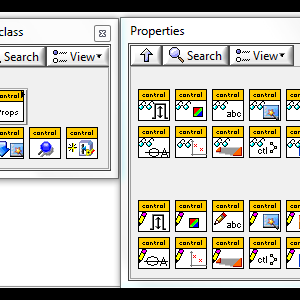
This package contains a class to quickly create controls programmatically based on templates.
Instructions:
After installing package with VIPM, refresh palettes if VIPM is not set to refresh automatically.
Use palettes.
On LabVIEW restart, a Tools Menu shortcut gives access to a Control Generator GUI (Tools >> UI Tools >> Control Generator)
Known Issues:
The control creator provided under "Tools" menu is not yet complete:
- It doesn't batch process controls yet.
- The "pure white" (xFFFFFF) is drawn as black (use FEFEFE instead... that's close, and I really don't know why!)
Acknowledgements:
Wojciech Golebiowski for his BitMan library (Bitmap Manipulation).
History:
v1.4.0: Removed a self-conflicting dependency on new installation
v1.3.0: Renamed package and moved templates to vi.lib to remove the need to rely on system files (outside of LabVIEW folder structure).
Upgraded source code to 2012. Older versions not supported anymore.
Changed the namespacing and added an incompatibility with previous versions of this package.
Integrated into the palette of UI Tools (base package on LVTN 1.3.0.59+)
Fixed issue with scaling factor for True decal button
v1.2.0: Migrated to VIP file type (from OGP)
v1.1.0: Added functionality for creating different decals for True and false states.
This release is untested with the rest of the package.
It is strictly aimed at providing a temporary solution to creating custom controls with different decals for True and False states.
The package works as standalone, but might introduce some bugs in the parent package "UI Tools".
Do no install unless you absolutely need the new functionality right away.
Keep the latest UI Tools Addon Control Class package at hand to fall back in case it breaks functionality.
v1.0.15: Added "Save to previous version"
Added "Drop on Front Panel" and tested to work in projects or outside projects.
Added some configuration file entries and more error checking.
v1.0.14: Initial release of the code. (8.6)
License:
Distributed under the BSD license.
Make sure you comply with the license of anyone who distributes icons on the web!
Support:
If you have any problems with this code or want to suggest features:
please go to www.lavag.org and Navigate to the discussion page.
Send me a personal message on LAVAG.org to get my attention faster.
Distribution:
This code was downloaded from the LAVA Code Repository found at www.lavag.org
============================
What's New in Version 1.4.0.15 See changelog
Released
- v1.4.0.15: Removed a self-conflicting dependency for new installs.