
Rolf Kalbermatter
-
Posts
3,987 -
Joined
-
Last visited
-
Days Won
283



Recent Profile Visitors
75,180 profile views



Rolf Kalbermatter's Achievements






-
Jordan, I would never dare to compare you to AI 😁 Of course after I reported many of those posts of the last two to three weeks, our great and tireless Brian Hoover did swiftly act on them and remove them. So my post appears now right after yours which could give a somewhat skewed impression. Luckily it contains the post I reacted on as a quote, I often forget that and wasn't sure if I did here too. Or did Brian maybe edit it in my post to make it less confusing after the spam post was deleted? Well, that sure will work for humans, but an AI? Naah, it will probably just spurn it on to work even harder. And I have no illusions about who would have the longer breath.
-
No, they are pretty obvious even when reading half of the first sentence (If they even have more than one sentence). But it simply feels completely senseless and a waste of energy, also for the AI CPU cycles as well as the server on which the Forum software runs but also my own energy to even read it. While not every single AI use is completely stupid, a lot is and that just is something I do not want to constantly be confronted with. So if LavaG is going to have near 99% of AI slop traffic anyways, I just will skip it completely and instead enjoy a nice beer or aperitive. 🍺 You seem to have more tolerance for AI slop and more inclined to try to see possible positive use cases than me. That's your right, but I have my own decisions and they tend to be very uncompromising as far as AI is concerned.
-
Yeah that one I found hard to judge. A lot of the comments were not entirely bad although still a bit wishy washy many times. But that is not something that humans wouldn't do sometimes. 😁 But if it is from a two hit wonder using LabVIEW 2020 and since 2015, it's still a strong hint to be an AI bot at this point. Of course I'm sure they will fix that soon.
-
I'm one of the last person wanting to cause you trouble. It is simply very frustrating. I felt sad about the dwindling interest here on LavaG but still felt the desire to regularly check it. But this AI slop simply is not good for my blood pressure and it will mean that I won't visit here anymore. I suspect it will be the same with many others. At this rate closing the forum for any new accounts would not have a worse effect. I would hate to see the accumulated wisdom of this forum disappear completely. The Wayback machine is a sort of archive for internet content but it is rather unreliable and tends to loose information after a while.
-
AI generated slop commenting on a thread about AI generated slop really starts to get into infinity recursion. At this rate, LAVAG is going to be a useless resource for real people wanting some help and real people wanting to help. It makes me simply not wanting to even visit here anymore. It was depressing to see the low traffic here before, but this simply is killing everything. Soon to be an AI slop echo chamber???? Still the same characteristics apply as mentioned in my initial post. They all use the same LabVIEW version, started in the same year, have one or now 2 posts generated shortly after each other on the day of account creation and are in a way on topic, from extracting the right context from the thread, but simply say about as much as "The earth is round". Total bullshit, sounding on topic but saying nothing. They are simply useless, but don't quite cross the limit for real spam advertisement since they don't include any links as far as I can see. But I think I start to report them anyways as spam from now on, at least for when I still happen to come here.
-
I'm a bit surprised that there is such a strong activity in recent days on this forum. On one side we should be happy but on the other, they all share similar traits: - They are all from new accounts created within the last ~24 hours or so with names that look quite made up - They all tend to be one hit or two hit wonders, which is still questionable - Their answer is kind of on topic but also at the same time rather generic in some ways - They all claim to use LabVIEW 2020 and working with LabVIEW since 2015 Are we witnessing a new wave of AI generated spam posts? What could be the purpose?
-

NI 9145 with NI 9476 + 9375 on TwinCAT doest work
Rolf Kalbermatter replied to Gabriel Utomo's topic in Hardware
I never did the IRC thing, but started with mailing lists as the main support channel. I have quite fond memories of the Info-LabVIEW mailing list started by Tom Coradeschi and currently maintained by Scott Hannahs for posterity. Back when you had to actually connect a modem through your main telephone line in order to go onto the big, friendly (back then at least) internet, mailing lists were very handy as one could respond to the mails offline and then connect to the internet provider to send off all the mails in one batch. -
NI 9145 with NI 9476 + 9375 on TwinCAT doest work
Rolf Kalbermatter replied to Gabriel Utomo's topic in Hardware
Both! NI's implementation of EtherCAT leaves a lot to be desired. As to Discord, it's not really the people on there but I just can't seem to manage and keep an overview on the various threads in Discord. Partly that is because I mostly look at it on mobile, but in a webbrowser on the PC it's not that much better, despite the bigger screen. -
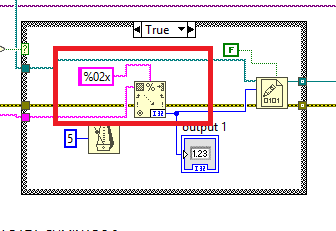
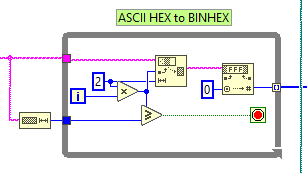
Shauns code is more robust than just scanning the lines. But you should NOT use Bytes at Serial Port ever (with a few very rare exceptions that you are unlikely to ever encounter)! This is the default presentation that everybody should watch who is trying to implement serial port communication in LabVIEW: https://labviewwiki.org/wiki/VIWeek_2020/Proper_way_to_communicate_over_serial Once you fixed the serial port communication, by using the termination character properly that you already enabled in the Serial Port Init by default, and simply removing the Byte at Port completely and instead wire a large number like 512 to the byte to read input, your main problem is this part of your code. You should replace this with this part of Shaun's code: Your code currently only converts the first two hex parameters of every received byte sequence and with your Bytes at Serial Port function you frequently won't receive an entire line, so only convert part of it. The remainder will be read in the next iteration but totally throw the Match Regular Expression function off the tracks as it does not see the expected line header.

-
I haven't looked at the VIs yet but could it be that you use the Write to Text File node and have not disabled the convert EOL option on it? If you want to write binary data, it is usually better to use the according Write to Binary File instead, but here you must not forget to wire a FALSE to the prepend array of string size input if the binary data is already the final format you need in the file.
-
Ohh well, I guess I will post all releases from now on with a disclaimer: Use at your own risk! 😁 "But nobody will be using them anymore after that!" Maybe, but it's not like a huge difference. The feedback one received in the past was virtually zero anyways, so not sure there were many people using it at all. 🙃
-
I'm actually maintaining the LabVIEW ZIP library in this repository: https://github.com/Open-G The other projects in there are not active as far as I can see. After Sourceforge more or less succumbed to the Gods of advertisement under Slashdot ownership, the OpenG project on there was relocated to different repositories by different people. I happened getting involved by the person who did the OpenG Github repository and relocated my own copy of the LabVIEW ZIP library in my Github repository to that location. But the OpenG Github repository does not seem to have any other activity unfortunately. The package for the library is however posted to vipm.io on each release. I would not be opposed to spend some time on real bug fixes for other libraries but don't see much beef in adding new features to them. So far they work still surprisingly well for me after more than 20 years of existence with very little trouble. The most serious is probably the missing support for Maps and Sets in the Variant Data Library, but that is something I haven't really needed until yet.
-
Most Recommended LabVIEW Version for Windows 11?
Rolf Kalbermatter replied to Bryan's topic in LabVIEW General
The recovery loop forcing is most likely related to the installation of DAQmx and other NI driver software that make under the hood use of NI-PAL and friends which is really part of the NI-PXI driver software stack. This driver goes fairly deep into the Windows PCI hardware driver stack and newer Windows versions tend to enable the newest features in the PCI chipsets. Some of these features did not even exist in the standard when DAQmx and NI-PAL that come with the standard install of LabVIEW 2020 were released. So if you want to install an older version of LabVIEW on a recent hardware, it is actually best to choose a custom install and disable installation of all hardware drivers and then install the latest version of the drivers you actually need that are still compatible with your LabVIEW version. That's of course cumbersome and the long term solution is indeed to move to a newer LabVIEW version altogether. But be aware that this problem will keep occurring. The times where hardware improvements were automatically always fully backwards compatible are definitely over. The PCI standard got so complicated over the years, and covers much more than just the traditional PCI slots that are almost unseen in modern computers. Pretty much every modern bus from USB3 and higher to Thunderbolt, all kinds of memory interfaces, and many more is nowadays using PCI technologies in one way or the other. Improving that without causing potential backwards compatibility problems got an almost impossible task. And each of the software component manufacturers from hardware firmware, to BIOS and chipset firmware to Windows drivers and vendor drivers such as NI-PAL would need to test their thing with everything else to be sure it still works. Which of course is impossible, so you end up with these issues. For LabVIEW itself I managed to install and use LabVIEW 2009 on Windows 11 without any real problems. I'm convinced that even LabVIEW 7.1 would be possible, although that most likely would require some careful hand holding and sweet talking to the installer to convince it to go fully through with it. And it might show some visual artefacts when running it under Windows 11. Hardware drivers on the other hand are a different story. The NI drivers go fairly deep into the system to allow high performance data acquisition and similar things and that has a big potential to run into compatibility trouble on newer hardware than what was available at the release date of the driver. -
Download LabVIEW Community Edition
Rolf Kalbermatter replied to Michael Aivaliotis's topic in LabVIEW Community Edition
As Shaun pointed out to you in the other thread you posted in, no that is unfortunately not really an option. In theory you could try to install an emulator like qemu, box64 or FEX or something similar and try to run it inside that but, chances are small that you get it to work if you are not a true low level tinkerer and can compile Linux with one hand while balancing half a dozen balls with your other. LabVIEW is also not your average spreadsheet application nor a game engine, for which these emulators usually are optimized and debugged. It has its own very specific low level details in conjunction about being a compiler, execution system, platform abstraction and what else, that these emulators were never tested with. Even its graphical interface is quite unique despite being fundamentally only a 2D graphics system with a few additions like alpha shading for certain types of controls. It's far from the complexities of a 3D game engine but implements the whole graphical interface itself using low level 2D primitives from the underlaying OS graphics interface. This is an approach that very few frameworks chose and sometimes exercises functionality in low level drivers that are neither well tested nor often used. -
Handling HAL with Children Through Packages
Rolf Kalbermatter replied to hooovahh's topic in Object-Oriented Programming
If I had to do it static at compile time my choice would be to have a Create xxx vi for every class that needs to be creatable. I don't like the class constant on the diagram at all.