All Activity
- Today
-
Ok, you should have specified that you were comparing it with tools written in C 🙂 The typical test engineer has definitely no idea about all the possible ways C code can be made to trip over its feet and back then it was even less understood and frameworks that could help alleviate the issue were sparse and far between. What I could not wrap my head around was your claim that LabVIEW never would crash. That's very much controversial to my own experience. 😁 Especially if you make it sound like it is worse nowadays. It's definitely not but your typical use cases are for sure different nowadays than they were back then. And that is almost certainly the real reason you may feel LabVIEW crashes more today then it did back then.
-
Gotta disagree here (surprise!) Take a look at the modern 20k VI monstrosities people are trying to maintain now so as to be in with the cool cats of POOP. I had a VI for every system device type and if they bought another DVM, I'd modify that exe to cater for it. It was perfect modularisation at the device level and modifying the device made no difference to any of the other exe's. Now THAT was encapsulation and the whole test system was about 100 VI's. They are called VI's because it stood for "Virtual Instruments" and that's exactly what they were and I would assemble a virtual test bench from them. Defintely 3). LabVIEW was the first ever programming language I learned when I was a quality engineer so as to automate environmental and specification testing. While I (Quality Engineering) was building up our test capabilities we would use the Design Engineering test harnesses to validate the specifications. I was tasked with replacing the Design Engineering white-box tests with our own black-box ones (the philosophy was to use dissimilar tools to the Design Engineers and validate code paths rather than functions, which their white-box testing didn't do). Ours were written in LabVIEW and theirs was written in C. I can tell you now that their test harnesses had more faults than the Pacific Ocean. I spent 80% of my time trying to get their software to work and another 10% getting them to work reliably over weekends. The last 10% was spent arguing with Engineering when I didn't get the same results as their specification That all changed when moving to LabVIEW. It was stable, reliable and predictable. I could knock up a prototype in a couple of hours on Friday and come back after the weekend and look at the results. By first break I could wander down to the design team and tell them it wasn't going on the production line . That prototype would then be refined, improved and added to the test suite. I forget the actual version I started with but it was on about 30 floppy disks (maybe 2.3 or around there). If you have seen desktop gadgets in Windows 7, 10 or 11 then imagine them but they were VI's. That was my desktop in the 1990's. DVM, Power Supply, and graphing desktop gadgets that ran continuously and I'd launch "tests" to sequence the device configurations and log the data. I will maintain my view that the software industry has not improved in decades and any and all perceived improvements are parasitic of hardware improvements. When I see what people were able to do in software with 1960's and 80's hardware; I feel humbled. When I see what they are able to do with software in the 2020's; I feel despair. I had a global called the "BFG" (Big F#*king Global). It was great. It was when I was going through my "Data Pool" philosophy period.

-
One BBF (Big Beauttiful F*cking) Global Namespace may sound like a great feature but is a major source of all kinds of problems. From a certain system size it is getting very difficult to maintain and extend it for any normal human, even the original developer after a short period. When I read this I was wondering what might cause the clear misalignment of experience here with my memory. 1) It was ironically meant and you forgot the smiley 2) A case of rosy retrospection 3) Or are we living in different universes with different physical laws for computers LabVIEW 2.5 and 3 were a continuous stream of GPFs, at times so bad that you could barely do some work in them. LabVIEW 4 got somewhat better but was still far from easy sailing. 5 and especially 5.1.1 was my first long term development platform. Not perfect for sure but pretty usable. But things like some specific video drivers for sure could send LabVIEW frequently belly up as could more complicated applications with external hardware (from NI). 6i was a gimmick, mainly to appease the internet hype, not really bad bad far from stable. 7.1.1 ended up to be my next long term development platform. Never touched 8.0 and only briefly 8.2.1 which was required for some specific real-time hardware. 8.6.1 was the next version that did get some use from me. But saying that LabVIEW never crashed on me in the 90ies, even with leaving my own external code experiments aside, would be a gross under-exaggeration. And working in the technical support of NI from 1992 to 1996 for sure made me see many many more crashes in that time.
-
The thing I loved about the original LabVIEW was that it was not namespaced or partitioned. You could run an executable and share variables without having to use things like memory maps. I used to to have a toolbox of executables (DVM, Power Supplies, oscilloscopes, logging etc. ) and each test system was just launching the appropriate executable[s] at the appropriate times. It was like OOP composition for an entire test system but with executable modules. Additionally, crashes were unheard of. In the 1990's I think I had 1 insane object in 18 months and didn't know what a GPF fault was until I started looking at other languages. We could run out of memory if we weren't careful though (remember the Bulldozer?). Progress!
-
Tell that to Microsoft. Again. Tell that to Microsoft. I'm afraid the days of preaching from a higher moral ground on behalf of corporations is very much a historical artifact right now.
- Yesterday
-
A11A11111, or any such alpha-numeric serial from that era worked. For a while at the company I was working at, we would enter A11A11111 as a key, then not activate, then go through the process of activating offline, by sending NI the PC's unique 20 (25?) digit code. This would then activate like it should but with the added benefit of not putting the serial you activated with on the splash screen. We would got to a conference or user group to present, and if we launched LabVIEW, it would pop up with the key we used to activate all software we had access to. Since then there is an INI key I think that hides it, but here is an idea exchange I saw on it. LabVIEW 5 EXEs also ran without needing to install the runtime engine. LabVIEW 6 and 7 EXEs could run without installing the runtime engine if you put files in special locations. Here is a thread, where the PDF that explains it is missing but the important information remains.
-
True there is no active license checking in LabVIEW until 7.1. And as you say, using LabVIEW 5 or 6 as a productive tool is not wise, neither is blabbing about Russian hack sites here. What someone installs on his own computer is his own business but expecting such hacks to be done out of pure love for humanity is very naive. If someone is able to circumvent the serial check somehow (not a difficult task) they are also easily able to add some extra payload into the executable that does things you rather would not want done on your computer.
-
I have LabVIEW 5 and 6 on my USB stick too and they both run OK on Windows 10. Initially LV 5 was hanging at the start, so I had to disable multithreading: ESys.StdNParallel=0 Not that I really need LabVIEW to be on hand all the time. But sometimes it's useful to have around an advanced calculator for quick-n-dirty prototyping. And sometimes to look at how things were then. Considering the age and bugs, using these versions for serious projects is, to put it mildly, unwise. I also don't like that LabVIEW re-registers file associations for itself every time it starts, but I'm more or less used to this. I also believe, those versions didn't really need some pirate tools. Just owner's personal data and serial number were needed. If not available, it was possible to use 'an infinite trial' mode: start, click OK and do everything you want.
-
I know it runs (mostly), installation is a slightly different story. But that's still no justification to promote pirated software no matter how old.
-
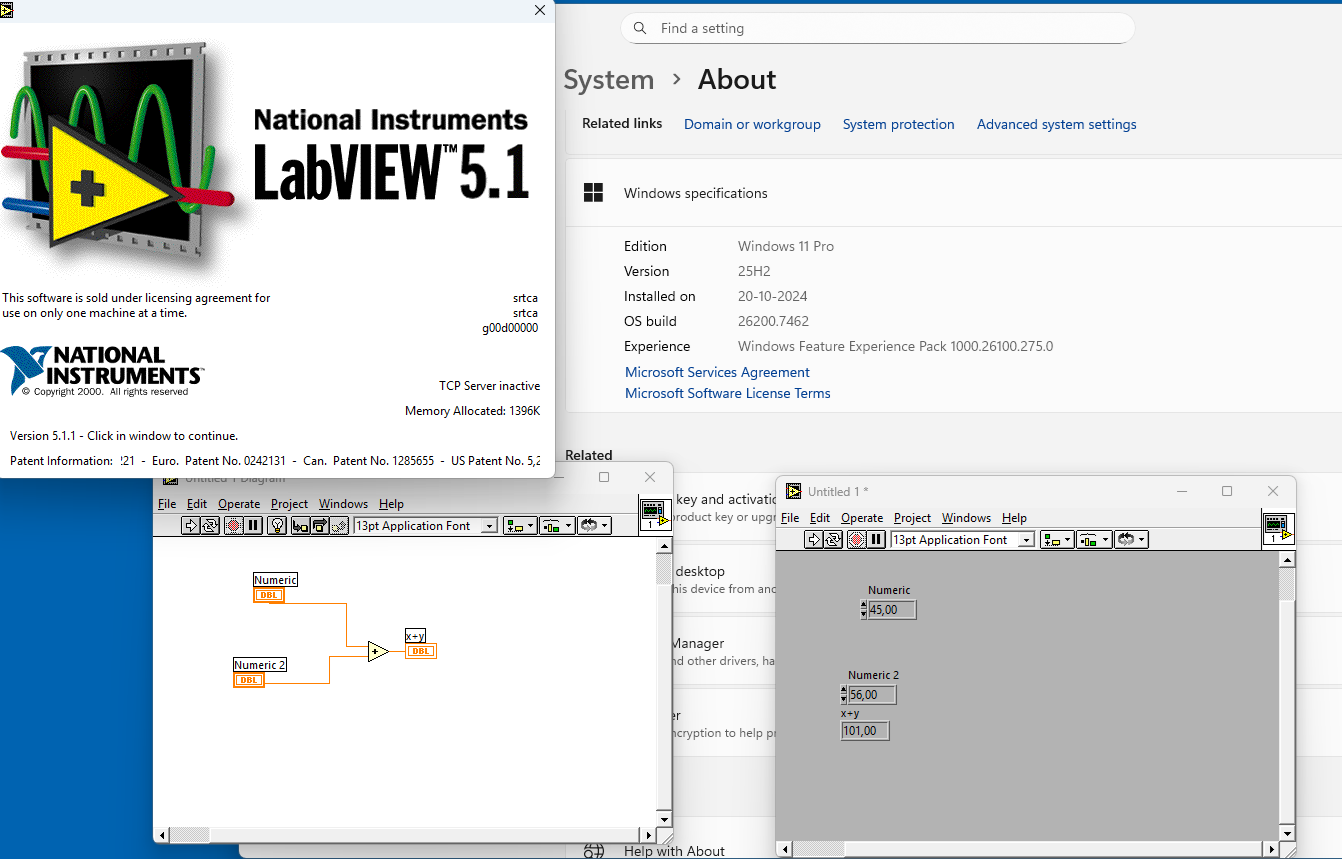
LabView 5.1 runs prefect on a windows 11 pro. The nice thing about LabView 5.x and maybe older, that is run from an USB stick. See picture
-
 goodhnj joined the community
 - Last week
-
LabVIEW 5 is almost 30 years old! It won't run on any modern computer very well if at all. Besides offering software even if that old like this is not just maybe illegal but definitely. So keep browsing your Russian crack sites but leave your offerings away from this site, please!
-

Necesito usar cwui.ocx en visual basic 6 alguien sabe usarlo
javierw replied to javierw's topic in LabVIEW General
Hola abro visual basic 6 uso cwui.ocx pero me sale mensaje a los 5 minutos de limite de uso como hago para usar cwui.ocx y que no me genere ese bloqueo -
Necesito usar cwui.ocx en visual basic 6 alguien sabe usarlo
javierw replied to javierw's topic in LabVIEW General
-
Hola necesito saber como registrar cwui.ocx para usarlo en visual basic 6 y que no me salga el molesto mensaje de registro
-
Tengo labview 5 alguien lo necesita, lo comparto
-
Necesito measurement studio que venia con labview 5 alguien lo tiene?
-
Hola amigos soy de Colombia y entusiasta de labview como lo son ustedes, en mis cosas debo tener el labview 5 full si están interesados lo compartiría, pero creo que acá por cosas de derechos no se puede quedar atento y lo busco y lo comparto, lo encontré en una página rusa hace un tiempo y esta full, quedo atento, además tengo información de cwui.ocx con visual basic 6.0 lo estoy usando y también lo tengo
-
javierw joined the community
-
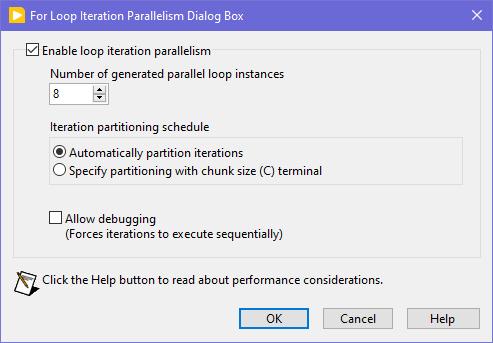
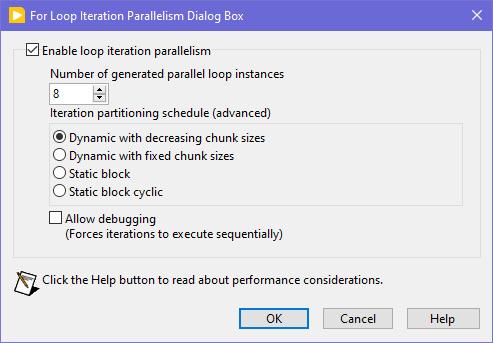
Seems like this one has "escaped everyone's grasp" too. ParallelLoop.ShowAllSchedules=True Because was only checked from the password-protected diagram of ParallelForLoopDialog.vi (LabVIEW 20xx\resource\dialog). Present since LabVIEW 2010. When activated, allows to apply more advanced iteration partitioning schedule. In other words, instead of this you will get this Сould this be useful? I can't say. Maybe in some very specific use-cases. In my quick tests I didn't manage to get increase in any productivity. It's easy to mess up with those options and make things worse, than by default. Also can be changed by this scripting counterpart.
-
 This is true. But! If the VI to open is a member of a lvclass or lvlib and the typedefs input is False (default value), then almost any subsequent action on that VI ref leads to the whole hierarchy loading into memory. This is not good in most cases as with large hierarchies loading takes several seconds and LabVIEW displays loading window during that, no matter which options are passed. The only easy way to escape that is to set the typedefs to True. Another option would be putting the VI in a bad (broken) state, but the function suitable for this is not exported. Frankly this Open.VI Without Refees method acts a bit odd, because when the typedefs is False, it sets the viBadVILibrary flag, but it does not give the desired effect, but when the typedefs is True, such a flag is not set, but no dependencies are loaded. Sometimes I use Open.VI Without Refees to scan VIs for some objects on their BD's / FP's and when there are thousands of VIs, it all takes many minutes to scan, even with the typedefs = True. I managed to speed things up 3-4 times by compiling my traversal VI and running it on a Full Featured RTE instead of a standard RTE to get the scripting working. Using that ~20 000 VIs are scanned in about 5 minutes.
 -

LabVIEWs response time during editing becomes so long
Rolf Kalbermatter replied to MikaelH's topic in LabVIEW General
Wow, over 2 hours build time sounds excessive. My own packages are of course not nearly as complex but with my simplistic clone of the OpenG Package Builder it takes me seconds to build the package and a little longer when I run the OpenG Builder relinking step for pre/postfixing VI names and building everything into a target distribution hierarchy beforehand. Was planning for a long time to integrate that Builder relink step directly into the Package Builder but it's a non-trivial task and would need some serious love to do it right. I agree that we were not exactly talking about the same reason for lots of VI wrappers although it is very much related to it. Making direct calls into a library like OpenSSL through Call Library Nodes, which really is a collection of several rather different paradigms that have grown over the course of over 30 years of development, is not just a pain in the a* but a royal suffering. And it still stands for me, solving that once in C code to provide a much more simple and uniform API across platforms to call from LabVIEW is not easy, but it eases a lot of that pain. It's in the end a tradeoff of course. Suffering in the LabVIEW layer to create lots of complex wrappers that end up often to be different per platform (calling convention, subtle differences in parameter types, etc) or writing fairly complex multiplatform C code and having to compile it into a shared library for every platform/bitness you want to support. It's both hard and it's about which hard you choose. And depending on personal preferences one hard may feel harder than the other. -

LabVIEWs response time during editing becomes so long
ShaunR replied to MikaelH's topic in LabVIEW General
I think, maybe, we are talking about different things. Exposing the myriad of OpenSSL library interfaces using CLFN's is not the same thing that you are describing. While multiple individual calls can be wrapped into a single wrapper function to be called by a CLFN (create a CTX, set it to a client, add the certificate store, add the bios then expose that as "InitClient" in a wrapper ... say). That is different to what you are describing and I would make a different argument. I would, maybe, agree that a wrapper dynamic library would be useful for Linux but on Windows it's not really warranted. The issue I found with Linux was that the LabVIEW CLFN could not reliably load local libraries in the application directory in preference over global ones and global/local CTX instances were often sticky and confused. A C wrapper should be able to overcome that but I'm not relisting all the OpenSSL function calls in a wrapper. However. The biggest issue with number of VI's overall isn't to wrap or not, it's build times and package creation times. It takes VIPM 2 hours to create an ECL package and I had to hack the underlying VIPM oglib library to do it that quickly. Once the package is built, however, it's not a problem. Installation with mass compile only takes a couple of minutes and impact on the users' build times is minimal. -
 egeoktay joined the community
 -
LabVIEWs response time during editing becomes so long
Rolf Kalbermatter replied to MikaelH's topic in LabVIEW General
Actually it can be. But requires undocumented features. Using things like EDVR or Variants directly in the C code can immensely reduce the amount of DLL wrappers you need to make. Yes it makes the C code wrapper more complicated and is a serious effort to develop, but that is a one time effort. The main concern is that since it is undocumented it may break in future LabVIEW versions for a number of reason, including NI trying to sabotage your toolkit (which I have no reason to believe they would want to do, but it is a risk nevertheless). - Earlier
-
 WonyongKim joined the community
 -
 daniel_v10 joined the community
 -
 xc123 joined the community
 -
 JNewton joined the community
 -
 yao111 joined the community
 -
 CooperW joined the community
 -
For Libre/openOffice:
-
En voyant le code, il me semble qu'il a été écrit pour lire un fichier csv, et il ne peut pas lire un fichier xls(x). Si tu dis que ça marchait avant et que ça ne marche plus maintenant sans avoir changé le code, peut être as tu ouvert le fichier csv avec Excel et sauvé en xls(x)? Vérifie le format de ton fichier, et le chemin du fichier lu par le logiciel. Ensuite, si tu veux lire des données dans un fichier xls(x) au lieu de csv, il y a plusieurs méthodes, chacune a ses avantages et inconvénients.. - activeX, Windows only, nécessite Excel installé sur la machine - pandas, multi plateforme, nécessite python et pandas installé - vi de Darren (voir forum NI), ne marche pas avec toutes les versions d'excel, multi-platform Bon courage !
-
I haven't had much time to investigate this until this month, but I think I've found the cause. XNodes on the production computer were not designed optimally. In the AdaptToInputs ability I was unconditionally passing a GenerateCode reply, thinking that the AdaptToInputs is only called when interacting with the XNode (connecting/disconnecting wires). It turned out that LabVIEW also calls the AdaptToInputs ability once, when the VIs are loaded and any single change is made, no matter if it touches the XNode or not. As I had many such non-optimal XNodes in many places, it was causing code regeneration in all of them. Besides of that some of my VIs had very high code complexity (11 to 13), because of a bunch of nested structures. When the XNodes regeneration was occurring simultaneously with the VIs recompilation, it was taking that a minute or so. After I added extra conditions into my AdaptToInputs ability (issue a GenerateCode reply only, when the Term Types are changed), the edits in my VIs started to take 1.5 seconds. Still the hierarchy saves can be slow, when some 'heavy' VIs are changed, but it's a task for me to refactor those VIs, so their complexity could decrease to 10 or less. By the way, my example from the previous page was not suitable for demonstrating the situation, as its code complexity is low and the Match Regular Expression XNode does not issue a GenerateCode reply in the AdaptToInputs.