All Activity
- Past hour
-

[CR] LabVIEW Task Manager (LVTM)
Francois Normandin replied to TimVargo's topic in Code Repository (Certified)
Found it here @Ajayvignesh https://github.com/sandialabs/LVTM - Today
-
All very good information thanks for the discussion. I was mostly just interested in reentrant for the ZLIB Deflate VI specifically. For my test I took 65k random CAN frames I had, organized them by IDs, then made something like roughly 60 calls to the deflate, getting compressed blocks for each ID and time. Just to highlight the improvement I turned the compression level up to 9, and it took about 400ms. In the real world the default compression level is just fine. I then set the loop to enable parallelism with 16 instances, which was the default for my CPU. That time to process the same frames at the same compression level took 90ms. In the real world I will likely be trying to handle something like a million frames, in chunks, maybe using pipelining. So the improvement of 4.5 times faster for the same result is a nice benefit if all I need to do is enable reentrant on a single VI. Just something for you to consider, and seems like a fairly low risk on this VI, since we aren't talking to outside resources, just a stream. I'd feel similarly for the Inflate VI. I certainly would not try to access the same stream on two different functions at the same time. Thanks for the info on time. I feel fairly certain that in my application, a double for time is the first easy step to improve log file size and compression.
-
 Ricardo_Ramirez joined the community
 -

How to load a base64-encoded image in LabVIEW?
Harris Hu replied to Harris Hu's topic in LabVIEW General
This is excellent. - Yesterday
-

My ZLIB Deflate and Compression in G
Rolf Kalbermatter replied to hooovahh's topic in Code In-Development
Reentrant execution may be a safe option. Have to check the function. The zlib library is generally written in a way that should be multithreading safe. Of course that does NOT apply to accessing for instance the same ZIP or UNZIP stream with two different function calls at the same time. The underlaying streams (mapping to the according refnums in the VI library) are not protected with mutexes or anything. That's an extra overhead that costs time to do even when it would be not necessary. But for the Inflate and Deflate functions it would be almost certainly safe to do. I'm not a fan of making libraries all over reentrant since in older versions they were not debuggable at all and there are still limitations even now. Also reentrant execution is NOT a panacea that solves everything. It can speed up certain operations if used properly but it comes with significant overhead for memory and extra management work so in many cases it improves nothing but can have even negative effects. Because of that I never enable reentrant execution in VIs by default, only after I'm positively convinced that it improves things. For the other ZLIB functions operating on refnums I will for sure not enable it. It should work fine if you make sure that a refnum is never accessed from two different places at the same time but that is active user restraint that they must do. Simply leaving the functions non-reentrant is the only safe option without having to write a 50 page document explaining what you should never do, and which 99% of the users never will read anyways. 😁 And yes LabVIEW 8.6 has no Separated Compiled code. And 2009 neither. -
My ZLIB Deflate and Compression in G
Rolf Kalbermatter replied to hooovahh's topic in Code In-Development
A Timestamp is a 128 bit fixed point number. It consists of a 64-bit signed integer representing the seconds since January 1, 1904 GMT and a 64-bit unsigned integer representing the fractional seconds. As such it has a range of something like +- 3*10^11 years relative to 1904. That's about +-300 billion years, about 20 times the lifetime of our universe and long after our universe will have either died or collapsed. And the resolution is about 1/2*10^19 seconds, that's a fraction of an attosecond. However LabVIEW only uses the most significant 32-bit of the fractional part so it is "only" able to have a theoretical resolution of some 1/2*10^10 seconds or 200 picoseconds. Practically the Windows clock has a theoretical resolution of 100ns. That doesn't mean that you can get incremental values that increase with 100ns however. It's how the timebase is calculated but there can be bigger increments than 100ns between two subsequent readings (and no increment). A double floating point number has an exponent of 11 bits and 52 fractional bits. This means it can represent about 2^53 seconds or some 285 million years before its resolution gets higher than one second. Scale down accordingly to 285 000 years for 1 ms resolution and still 285 years for 1us resolution. -
My ZLIB Deflate and Compression in G
Rolf Kalbermatter replied to hooovahh's topic in Code In-Development
Well I referred to the VI names really, the ZLIB Inflate calls the compress function, which then calls internally the inflate_init, inflate and inflate_end functions, and the ZLIB Deflate calls the decompress function wich calls accordingly deflate_init, deflate and deflate_end. The init, add, end functions are only useful if you want to process a single stream in junks. It's still only one stream but instead of entering the whole compressed or uncompressed stream as a whole, you initialize a compression or decompression reference, then add the input stream in smaller junks and get every time the according output stream. This is useful to process large streams in smaller chunks to save memory at the cost of some processing speed. A stream is simply a bunch of bytes. There is not inherent structure in it, you would have to add that yourself by partitioning the junks accordingly yourself. -
I don't see any function name in the DLL mention Deflate/Inflate, just lvzlib_compress and lvzlib_compress2 for the newer releases. Still I don't know if you need to expose these extra functions just for me. I did some more testing and using the OpenG Deflate, and having two single blocks for each ID (Timestamp and payload) still results in a measurable level of improvement on it's own for my CAN log testing. 37MB uncompressed, 5.3MB with Vector compression, and 4.7MB for this test. I don't think that going to multiple blocks within Deflate will have that much of a savings, since the trees, and pairs need to be recreated anyway. What did have a measurable improvement is calling the OpenG Deflate function in parallel. Is that compress call thread safe? Can the VI just be set to reentrant? If so I do highly suggest making that change to the VI. I saw you are supporting back to LabVIEW 8.6 and I'm unsure what options it had. I suspect it does not have Separate Compile code back then. Edit: Oh if I reduce the timestamp constant down to a floating double, the size goes down to 2.5MB. I may need to look into the difference in precision and what is lost with that reduction.
-
My ZLIB Deflate and Compression in G
Rolf Kalbermatter replied to hooovahh's topic in Code In-Development
Actually there is ZLIB Inflate and ZLIB Deflate and Extended variants of both that take in a string buffer and output another one. Extended allows to specify which header format to use in front of the actual compressed stream. But yes I did not expose the lower level functions with Init, Add, and End. Not that it would be very difficult other than having to consider a reasonable control type to represent the "session". Refnum would work best I guess. -
Thanks but for the OpenG lvzlib I only see lvzlib_compress used for the Deflate function. Rolf I might be interested in these functions being exposed if that isn't too much to ask. Edit: I need to test more. My space improvements with lower level control might have been a bug. Need to unit test.
-
With ZLib you just deflateInit, then call deflate over and over feeding in chunks and then call deflateEnd when you are finished. The size of the chunks you feed in is pretty much up to you. There is also a compress function (and the decompress) that does it all in one-shot that you could feed each frame to. If by fixed/dynamic you are referring to the Huffman table then there are certain "strategies" you can use (DEFAULT_STRATEGY, FILTERED, HUFFMAN_ONLY, RLE, FIXED). The FIXED uses a uses a predefined Huffman code table.
-
 jstaxton joined the community
 -

[CR] LabVIEW Task Manager (LVTM)
Ajayvignesh replied to TimVargo's topic in Code Repository (Certified)
Great tool, just discovered it.! @Ravi Beniwal @TimVargo Is this tool available in GitHub for forking? -
So then is this what an Idea Exchange should be? Ask NI to expose the Inflate/Deflate zlib functions they already have? I don't mind making it I just want to know what I'm asking for. Also I continued down my CAN logging experiment with some promising results. I took log I had with 500k frames in it with a mix of HS and FD frames. This raw data was roughly 37MB. I created a Vector compatible BLF file, which compresses the stream of frames written in the order they come in and it was 5.3MB. Then I made a new file, that has one block for header information containing, start and end frames, formats, and frame IDs, then two more blocks for each frame ID. One for timestamp data, and another for the payload data. This orders the data so we should have more repeated patterns not broken up by other timestamp, or frame data. This file would be roughly 1.7MB containing the same information. That's a pretty significant savings. Processing time was hard to calculate. Going to the BLF using OpenG Deflate was about 2 seconds. The BLF conversion with my zlib takes...considerably longer. Like 36 minutes. LabVIEW's multithreaded-ness can only save me from so much before limitations can't be overcome. I'm unsure what improvements can be made but I'm not that optimistic. There are some inefficiencies for sure, but I really just can't come close to the OpenG Deflate. Timing my CAN optimized blocks is hard too since I have to spend time organizing it, which is a thing I could do in real time as frame came in if this were in a real application. This does get me thinking though. The OpenG implementation doesn't have a lot of control for how it work at the block level. I wouldn't mind if there is more control over the ability to define what data goes into what block. At the moment I suspect the OpenG Deflate just has one block and everything is in it. Which to be fair I could still work with. Just each unique frame ID would get its own Deflate, with a single block in it, instead of the Deflate containing multiple blocks, for multiple frames. Is that level of control something zlib will expose? I also noticed limitations like it deciding to use the fixed or dynamic table on it's own. For testing I was hoping I could pick what to do.
-

How to load a base64-encoded image in LabVIEW?
ensegre replied to Harris Hu's topic in LabVIEW General
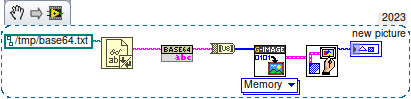
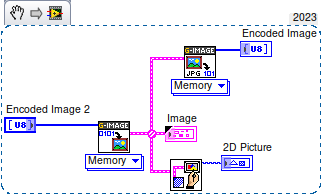
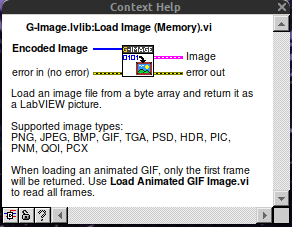
So in LV>=20, using OpenSerializer.Base64 and G-Image. That simple. Linux just does not have IMAQ. Well, who said that the result should be an IMAQ image?
-
How to load a base64-encoded image in LabVIEW?
ensegre replied to Harris Hu's topic in LabVIEW General
Where do you get that from? -

How to load a base64-encoded image in LabVIEW?
ShaunR replied to Harris Hu's topic in LabVIEW General
OP is using LV2019. Nice tool though. Shame they don't ship the C source for the DLL but they do have it on their github repository. -
How to load a base64-encoded image in LabVIEW?
ensegre replied to Harris Hu's topic in LabVIEW General
Uhm. This is G-image. Am I missing something?
-
How to load a base64-encoded image in LabVIEW?
Rolf Kalbermatter replied to Harris Hu's topic in LabVIEW General
I can understand that sentiment. I'm also just doing some shit that I barely can understand.🤫 -
How to load a base64-encoded image in LabVIEW?
ShaunR replied to Harris Hu's topic in LabVIEW General
Nope. It needs someone better than I. -
How to load a base64-encoded image in LabVIEW?
ensegre replied to Harris Hu's topic in LabVIEW General
I haven't yet really looked into, but why not just wrapping libjpeg, instead of endeavoring the didactic exercise of G-reinventing of the wheel? -
How to load a base64-encoded image in LabVIEW?
Rolf Kalbermatter replied to Harris Hu's topic in LabVIEW General
You seem to have done all the pre-research already. Are you really not wanting to volunteer? 😁 -
My ZLIB Deflate and Compression in G
Rolf Kalbermatter replied to hooovahh's topic in Code In-Development
They absolutely do! The current ZIP file support they have is basically simply the zlib library AND the additional ZIP/UNZIP example provided with it in the contribution order of the ZLIB library. It used to be quite an old version and I'm not sure if and when they ever really upgraded it to later ZLIB versions. I stumbled over that fact when I tried to create shared libraries for realtime targets. When creating on for the VxWorks OS I never managed to load it at all on a target. Debugging that directly would have required an installation of the Diabolo compiler toolchain from VxWorks which was part of the VxWorks development SDK and WAAAAYYY to expensive to even spend a single thought about trying to use it. After some back and forth with an NI engineer he suggested I look at the export table of the NI-RT VxWorks runtime binary, since VxWorks had the rather huge limitation to only have one single global symbol export table where all the dynamic modules got their symbols registered, so you could not have two modules exporting even one single function with the same name without causing the second module to fail to load. And lo and behold there were pretty much all of the zlib zip/unzip functions in that list and also the zlib functions itself. After I changed the export symbol names of all the functions I wanted to be able to call from my OpenG ZIP library with an extra prefix I could suddenly load my module and call the functions. Why not use the function in the LabVIEW kernel directly then? 1) Many of those symbols are not publicly exported. Under VxWorks you do not seem to have a difference between local functions and exported functions, they all are loaded into the symbol table. Under Linux ELF, symbols are per module in a function table but marked if they are visible outside the module or not. Under Windows, only explicitly exported functions are in the export function table. So under Windows you simply can't call those other functions at all, since they are not in the LabVIEW kernel export table unless NI adds them explicitly to the export table, which they did only for a few that are used by the ZIP library functions. 2) I have no idea which version NI is using and no control when they change anything and if they modify any of those APIs or not. Relying on such an unstable interface is simply suicide. Last but not least: LabVIEW uses the deflate and inflate functions to compress and decompress various binary streams in its binary file formats. So those functions are there, but not exported to be accessed from a LabVIEW program. I know that they did explicit benchmarks about this and the results back then showed clearly that reducing the binary size of data that had to be read and written to disk by compressing them, resulted in a performance gain despite the extra CPU processing for the compression/decompression. I'm not sure if this would still hold with modern SSD drives connected through NVE but why change it now. And it gave them an extra marketing bullet point in the LabVIEW release notes about reduced file sizes. 😁 -

How to load a base64-encoded image in LabVIEW?
hooovahh replied to Harris Hu's topic in LabVIEW General
😅 You might be waiting a while, I'm mostly interested in compression, not decompression. That being said in the post I made, there is a VI called Process Huffman Tree and Process Data - Inflate Test under the Sandbox folder. I found it on the NI forums at some point and thought it was neat but I wasn't ready to use it yet. It isn't complete obviously but does the walking through of bits of the tree, to bytes. EDIT: Here is the post on NI's forums I found it on. -
Yes I'm trying to think about where I want to end this endeavor. I could support the storage, and fixed tables modes, which I think are both way WAY easier to handle then the dynamic table it already has. And one area where I think I could actually make something useful, is in compression of CAN frame data and storage. zLib compression works on detecting repeating patterns. And raw CAN data for a single frame ID is very often going to repeat values from that same ID. But the standard BLF log file doesn't order frames by IDs, it orders them by time stamps. So you might get a single repeated frame, but you likely won't have huge repeating sections of a file if they are ordered this way. zLib has a concept of blocks, and over the weekend I thought about how each block could be a CAN ID, compressing all frames from just that ID. That would have huge amounts of repetition, and would save lots of space. And this could be very multi-threaded operation since each ID could be compressed at once. I like thinking about all this, but the actual work seems like it might not be as valuable to others. I mean who need yet another file format, for an already obscure log data? Even if it is faster, or smaller? I might run some tests and see what I come up with, and see if it is worth the effort. As for debugging bit level issues. The AI was pretty decent at this too. I would paste in a set of bytes and ask it to figure out what the values were for various things. It would then go about the zlib analysis and tell me what it thought the issue was. It hallucinated a couple of times, but it did fairly well. Yeah performance isn't wonderful, but it also isn't terrible. I think some direct memory manipulation with LabVIEW calls could help, but I'm unsure how good I can make it, and how often rusty nails in the attic will poke me. I think reading and writing PNG files with compression would be a good addition to the LabVIEW RT tool box. At the moment I don't have a working solution for this, but suspect that if I put some time into I could have something working. I was making web servers on RT that would publish a page for controlling and viewing a running VI. The easiest way to send image data over was as a PNG, but the only option I found was to send it as uncompressed PNG images which are quite a bit larger than even the base level compression. I do wonder why NI doesn't have a native Deflate/Inflate built into LabVIEW. I get that if they use the zlib binaries they need a different one for each target, but I feel that that is a somewhat manageable list. They already have to support creating Zip files on the various targets. If they support Deflate/Inflate, they can do the rest in native G to support zip compression.
-
 Wang Jinshuo joined the community
 - Last week
-
How to load a base64-encoded image in LabVIEW?
ShaunR replied to Harris Hu's topic in LabVIEW General
While we are waiting for Hooovah to give us a huffman decoder ... most of the rest seem to be here: Cosine Transform (DCT), sample quantization, and Huffman coding and here: LabVIEW Colour Lab -
How to load a base64-encoded image in LabVIEW?
Rolf Kalbermatter replied to Harris Hu's topic in LabVIEW General
You make it sound trivial when you list it like that. 😁