
Rolf Kalbermatter
-
Posts
3,959 -
Joined
-
Last visited
-
Days Won
277
Content Type
Profiles
Forums
Downloads
Gallery
Everything posted by Rolf Kalbermatter
-
That's quite a blanket statement. I'm sure it can be done, not directly but the myRIO does have a Wifi interface, and all cRIO have wired Ethernet. So if you have a Wifi router that you can let the myRIO connect to, you can certainly connect it to the cRIO which all have wired Ethernet in one way or the other. It also support Ethernet over USB but that is generally only easily usable to connect from a computer to the device. In order to connect this to another device like a cRIO connected to the network, you would have to somehow bridge the virtual USB network adapter with the normal network interface. It's possible but not straightforward.
-
 Since you have already experience with network communication in LabVIEW I would strongly suspect that this is on the short and medium term less than what you will have to put up with to make this current external shared library work fully reliable. Basically writing the readValue() function in LabVIEW is pretty straightforward and the underlaying readLong(), readDouble() and readString() should be even simpler. As long as you have the C source code of these all available I would think it is maybe 1 or two days of work. The only tricky things I see are: - we haven't seen the sendCHARhandle() function nor what the CharacteristicHandle datatype is. It's likely just an integer of some size, so shouldn't be really difficult. - it's not clear how the protocol sends a string. ideally it would first send a byte, or integer that indicates the number of bytes that follow, then everything is very easy. If it rather uses a zero termination character you would need to go into a loop and read one character after the other until you see the zero character, that's more of a hassle and slows down communication a bit, but that would be similar in the C code.
 -
Then you need to deallocate this pointer after you are done with it! Any you can not just call whatever deallocation function you would like, it MUST be the matching function that was used to allocate the buffer. Windows knows several dozen different functions to do something like that and all ultimately rely on the Windows kernel to do the difficult task of managing the memory, but they do all some intermediate thing of their own too. To make matters worse, if your library calls malloc() you can't just call free() from your program. The malloc() the library calls may not operate on the same heap than the free() you call in your calling program. This is because there is generally not a single C runtime library on a computer but a different version depending on what compiler was used to compile the code. And a DLL (or shared library) can be compiled by a completely different C compiler (version) than the application that calls this shared library. On Linux things are a little less grave since libc is since about 1998 normally always accessed through the libc.so.6 symbolic link name which resolves to the platform installed libc.x.y.so shared library but even here you do not have any guarantee that it will always remain like this. The fact that the libc.so soname link is currently already at version number 6 clearly shows that there is a potential for this library to change in binary incompatible ways, which would cause a new soname version to appear. It's not very likely to happen as it would break a lot of programs that just assume that there is nothing else than this version on a Linux computer, but Linux developers have been known to break backward compatibility in the past for technical and even just perceived esthetical reason. The only safe way is to let the library export an additional function that calls free() and use that from all callers of that library. And to make matters worse, this comment here: typedef struct Value { union /* This holds the value. */ { long l; unsigned long ul; double d; char *s; /* If a string user is responsible for <<<<<------------ * allocating memory. */ } v; long order; valueType type; /* Int,float, or string */ valueLabel label; /* Description of characteristic -- what is it? */ } Value; would be in that case totally and completely false and misleading!! It would be more logical to let readString() allocate the memory as it is the one which knows that a string value is actually to be retrieved and it also can determine how big that string will need to be, but adding such misleading comments to the library interface description is at best negligent and possibly even malicious.
-
Strictly speaking is the v nothing in itself. It's the unions name and does not really occupy any memory in itself. It's just a container that contains the real data which is one of the union elements, so the l, ul, d, or s. And yes the s is a string pointer, so according to the comment in the declaration, if you request a string value you have to preallocate a pointer and assign it to this s pointer. What size the memory block needs to have you better also know beforehand! And when you don't need it anymore you have to deallocate it too or you cause a memory leak! Now LabVIEW does not know unions so we can't really make it like that. Since the union contains a double, its memory size is always 8 byte. But!! So if the type is Double, we need to Typecast the uint64 into a Double. But the LabVIEW Typecast does Big Endian swapping, so we rather need to use the Unflatten to string and specify Native Byte Order If the type is Long or ULong we need to know if it was sent by a Linux or Windows remote side. If it was Linux we just convert it to the signed or unsigned int64, otherwise we need to split the uint64 into 2 uint32 and take the lower significant one. If it was (or rather really is going to be a string) we first need to allocate a pointer, and assign it to the uint64, but only if we run in 64 bit LabVIEW, otherwise we would strictly speaking need to convert the LabVIEW created pointer which is always an (U)Int64 on the diagram into an (U)int32 and then Combine it with a dummy (U)Int32 into an uint64 and assign that to the union value then pass that to the readValue() function, retrieve the data from the string pointer and then deallocate the pointer again. Since we nowadays always run on Little Endian, unless you want to also support VxWorks targets, you can however forget the (U)Int64 -> (U)Int32 -> (U)Int64 conversion voodoo and simply assign the LabVIEW (U)Int64 pointer directly to the union uint64 even for the 32-bit version. And if that all sounds involved, then yes it is and that is not the fault of LabVIEW but simply how C programming works. Memory management in C is hard, complicated, usually under documented when using a library and sometimes simply stupidly implemented. Doing the same fully in LabVIEW will almost certainly be less work, much less chance for memory corruptions and leaks (pretty much zero chance) and generally a much more portable solution. The only real drawback will be that if the library implementer decides to change how his communication data structures are constructed on the wire, you would have to change your LabVIEW library too. However seeing how thin the library implementation really is it is almost certain that such a change would also cause a change to the functional interface and you would have to change the LabVIEW library anyhow. That is unless the readString() function allocates the pointer, which would be more logical but then the comment in the Value typedef would be wrong and misleading and your library would need to export also a function that deallocates that pointer and that you would have to call from LabVIEW after you are done converting it into a LabVIEW string.
-
But someone has to allocate the pointer. If it is not readString() it has to be done by you as shown in Shauns last picture. Otherwise it may seem to work but is in fact corrupting memory.
-
That code is in itself neither complete nor very clear. And it is not clear to me why you would even need to interface to the so library. It seems to simply read data from a socket and put it into this artificial variant. Rather than using a so that does such low level stuff to then call it from LabVIEW on an only slightly higher level, it would seem to me much more logical to simply do the entire reading and writing directly on a LabVIEW TCP refnum. The problem likely is in the readString() function which is not shown anywhere how it is implemented. It supposedly should allocate a buffer to assign to the c_ptr variable and then fill that buffer. But that also means that you need to call the correct memory dispose function afterwards to deallocate that buffer or you will create nice memory leaks every time you call the getValue() function for a string value. Doing the whole thing directly with LabVIEW TCP functions would solve a lot of problems without a lot more work needed. - You don't depend on a shared library that needs to be compiled for every platform you use. - You don't end up with the long difference between Windows and Unix. Most likely this library was originally written for Windows and never tested under Unix. What he calls long in this library is likely meant to be always an int32. Alternatively it was originally written for Linux and that value is really meant to be always an int64. As it is programmed now it is not platform interoperable, but that doesn't need to bother you if you write it all in LabVIEW. You simply need to know what is the intended type and implement that in LabVIEW accordingly and you can leave the library programmer to try to deal with his ignorance. - You have one LabVIEW library that works on all LabVIEW platforms equally, without the need to distribute additional compiled code in the form of shared libraries. - You don't have to worry about buffers the C library may or may not allocate for string values and deallocate them yourself. - You don't have to worry about including the LabVIEW lvimpltsl.so/dll file in a build application.
-
Definitely not the same. A 32-bit process simply can't address more than 4GB in total so it makes no sense to have a variable that can specify a size of more than that. Usually the maximum amount of memory that can be allocated as a single block is much smaller than that too. According to the 1999 ISO C standard (C99) it is at least 16-bit but meant to represent the size of an object. Library functions that take or return sizes expect them to be of this type or have the return type of size_t. As such it is most commonly defined to be the address size for the current platform. In most modern compilers this is the same as the bitness for that platform. Your reasoning would be correct if you wanted to write a general completely target platform independent library. But we work in the confines of LabVIEW here. And that supports several platforms but not that very exotic ones. Under Windows size_t is meant to be the same as the unsigned bitness value. Under Linux the same applies as can be easily verified in the stddef.h file. So in terms of LabVIEW it is safe to assume that size_t is actually always the same as the unsigned pointer sized integer. Of course once we have 128-bit CPUs (or God help us, 64/64 segmented addresses) and LabVIEW chooses to support them, this assumption may not hold anymore. Also the specification only says that size_t must be able to at least address SIZE_MAX (which is probably the same as UINT_MAX under Windows) elements but not how big it actually is. Pretty much all current implementations except maybe some limited embedded platforms use a size_t that can address a lot more than that. And that is the nature of standards, they use a lot of at least, must, can, should and at most and that are usually all constraints but not exact values. C is especially open in that sense as the C designers tried to be as flexible as possible to not put to much constraints on C compiler implementation on specific hardware.
-
size_t is usually according to the platform bitness since it makes little sense to have size parameters that would span more than 4GB on a 32-bit platform. If you need a 64-bit value regardless you need to use the explicit uint64_t. time_t is another type that can be 64-bit even on 32-bit platforms, but it doesn't have to be. It often depends on the platform libraries such as the libc version used or similar things.
-
This doesn't make much sense. His example points nowhere, it simply takes the pointer and interprets it as a Zero terminated C string and converts it to a LabVIEW String/Byte array. If this doesn't return the right value, your v value is not what you think it is. And the Get Value Pointer xnode does in principle nothing else for a string type. But without an example to look at, that we can ideally test on our own machines, we won't be able to tell you more.
-
Technically there are two mistakes in this. StrLen() returns an int32_t not an uint32_t (LabVIEW array lengths are for historical reasons always int32 values, even though an uint32_t would be more logical as negative array lengths make no sense and there is no mechanisme I'm aware of in LabVIEW that would use negative lengths for arrays as a special indicator of something). But this is a minor issue. If your string gets bigger than 2 billion characters, something is likely very wrong. The other error is potentially more problematic as the length parameter of MoveBlock() is since many many moons a size_t (it used to be an int32 in very early extcode.h headers before the C99 standard was getting common place, which introduced the size_t and other xxxx_t types). And yes that is a 64-bit (usually unsigned) integer on 64-bit platforms. It will likely go well anyways as LabViEW will probably sign extend the U32 to an U64 to fill the entire 64-bit stack location for this parameter, but it is not entirely guaranteed that this will happen. Technically it would be allowed to optimize this and just fill in the lower 32-bit and leave the upper 32-bit to whatever is there in memory, which could cause the function to misbehave very badly.
-
It's most likely related to the xnode. Not sure why, it supposedly has worked in the past or the code in my inherited application would have made no sense as it was always meant to run as build executable and used as such before. But I just threw it out and replaced it with direct calls to the LabVIEW manager functions StrLen and MoveBlock and everything was fine.
-
So you propose for NI to more or less make a Windows GDI text renderer rewrite simply to allow it to use UTF-8 for its strings throughout? And that that beast would even be close to the Windows native one in terms of features, speed and bugs? That sounds like a perfect recipe for disaster. If the whole thing would be required to be in UTF-8 the only feasable way would be to always convert it to UTF-16 before passing it to Windows APIs. Not really worse than now in fact as the Windows ANSI APIs do nothing else in fact but quite a lot of repeated conversions back and forth.
-
How to input Class type to python node
Rolf Kalbermatter replied to Hello183's topic in LabVIEW Community Edition
It's just an integer value. You can either just pass 0, 1 etc to that parameter or create in LabVIEW an enum that has these values assigned to the individual enum values. What doesn't work?- 1 reply
-
- 1
-

-
Not really. There are two hidden nodes that convert between whatever is the current locale and UTF-8 and vice versa. Nothing more. This works and can be done with various Unicode VI libraries too. Under Windows what it essentially does is something analoguous to this: MgErr ConvertANSIStrToUTF8Str(LStrHandle ansiString, LStrHandle *utf8String) { MgErr err = mgArgErr; int32_t wLen = MultiByteToWideChar(CP_ACP, 0, LStrBuf(*ansiString), LStrLen(*ansiString), NULL, 0); if (wLen) { WCHAR *wStr = (WCHAR*)DSNewPtr(wLen * sizeof(WCHAR)); if (!wStr) return mFullErr; wLen = MultiByteToWideChar(CP_ACP, 0, LStrBuf(*ansiString), LStrLen(*ansiString), wStr, wLen); if (wLen) { int32_t uLen = WideCharToMultiByte(CP_UTF8, 0, wStr, wLen, NULL, 0, NULL, NULL); if (uLen) { err = NumericArrayResize(uB, 1, (UHandle*)utf8String, uLen); if (!err) LStrBuf(**utf8String) = WideCharToMultiByte(CP_UTF8, 0, wStr, wLen, LStrBuf(**utf8String), uLen, NULL, NULL); } } DSDisposePtr(wStr); } return err; } The opposite is done exactly the same, just swap the CP_UTF8 and CP_ACP. Windows does not have a direct UTF-8 to/from anything conversion. Everything has to go through UTF-16 as the common standard. And while UTF-8 to/from UTF-16 is a fairly simple algorithm, since they map directly to each other, it is still one extra memory copy every time. That is why I would personally use native strings in LabVIEW without exposing the actually used internal format and only convert them to whatever is explicitly required, when it is required. Otherwise you have to convert the strings continuously back and forth as Windows APIs either want ANSI or UTF-16, nothing else (and all ANSI functions convert all strings to and from UTF-16 before and after calling the real function, which is always operating on UTF-16. By keeping the internal strings in whatever is the native format, you would avoid a lot of memory copies over and over again. And make a lot of things in the LabVIEW kernel easier. Yes you LabVIEW needs to be careful whenever interfacing to other things, be it VISA, File IO, TCP and also external formats such as VI file formats when they store strings or paths. You do not want them to be platform specific. For the nodes such as VISA, TCP, File read and Write and of course the Call Library Node parameter configuration for strings, it would have to provide a way to explicitly let the user choose the external encoding. It would be of course nice if there were many different encodings selectable including all possible codepages in the world but that is an impossible task to make platform independent. But it should at least allow Current Locale, UTF-8 and WideChar, which would be UTF-16-LE on Windows and UTF-32 on other platforms. Only UTF-8 will be universally platform independent and should be the format used to transport information across systems and between different LabVIEW platforms. The rest is mainly to interface to local applications, APIs and systems. UTF-8 would be the default for at least TCP, and probably also VISA and other instrument communication interfaces. Current Local would be the default for Call Library Node string parameters and similar. Other Nodes like Flatten and Unflatten would implicitly always use UTF-8 format on the external side. But the whole string handling internally is done in one string type which is whatever is the most convenient for the current platform. In my own C library I called it NStr for native string. (Which is indeed somewhat close to the Mac Foundation type NSString, but different enough to not cause name clashing). On Windows it is basically a WCHAR string, on other platforms it is a char string but with the implicit rule to be always in UTF-8 no matter what, except on platforms that would not support UTF-8 which was an issue for at least VxWorks and Pharlap systems, but luckily we don't have to worry about them from next year on since NI will have them definitely sacked by then.😀
-
I think it should. The old string is in whatever locale the system is configured for and is at the same time also using the existing Byte Array === String analogy. That is usually also UTF-8 on most modern Unix systems, and could be UTF-8 on Windows systems that have the UTF-8 Beta hack applied. There should be another string which is whatever the prefered Unicode type for the current platform is. For Windows I would tend to use UTF-16 internally for Unix it is debatable if it should be UTF-32, the wchar_t on pretty much anything that is not Windows, or UTF-8 which is pretty much the predominant Unicode encoding nowadays on non Windows systems and network protocols. I would even go as far as NOT exposing the inner datatype of this new string very much like with Paths in LabVIEW since as long as it existed, but instead provide clear conversion methods to and from explicit String encodings and ByteArrays. The string datatype in the Call Library Node would also have such extra encoding option changes. Flattened strings for LabVIEW internal purposes would be ALWAYS UTF-8. Same for flattened paths. Internally Paths would use whatever the native string format is, which in my opinion would be UTF-16 on Windows and UTF-8 on other systems. Basically the main reason Windows is using UTF-16, is because Microsoft was an early adopter of Unicode. At the time when they implemented Unicode support for Windows, the Unicode space fit easily within the 2^16 character points that UTF-16 provided. When the Unicode consortium finalized the Unicode standard with additional exotic characters and languages, it did however not fit anymore but the Microsoft implementation was already out in the field and changing it was not really a good option anymore. Non-Windows versions only started a bit later and went for UTF-32 as widechar. But that wastes 3 bytes for 99% of the characters used in text outside of Asian languages and that was 20 years ago still a concern. So UTF-8 was adopted by most implementations instead, except on Windows where UTF-16 was both fully implemented and also a moderate compromise between wasting memory for most text representations and being a better standard than the multi codepage mess that was the alternative.
-
Please also allow for byte arrays, as a prefered default data type. Same applies for Flatten and Unflatten. The pink wire for binary strings should be only a backwards compatibility feature and not the default anymore. As to strings, the TCP and other network nodes, should allow to pass in at least UTF-8 strings. This is already the universal encoding for pretty much anything that needs to be in text and go over the wire.
-
Not a chance in a million years. 🙂
-
Yes it's not completely unlogical, just a bit strange since hexa is Greek and decem is Latin. So it's a combination of two words from two different languages. Currently it is so very much commonly used that it is in fact a moot point to debate. But sedecim is fully Latin and means 16. If you wanted to go fully Greek it would be hexadecadic.
-
It's useful and not a bad idea. Clever I would consider something else 🙂 And it's 7 bits since that was the actual prefered data size back then! Some computers had 9 bits, which made octal numbers quite popular too, 8 bits only got popular in the 70ies with the first microprocessors (we leave the 4004 out of this for the moment) which were all using an 8 bit architecture and that got the hexadecimal or more correctly written sedecimal notation popular. Hexa is actually 6 and not 16!
-
Yes but!!!!! That only works for the 7-bit ASCII characters! If you use another encoding it's by far not as simple. While almost all codepages including all Unicode encodings also use the same numeric value for the first 128 characters as what ASCII does (and that is in principle sufficient to write English texts), things for language specific characters get a lot more complicated. The German Umlaut also have upper and lowercase variants, the French accents are not written on uppercase characters but very important on lowercase. Almost every language has some special characters some with uppercase and lowercase variants and all of them are not as simple as just setting a single bit to make it lowercase. So if you are sure to only use English text without any other characters your trick usually works with most codepages including Unicode, but otherwise you need a smart C library like ICU, (and maybe some C runtimes nowadays( which use the correct collation tables to find out what lowercase and uppercase characters correspond to each other. With many languages it is also not always as easy as simply replacing a character with its counterpart. There are characters that have in UTF-8 for instance 2 bytes in one case and 3 bytes in the other. That's a nightmare for a C function having to work on a buffer. Well it can be implemented of course but it makes calling that function a lot more complicated as the function can't work in place at all. And things can get even more complicated since Unicode for instance has for many diacritics two or more ways to write it. There are characters that are the entire letter including the diacritic and others where such a letter is constructed of multiple characters, first the non-diacritic character followed by a not advancing diacritic.
-
Labview VI 2009 mit der Version 2019 bearbeiten
Rolf Kalbermatter replied to Viviane N.'s topic in LabVIEW General
Posted here as well: https://forums.ni.com/t5/LabVIEW/Labview-VI-2009-mit-der-Version-2019/td-p/4182293 Please mention duplicate posts elsewhere, to help people not duplicate effort. -
Calling PeekMessage() is the solution? I would have to disagree! It's more of a workaround than a solution and clearly only Windows only. Trying to do this for Linux or MacOS is going to bring you in very deep waters! Working within the realms of LabVIEW whenever you can is much more of a solution than trying to mess with the message loop. I'm not sure if you ever used the Windows message queue library, which hooks into the WndProc dispatching for a particular window. It's notorious to only work for certain messages and not give you some of the messages you are interested in since Windows is not dispatching it to that window but some other windows such as the hidden root window. And threading comes into the play at every corner. Windows is quite particular about what sort of functions in its window handling it will allow to be executed in a different thread than the one which created that window. Generally there are many limitations and while it may sometimes seem to work at first, it often breaks apart after making seemingly small modifications to the handling. The whole window handling and GDI system originates from a time where Windows used cooperative multitasking. While they tried to make it more concurrent threading tolerant when moving to the Win32 model, a lot of that was through semaphores that can potentially even lock up your code if you are not very careful. And some functions simply don't do much if they don't match the thread affinity of the object they are supposed to operate on.
-
Can you tell me why you want to call PeekMessage() and not simply do the diagram looping to let LabVIEW do the proper abort handling and what else?
-
It might be, however I'm not aware of a MessagePump() exported function in the LabVIEW kernel. It may exist but without the according header file to be able to call it correctly it's a pretty hopeless endeavor. It definitely wasn't exported in LabVIEW versions until around 2009, I stopped trying to analyze what LabVIEW might export on secret goodies around that time. Besides this is not leaving the work to the user. This loop is somewhere inside a subVI of your library. Can the user change it like that? Yes of course but there are funnier ways to shoot in your own feet! 😝 If someone thinks he knows better than me and wants to go and mess with such a subVI, it's his business, but don't come to me and wine if the PC then blows up into pieces! 😀 I'm not quite sure to which statement you refer with the NI reference. Technically every Win32 executable has somewhere pretty much this code, which should be called from the main thread of the process, the same that is created by the OS when launching the process and which is used to execute WinMain() int PASCAL WinMain(HINSTANCE hInstance, HINSTANCE hPrevInstance, LPSTR lpszCmdLine, int nCmdShow) { MSG msg; BOOL bRet; WNDCLASS wc; UNREFERENCED_PARAMETER(lpszCmdLine); // Register the window class for the main window. if (!hPrevInstance) { wc.style = 0; wc.lpfnWndProc = (WNDPROC) WndProc; wc.cbClsExtra = 0; wc.cbWndExtra = 0; wc.hInstance = hInstance; wc.hIcon = LoadIcon((HINSTANCE) NULL, IDI_APPLICATION); wc.hCursor = LoadCursor((HINSTANCE) NULL, IDC_ARROW); wc.hbrBackground = GetStockObject(WHITE_BRUSH); wc.lpszMenuName = "MainMenu"; wc.lpszClassName = "MainWndClass"; if (!RegisterClass(&wc)) return FALSE; } hinst = hInstance; // save instance handle // Create the main window. hwndMain = CreateWindow("MainWndClass", "Sample", WS_OVERLAPPEDWINDOW, CW_USEDEFAULT, CW_USEDEFAULT, CW_USEDEFAULT, CW_USEDEFAULT, (HWND) NULL, (HMENU) NULL, hinst, (LPVOID) NULL); // If the main window cannot be created, terminate // the application. if (!hwndMain) return FALSE; // Show the window and paint its contents. ShowWindow(hwndMain, nCmdShow); UpdateWindow(hwndMain); // Start the message loop. while( (bRet = GetMessage( &msg, NULL, 0, 0 )) != 0) { if (bRet == -1) { // handle the error and possibly exit } else { TranslateMessage(&msg); DispatchMessage(&msg); } } // Return the exit code to the system. return msg.wParam; } The message loop is in the while() statement and while LabVIEWs message loop is a little more complex than this, it is still principally the same. This is also called the root loop in LabVIEW terms, because the Mac message loop works similar but a little different and was often referred to as root loop. MacOS was not inherently multithreading until MacOS X, but in OS 7 and later an application could make use of extensions to implement some sort of multithreading but it was not multithreading like the pthread model or the Win32 threading. And this while loop is also often referred to as message pump, and even Win32 applications need to keep this loop running or Windows will consider the application not responding and will eventually make most people open Task Manager to kill the process. This message pump is also where the (D)COM Marshalling hooks into and makes that marshalling fail if a process doesn't "pump" the messages anymore. And the window created here is the root window in LabVIEW. It is always hidden but its WndProc is the root message dispatcher that receives all the Windows messages that are sent to processes rather than individual windows.
-
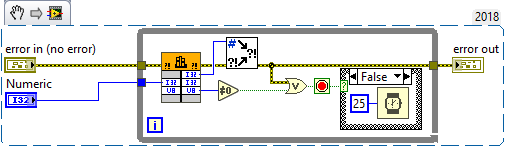
Well, I do understand all that and that is what I have tried to explain to you in my previous two posts, how to work around that. If you for some reason need to execute the CLFN in the UI thread you can NOT use the Abort() callback anymore. Instead you need to do something like this: Basically you move the polling loop from inside the C function into the LabVIEW diagram and just call the function to do its work and check if it needs to be polled again or is now finished. If you put a small wait in the diagram or not depends on the nature of what your C function does. If it is mostly polling some (external) resource you should put a delay on the diagram, if you do really beefy computation in the function you may rather want to spend as much as possible in that function itself (but regularly return to give LabVIEW a chance to abort your VI). The C code might then look something like this: typedef enum { Init, Execute, Finished, } StateEnum; typedef struct { int state; int numm; } MyInstanceDataRec, *MyInstanceDataPtr; MgErr MyReserve(MyInstanceDataPtr *data) { // Don't specifically allocate a memory buffer here. If it is already allocated just initialize it if (*data) { (*data)->state = Init; (*data)->num = 0; } return noErr; } MgErr MyUnreserve(MyInstanceDataPtr *data) { if (*data) { DSDisposePtr(*data); *data = NULL; } return noErr; } MgErr MyPollingFunc(int32_t someNum, uInt8_t *finished, MyInstanceDataPtr *data) { if (!*data) { *data = (MyInstanceDataPtr)DSNewPClr(sizeof(MyInstanceDataRec)); (*data)->state = Execute; } else if ((*data)->state != Execute) { (*data)->state = Execute; (*data)->numm = 0; } // No looping inside our C function and neither should we call functions in here that can block for long periods. The idea is to do what is // necessary in small chunks, check if we need to be executed again to do the next chunk or if we are finished and return the according status. (*data)->numm++; *finished = (*data)->numm >= someNum; if (*finished) (*data)->state = Finished; else usleep(10000); return noErr; } You could almost achieve the same if you would pass a pointer sized integer into the CLFN instead of an InstanceDataPtr, and maintain that integer in a shift register of the loop. However if the user aborts your VI hierarchy, this pointer is left lingering in the shift register and might never get deallocated. Not a big issue for a small buffer like this but still not neat. And yes this works equally well for CLFNs that can run in any thread, but it isn't necessary there. And of course: No reentrant VIs for this! You can not have a reentrant VI execute a CLFN set to run in the UI thread!