All Activity
- Past hour
-
 Nice to see the source and docs opened up too, not just a free binary drop. MIT should make it much easier for old LabVIEW projects to keep this alive.
-
tidytern12 joined the community
-
 kali joined the community
- Today
-
 Never heard of or used it but great news about MIT open sourcing.
-
 After years of commercial availability, the VI Helpeks toolkit has transitioned to an open-source project under the terms of the MIT License. Starting with version 3.1, all source code, developer tools, and documentation assets are publicly available on GitHub: https://github.com/konstantin-shifershteyn/vihelpeks Installation and Distribution • VI Package Manager (VIPM): VI Helpeks is listed in the VIPM package repository for direct installation. • Direct Downloads: Distribution packages are available via GitHub and the NI LabVIEW Tools Network. https://github.com/konstantin-shifershteyn/vihelpeks/releases/tag/v3.1.0 https://www.ni.com/en/support/downloads/tools-network/download.vi-helpeks.html#372323 Licensing and Contribution Under the MIT License, users are free to download, install, modify, and integrate the toolkit into both personal and proprietary commercial applications without restriction. Community members are welcome to use the software free of charge and contribute to future development. About VI Helpeks VI Helpeks is a LabVIEW add-on providing UI tools and API VIs for generating professional documentation for VIs and palettes in HTML and CHM formats, matching the native LabVIEW Help style. It has been listed on the LabVIEW Tools Network for many years and was named a finalist for the LabVIEW Tools Network Innovation Product of the Year 2013.
- Yesterday
-
 Ozan Kirdar joined the community
- Last week
-
I’m seeing compile insanities in JSONtext’s “Get all Object Items (by Offset).vi” during a mass compile. The VI is installed at: C:\Program Files\National Instruments\LabVIEW 2026\vi.lib\JDP Science\JSONtext\Offset\Get all Object Items (by Offset).vi The errors are: Insane Numeric(1203) in FPHP of "JSONtext.lvlib:Get all Object Items (by Offset).vi": {tdname } (0x4000): owner=Array(1541) Insane Numeric(1660) in FPHP of "JSONtext.lvlib:Get all Object Items (by Offset).vi": {tdname } (0x4000): owner=Array(1610) They appeared while mass-compiling code in a LabVIEW 2026 Q3, 64-bit project. Our project manifest pins JSONtext 1.9.1.125. Note: It seems like this issue was reported a couple years back on the VIPM forum but never addressed. Just recreating the controls should solve it i think.
-
 JamesHua joined the community
-
 Tawatchai joined the community
-
 maxmori joined the community
-
Simple solution. Remove it from the palette. If someone accesses "private" methods to do things and encounters unexpected problems stemming from unexpected use of such methods, it's entirely their problem. If a function is however on the palette, it should have a minimal protection against wrong inputs.
- Earlier
-
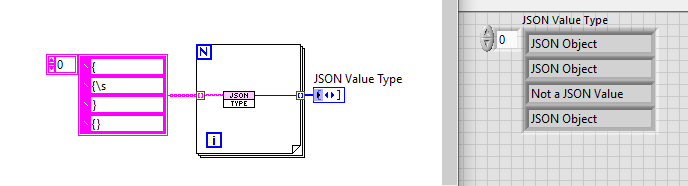
Seems a bit of a cop-out. Especially so since it is designed to return "Not a JSON Value"
-
JSON type.vi is not a validator; it is a very cheap operation to determine the type of a JSON item. If you feed it non-JSON then it will be wrong. If you want to validate, use the Next JSON Value function first.
-

Most Recommended LabVIEW Version for Windows 11?
Rolf Kalbermatter replied to Bryan's topic in LabVIEW General
I mainly work in LabVIEW 2026Q1 and since shortly Q3 on my work machine but keep the project sources in LabVIEW 2020 or sometimes older and use those VIs sometimes back to version 2018 on other machines without such problems at all. It's quite likely something in some VIs you are using in your project and which are part of your sources. Did you maybe happen to copy some stock VIs of LabVIEW and modify them and add them to the sources of your project? I could imagine that that might cause possibly problems if they call into specific DLLs. -
 sandhaf joined the community
-
I’ve always used LabVIEW 2021 for development. Later, I started using LabVIEW 2026. I have a project that was originally developed in LabVIEW 2021 and was later maintained in LabVIEW 2026. Now I want to switch back to LabVIEW 2021, and I’m running into a problem. After I use LabVIEW 2026 to save the project as a LabVIEW 2021 version, I can open it in LabVIEW 2021. But after I save the project, when I open it again in LabVIEW 2021, LabVIEW crashes immediately. I don’t know what’s causing it. Has anyone encountered a similar issue and could offer some suggestions?
-
Te comento que revise tu referencia y logre que funcione y cubre mis expectativas. Ahora debo consolidar la info que recibe y sus calibraciones. Luego buscaré mejorar la interfaz gráfica. Muchas gracias por tu interés. Un saludo desde Córdoba, Argentina.
-
 Definitely try running without the UI and anything plugged into the display port. I know we had an issue with the display port causing crashes after 2 days. Pulled the display port and the cRIO ran fine.
-
Lo he estudiado y podria andar para lo que necesito, pero no sera facil al menos para mi. Respecto al otro, Si, comenté pero sin respuesta. Muchas gracias por tu ayuda 😊
-
 Hello together, since we moved to LV 2026Q3 (from 2023Q3), some of our classes are locked as soon as a certain packed lib is loaded. I'd like to know whether anyone has seen this or has an idea what is going on. Setup, where i recreated the issue: BaseLib.lvlibp : BaseCtrl.lvclass | has a dynamic dispatch method "DoSomething.vi" CtrlLib.lvlibp (uses BaseLib.lvlibp) | an XControl whose Init ability calls "DoSomething.vi" on a ChildCtrl object. ChildCtrl.lvclass overrides "DoSomething.vi" SrcChild.lvclass: a source class that inherits from BaseLib.lvlibp:BaseCtrl.lvclass Repro: Open Test/Test.lvproj which contains BaseLib.lvlibp and SrcChild.lvclass -> SrcChild is editable. Add Test/CtrlLib.lvlibp to "My Computer" -> SrcChild is locked. The error message I get on "Why is Library Locked?": The library is locked for the following reason(s): A vi in the library is reserved in this application instance or another application instance. The containing library is locked. Nothing else is running and no XControl instance exists on any FP. The execution states after adding CtrlLib.lvlibp: Running: Init.vi, Facade.vi, BaseCtrl:DoSomething.vi, the ChildCtrl override and SrcChild.ctl Idle: Data.ctl and State.ctl Before CtrlLib.lvlibp is added, everything is idle. Where I stand so far: LV 2023Q3 with the identical code does not have this issue. The XControl is required. CtrlLib.lvlibp with only ChildCtrl (XControl removed) does not lock SrcChild.ctl Classes without a parent are not affected. SuperSecretPrivateSpecialStuff does not matter. I tested with and without it -> same result LV 2024 and 2025 are untested. My environment: Windows 11 24H2 LabVIEW 26.3.1f1 64-bit Has anyone seen this problem before and knows what i can do to prevent it? I attached the repro projects in versions 2026Q3 (to show the issue) and 2023Q3 (to show that it worked before). Thanks in advance! ReproCode_LV2026Q3.zip ReproCode_LV2023Q3.zip
-
niXController joined the community
-
 Air23 joined the community
-
 xty joined the community
-
JSON type.vi returns JSON Object when trailing } is missing:

-
Horizonte Artificial o Control de Actitud
Rolf Kalbermatter replied to jro1952's topic in LabVIEW General
Maybe this could be a start to look at: https://forums.ni.com/t5/Example-Code/Artificial-Horizon-with-LabVIEW/ta-p/3498922 Or this discussion as some inspiration, it does not contain any VIs you could download and not sure if Chris Ludwig is still active and can be contacted: https://forums.ni.com/t5/LabVIEW/Aerospace-Indicators-Artificial-Horizon-Primary-Flight-Display/td-p/4217092 But you seem to have commented on this second thread already back in August. -
Have you tried running the application without UI? The NI Linux RT UI subsystem is a handy debug tool and tempting to use as local operator interface, despite its somewhat arcane look, but I remember having had quite some trouble in the past when using that for normal operation. Admittingly it's some years ago, ca LabVIEW 2018/19 but certain setups with specific additional software tended to lock up frequently in very similar ways. Sometimes it was only the local UI that hung but often the entire controller seemed kind of hung somewhere and even remote connections couldn't reach it anymore without a power reset. Debug logs sent to NI at that time indicated that resource management in the UI seemed to be buggy and accumulate stale memory objects until the controller run out of resources and the whole OS kind of stopped responding to anything. Our resolution back then was to only use the local UI for testing and debugging and disable it for in production operation.
-
Hola, necesito un instrumento: Horizonte Artificial o Control de Actitud, para panel frontal version 2010. Si alguien puede apartarlo desde ya muchas gracias. PD: seguramente este tema ya ha sido tratado pero, utilice el buscador y no lo pide hubicar.
-
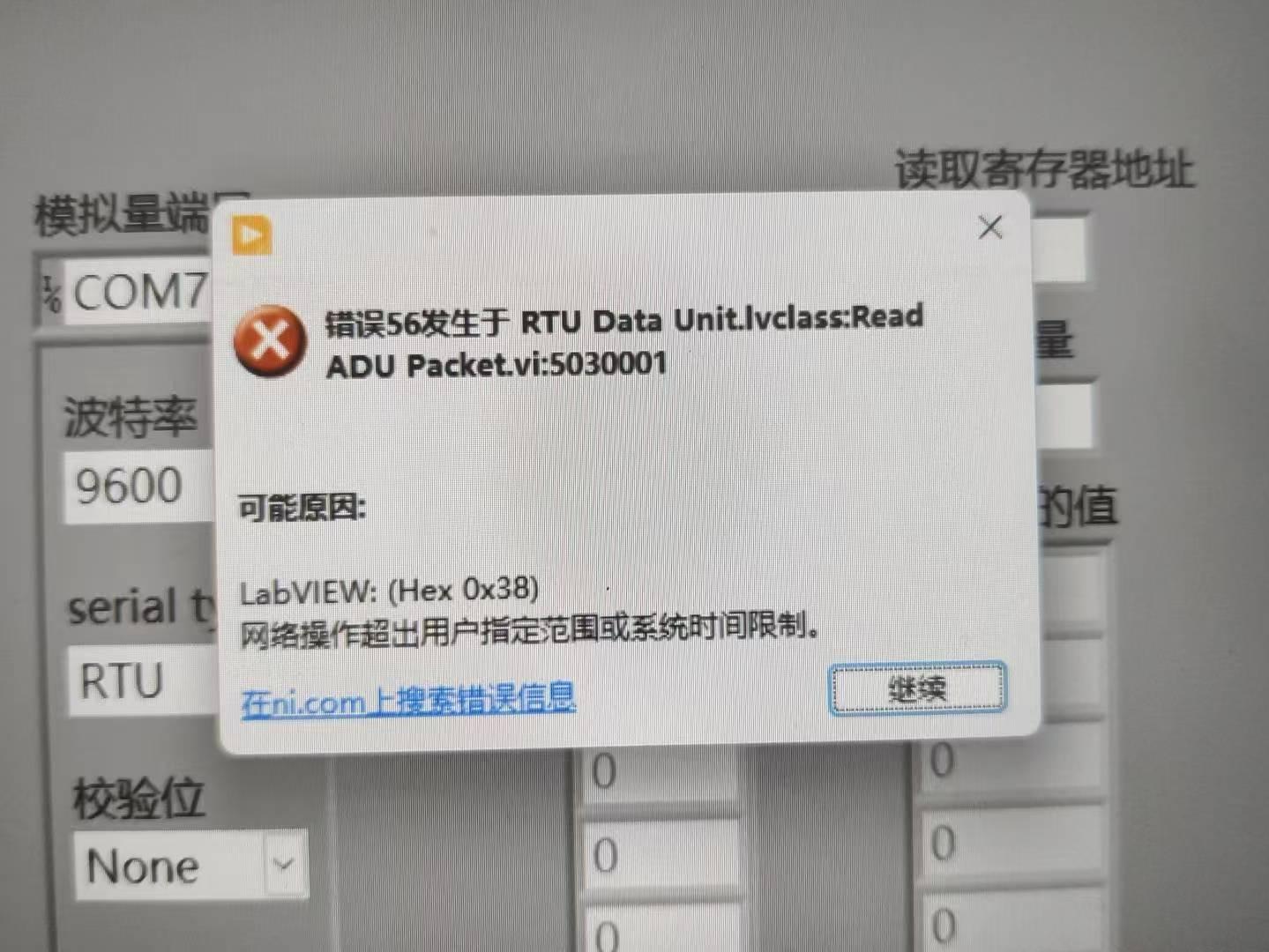
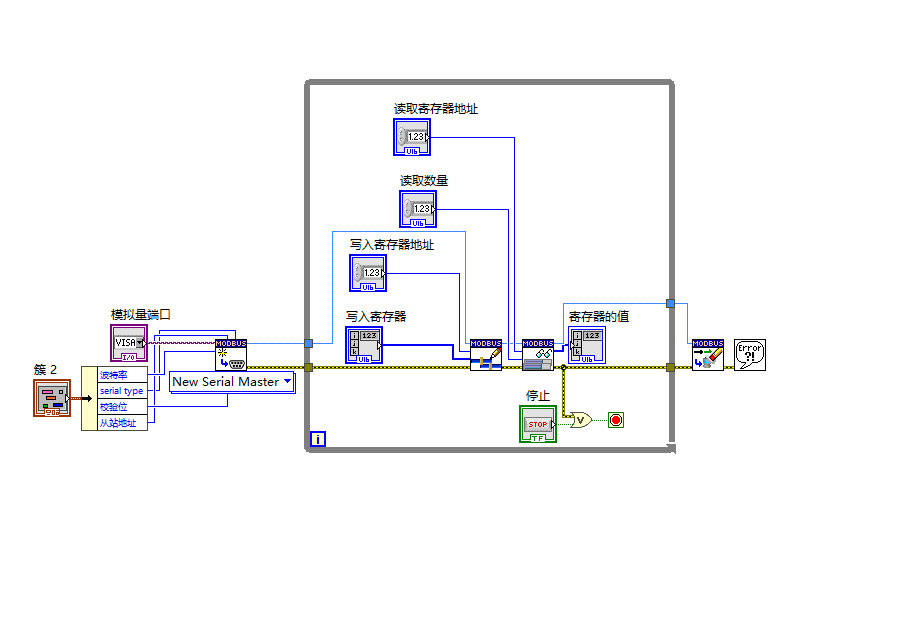
大家好,我正在学习LabVIEW如何调用模拟量输入输出模块,在程序运行时出现错误,各位大佬有没有知道这是什么原因,该怎样解决呢,万分感谢!
-
Thank you for your very fast answers. How stupid from me using the wrong conversion. Also the simplification of String to Byte array. Good night.
-
You should replace the Type Cast with a String To Byte Array. It turns the type cast into a NoOp under the hood and is just a lot easier to read. I also highly recommend you turn on the Display Style for all of your string controls and indicators (Right-Click->Visible Items->Display Style). This is a way of making sure you know how your data is encoded and eliminate a lot of confusion. CT003 CRC checksum.vi
-
The CRC is in hex. You are using to Decimal instead of to Hex ->
-
I have a Marstek Venus3 Home battery that communicates with a Marstek CT003 netpower meter. I intercepted a data package with Wireshark from Venus to CT003. If I send this captured data package to the CT003 with UDP in Labview I receive a good answer from CT003. No problem so far. But if I want replicate how they calculate the CRC checksum from that package, I don't get the right CRC checksum in Labview. See VI. The last 2 bytes in package are the CRC checksum. In the VI is the Python code the I found at Github, to see how they calculate the CRC checksum and replicate that in Labview. Question what am I doing wrong. CT003 CRC checksum.vi
-
 If you do reach out to NI they will likely ask for a crash dump. Here is a page on how to enable it and get it: https://nilrt-docs.ni.com/troubleshooting/lvrt-crash-dumps.html I've tried sending NI projects with weird behavior, in the hopes they could find and fix LabVIEW bugs. Some times it works out, but because of the nature of some configurations, and weird compile cache and deployment errors, it can be hard for NI to pinpoint a cause, and create a fix.
-
 Thanks for sharing your experience. We’ve already tried 2025 and observed similar symptoms, then tried 2026 as well. When you mention the 2025 stack, do you mean LabVIEW RT, the Linux RT image and drivers together? During your freezes, was SSH also unreachable? In our case, both the application and the embedded desktop stopped responding, and we couldn’t connect via SSH or SFTP.
-
Thanks, Yair, I'll check that out.