All Activity
- Today
-
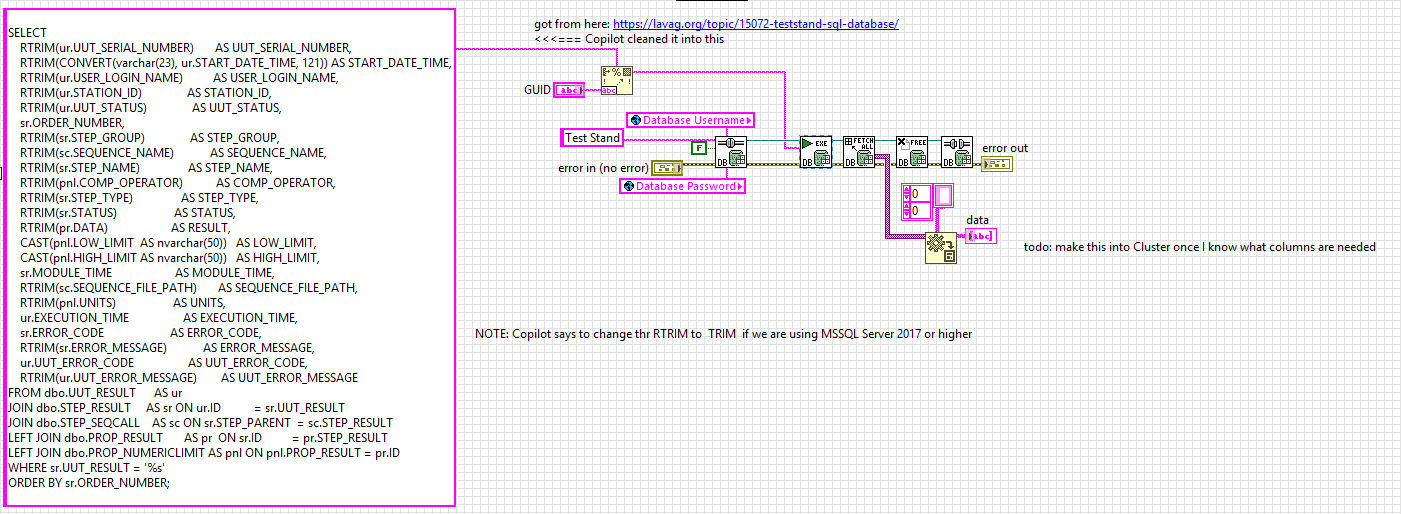
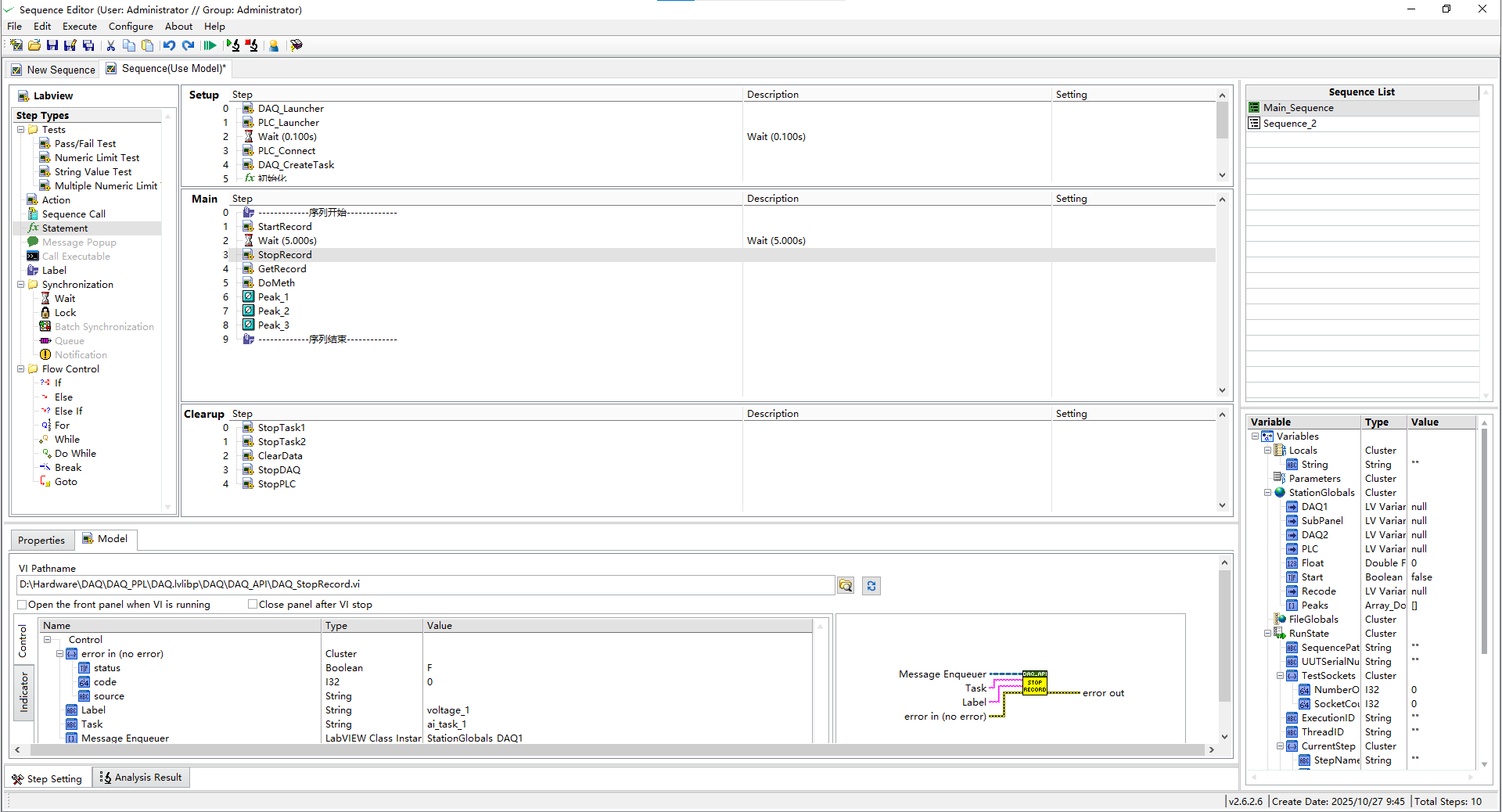
here is a version without the DECLARE, which LabVIEW's Database tool kit can execute using the "Conn Execute.vi" Here is how to use the query with LabVIEW's Database toolkit Here is the updated query SELECT RTRIM(ur.UUT_SERIAL_NUMBER) AS UUT_SERIAL_NUMBER, RTRIM(CONVERT(varchar(23), ur.START_DATE_TIME, 121)) AS START_DATE_TIME, RTRIM(ur.USER_LOGIN_NAME) AS USER_LOGIN_NAME, RTRIM(ur.STATION_ID) AS STATION_ID, RTRIM(ur.UUT_STATUS) AS UUT_STATUS, sr.ORDER_NUMBER, RTRIM(sr.STEP_GROUP) AS STEP_GROUP, RTRIM(sc.SEQUENCE_NAME) AS SEQUENCE_NAME, RTRIM(sr.STEP_NAME) AS STEP_NAME, RTRIM(pnl.COMP_OPERATOR) AS COMP_OPERATOR, RTRIM(sr.STEP_TYPE) AS STEP_TYPE, RTRIM(sr.STATUS) AS STATUS, RTRIM(pr.DATA) AS RESULT, CAST(pnl.LOW_LIMIT AS nvarchar(50)) AS LOW_LIMIT, CAST(pnl.HIGH_LIMIT AS nvarchar(50)) AS HIGH_LIMIT, sr.MODULE_TIME AS MODULE_TIME, RTRIM(sc.SEQUENCE_FILE_PATH) AS SEQUENCE_FILE_PATH, RTRIM(pnl.UNITS) AS UNITS, ur.EXECUTION_TIME AS EXECUTION_TIME, sr.ERROR_CODE AS ERROR_CODE, RTRIM(sr.ERROR_MESSAGE) AS ERROR_MESSAGE, ur.UUT_ERROR_CODE AS UUT_ERROR_CODE, RTRIM(ur.UUT_ERROR_MESSAGE) AS UUT_ERROR_MESSAGE FROM dbo.UUT_RESULT AS ur JOIN dbo.STEP_RESULT AS sr ON ur.ID = sr.UUT_RESULT JOIN dbo.STEP_SEQCALL AS sc ON sr.STEP_PARENT = sc.STEP_RESULT LEFT JOIN dbo.PROP_RESULT AS pr ON sr.ID = pr.STEP_RESULT LEFT JOIN dbo.PROP_NUMERICLIMIT AS pnl ON pnl.PROP_RESULT = pr.ID WHERE sr.UUT_RESULT = '%s' ORDER BY sr.ORDER_NUMBER;

-
I was unable to run the query in MSSQL... Copilot was able to rearrange a few things and resulted inn the following working query next step is to use the LabVIEW Database toolkit to execute the querry DECLARE @UGID nvarchar(50); SET @UGID = N'C0CFF9BF-A8A5-11F0-9E18-4CB04AE64A78'; SELECT RTRIM(ur.UUT_SERIAL_NUMBER) AS UUT_SERIAL_NUMBER, RTRIM(CONVERT(varchar(23), ur.START_DATE_TIME, 121)) AS START_DATE_TIME, -- ISO 8601 RTRIM(ur.USER_LOGIN_NAME) AS USER_LOGIN_NAME, RTRIM(ur.STATION_ID) AS STATION_ID, -- <-- moved to UUT_RESULT RTRIM(ur.UUT_STATUS) AS UUT_STATUS, sr.ORDER_NUMBER, -- keep numeric for sorting RTRIM(sr.STEP_GROUP) AS STEP_GROUP, RTRIM(sc.SEQUENCE_NAME) AS SEQUENCE_NAME, RTRIM(sr.STEP_NAME) AS STEP_NAME, RTRIM(pnl.COMP_OPERATOR) AS COMP_OPERATOR, RTRIM(sr.STEP_TYPE) AS STEP_TYPE, RTRIM(sr.STATUS) AS STATUS, RTRIM(pr.DATA) AS RESULT, CAST(pnl.LOW_LIMIT AS nvarchar(50)) AS LOW_LIMIT, CAST(pnl.HIGH_LIMIT AS nvarchar(50)) AS HIGH_LIMIT, sr.MODULE_TIME AS MODULE_TIME, RTRIM(sc.SEQUENCE_FILE_PATH) AS SEQUENCE_FILE_PATH, RTRIM(pnl.UNITS) AS UNITS, ur.EXECUTION_TIME AS EXECUTION_TIME, sr.ERROR_CODE AS ERROR_CODE, RTRIM(sr.ERROR_MESSAGE) AS ERROR_MESSAGE, ur.UUT_ERROR_CODE AS UUT_ERROR_CODE, RTRIM(ur.UUT_ERROR_MESSAGE) AS UUT_ERROR_MESSAGE FROM dbo.UUT_RESULT AS ur JOIN dbo.STEP_RESULT AS sr ON ur.ID = sr.UUT_RESULT JOIN dbo.STEP_SEQCALL AS sc ON sr.STEP_PARENT = sc.STEP_RESULT LEFT JOIN dbo.PROP_RESULT AS pr ON sr.ID = pr.STEP_RESULT LEFT JOIN dbo.PROP_NUMERICLIMIT AS pnl ON pnl.PROP_RESULT = pr.ID WHERE sr.UUT_RESULT = @UGID ORDER BY sr.ORDER_NUMBER;
-
 jiangxinxin joined the community
 -
There is a good chance that Microsoft eventually dropped support in Office for 32-bit applications. What I wrote above was true 2015 - 2020. Haven't ever tried to use Excel from LabVIEW since, and generally use Libre Office anyhow if I need an Office application.
- Yesterday
-
 nutellina2000 joined the community
 - Last week
-
 jfuell joined the community
 -
 PiotrG joined the community
 -
Hello, Yes I also check that there are no problem with ActiveX and I also try Repair Install but nothing happen, there are the same problem
-
Hello, When I try to debug I check the compatibility between the labview version and MS Office version there are no problem.
-
 JSchwochow joined the community
 -
 Ledz joined the community
 -
Wow that is a great tool. My suggestion (which is not as good) is to use a NoSleep program. I made one in AutoIt scripting years ago and have been having it run on startup of test PCs for years. There are a couple versions, one would turn on and off the scroll lock every 30 seconds, but sometimes it did need a mouse jiggle to keep it awake. Here is one I found online that is similar to what I have used. One down side of this I did discover is that if you use remote desktop, and you remove into a machine that has a mouse jiggle no sleep, then it will do weird things in the host PC.
-

Preventing Windows going to Lock screen
AutoMeasure replied to AutoMeasure's topic in User Interface
I tried it, that Request Display function works in my test program. Looks like I just need to call it once and then keep the handle open. Thanks very much! -Joe -
Look at this new download on VIPM https://www.vipm.io/package/bjm_lib_request_power/
-
I have always used this library to prevent the screensaver and windows lock from occurring. Our IT locks down the computer so the screensaver, lock screen, cannot be changed. This library bascially tells Windows it's in Presentation mode, e.g., slideshow, watching a movie, etc, such that the screen will not got to screensaver or lock screen.
-
Hi folks - Do any of you know of a way to prevent Windows from going to lock screen during a long test run, by sending a command or doing some action periodically inside the Labview program? Assuming that the lock screen timeout setting is inaccessible due to access restriction. Telling the test operator to jiggle the mouse every couple of minutes is not always an option, ha ha. Thanks, -Joe
-
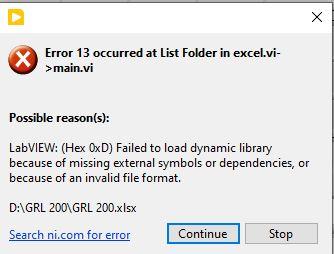
It could be made to work in the past. Basically the Office interfaces are all ActiveX based. ActiveX is very well able to invoke an ActiveX Automation Server out of process through an ActiveX proxy server process in the background. If the ActiveX Automation Server is properly registered this happens transparently in the background without extra user interactions. Unfortunately the so called Click to Run MS Office installers that are nowadays used, either forget to do the 32-bit registration of their Automation Server component or somehow bork it up. I have been in the past able to fix that on different machines by running a Repair Install from the Windows Applications control panel.
-
Make sure your office installation has the same bitness as LabVIEW. 64-bit office (most recent installations are 64 bits) won't work with LV 32bit.
-
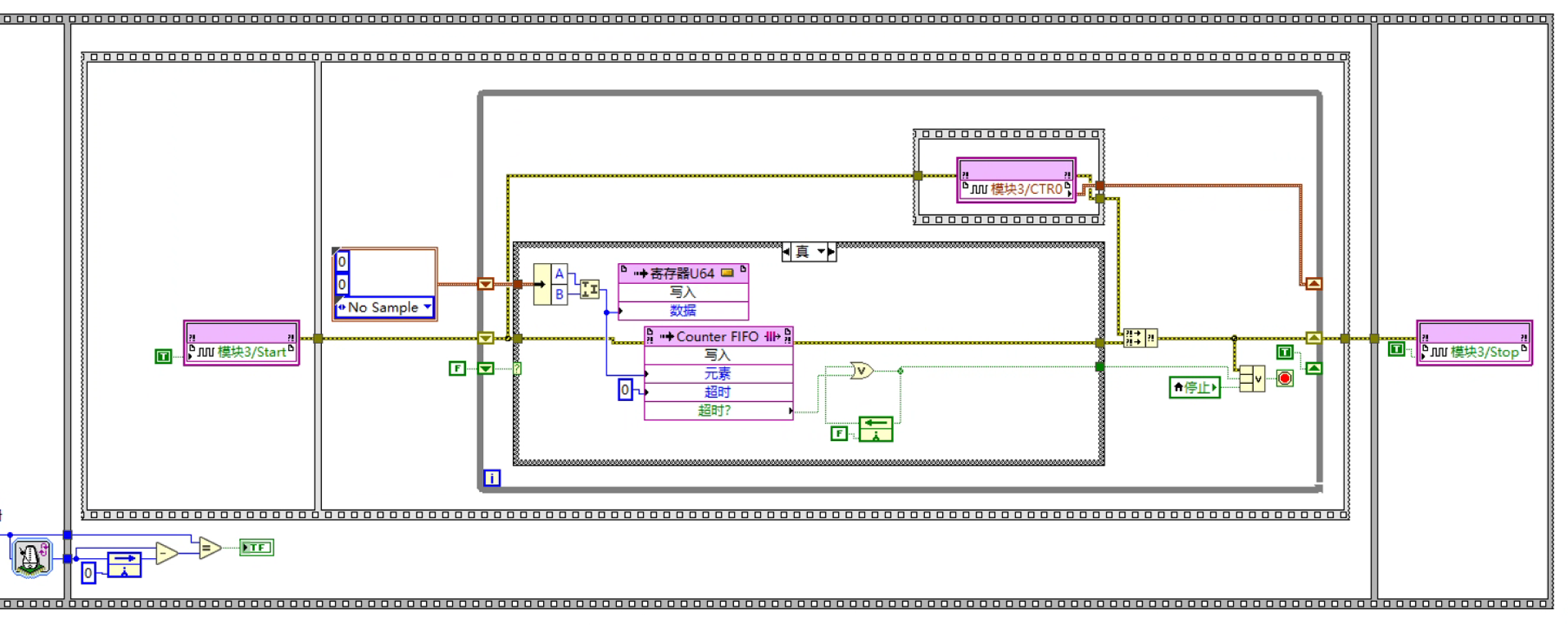
I’d like to ask you about reading quadrature encoder position signals in an FPGA environment using the NI-9361. In X4 mode, I followed the example program to write my code, but I still cannot get any data. I am using a loop timer together with a flat sequence structure to form a timed loop for acquiring the position signal.I’m very sorry that I only have a Chinese version. I hope to get help from everyone!
-
 LA_YUAN joined the community
 -
-
 ekrep joined the community
 -
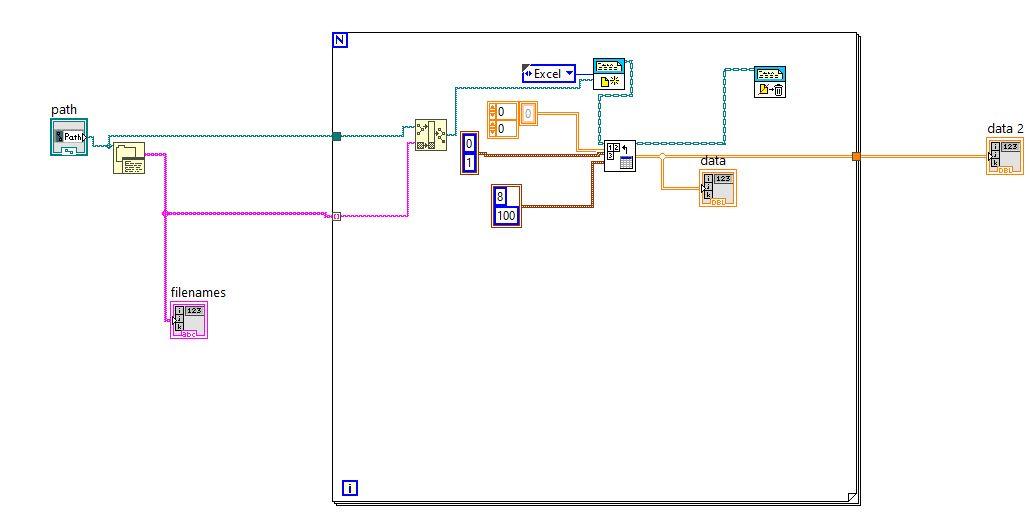
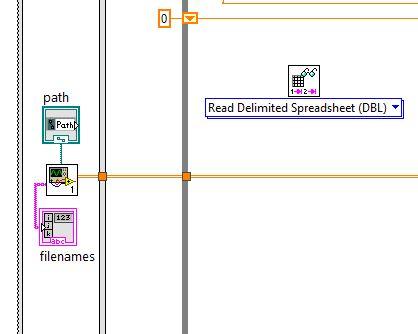
Bonjour à tous, Je demande de l'aide car, j'essaye de dépanner un programme labview que je n'ai pas conçu. Le programme labview lis un fichier xlsx ou CSV (j'ai essayé dans les deux cas) afin d'envoyer plusieurs niveau de tension. Je tiens à préciser que le programme fonctionnait bien de base, mais du jour au lendemain plus rien, j'ai donc re installer excel reconfiguré au cas où il y avait une potentielle mise a jour de faite mais rien non plus de ce côté. J'ai beau avoir poncer les forums et les recherches mais rien de positif.
-
我在Windows 11上用32位LabVIEW 2020版本构建了一个程序,在开发环境中运行良好。当我尝试将它们构建到exe中时,弹出提示说“内存不足以完成此作”,如图所示。我该怎么做才能解决这个问题? 有人能给我一些建议吗?任何建议都将非常感激。 problem.bmp
-
 zzzcl joined the community
 -
 KIKCD joined the community
 - Earlier
-
Hi, I'm generating a user drawed waveform (it can be half sine, with a square, than a triangle and so on all in a single waveform) and I need this waveform to be changed by the user without any pause between the old an the new wave. The new wave MUST start at the end of the old one. As I understood making some tests, If I use regeneration mode (so I use the internal FIFO buffer) I have to stop, fill the buffer with the new wave and then restart and that cause an unwanted pause between waveforms. Because If I populate directly the buffer I will get a glitch having some old and some new values. To avoid this behaviour I generate a fixed samplerate waveform (so I the new waveform is longer oor shorter I interpolate it) and loop regenerating and starting it every iteration. The waveform MUST have a duration major than the generation cycle (that's why I duplicate waveform if not double than the cycletime) In this way it seems to work as I expect but it doesn't seem a clean solution to me. Any suggestion of how to improve my code? (In the past I thought about manipulating the internal buffer use splitting it as a two part buffer, one for the old and one for the new wave but it wasn't possible) Thank youSintesi_gnerazione_segnale.vi
-
 哈哈哈,确实如此,和他们很难有沟通的欲望。不过你做的这个功能看起来非常完善啊,方便WX交流不?WX号:CunZhangYaa
 -
 我也做了个类似的软件,有机会一起交流一下,很多老外都觉得重复造轮子很愚蠢,哈哈哈哈
-

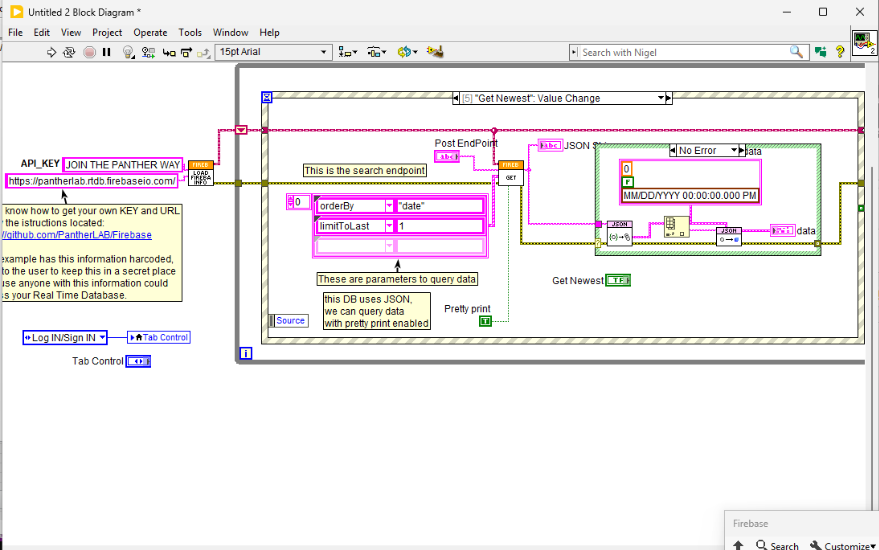
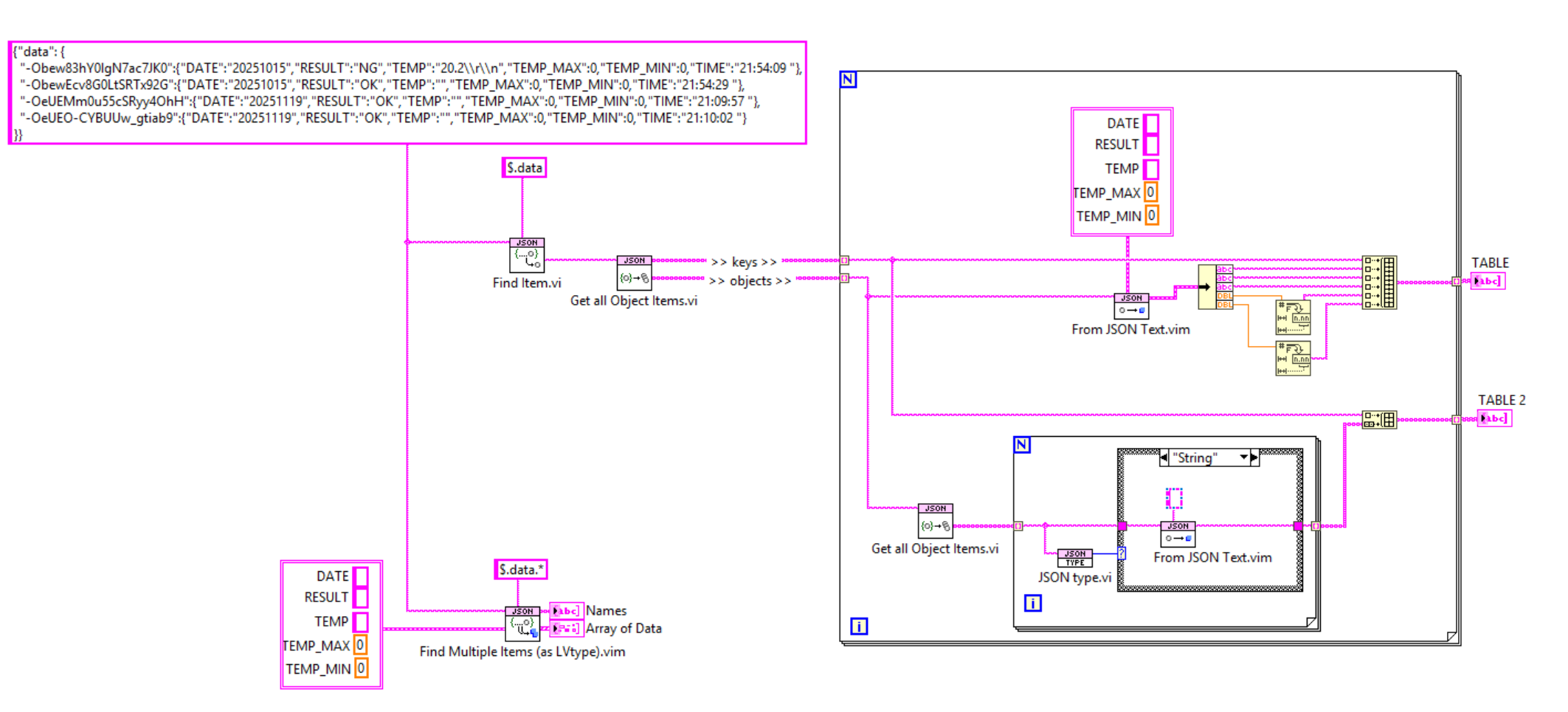
Extracting Firebase JSON Data Into a LabVIEW Table
Stagg54 replied to hwkim418's topic in LabVIEW General
It does support filtering though, so you can just grab the latest or a certain number.
-
Extracting Firebase JSON Data Into a LabVIEW Table
Stagg54 replied to hwkim418's topic in LabVIEW General
You might check out this https://www.vipm.io/package/pantherlab_lib_firebase_api/ It simplifies the connection process. Although it does still return json, so you'll need to parse it using JSON text or something similar as Francois mentioned. -
 This page seems to indicate that DAQmx 2024Q4 is compatible with LabVIEW 2021 and later.
 -
 Hello everyone, I’m looking for a precise answer regarding LabVIEW ↔ NI-DAQmx compatibility, because the official documentation is not entirely clear for recent hardware. We need to work with a CompactDAQ cDAQ-9183 chassis. According to NI’s documentation, this device is officially supported starting from NI-DAQmx 2024 Q4. Our current environment is LabVIEW 2020, and the customer may consider upgrading to LabVIEW 2022. However, the issue is that DAQmx 2024 Q4 does not seem to provide “Support for LabVIEW 2020”, and it is unclear whether it still supports LabVIEW 2022. The public DAQmx–LabVIEW compatibility table is not up to date for the newest driver versions, and the installer no longer clearly shows which LabVIEW versions are supported. My main question is therefore the following: 👉 How can we verify which version of LabVIEW is actually compatible with the specific NI-DAQmx version required by the cDAQ-9183? More specifically: The cDAQ-9183 requires NI-DAQmx 2024 Q4 or later. How can we know whether DAQmx 2024 Q4 still includes support for LabVIEW 2020 or LabVIEW 2022? The documentation does not state clearly which LabVIEW versions are supported by the newer DAQmx drivers. In other words: 👉 I want to know whether it is possible to use the cDAQ-9183 with LabVIEW 2020 — and if so, how? 👉 And I want to know the same thing for LabVIEW 2022. If anyone has an official reference, a compatibility matrix, or has already tested this combination in a real project, any insight would be greatly appreciated. Thank you in advance.
 -

Extracting Firebase JSON Data Into a LabVIEW Table
hwkim418 replied to hwkim418's topic in LabVIEW General
I genuinely appreciate your help! -

Extracting Firebase JSON Data Into a LabVIEW Table
Francois Normandin replied to hwkim418's topic in LabVIEW General
@hwkim418 There are many ways you can go about this. Here's a few examples using JSONtext. (VI saved in LV 2019) object_deserialization.vi