
dadreamer
-
Posts
369 -
Joined
-
Last visited
-
Days Won
43
Content Type
Profiles
Forums
Downloads
Gallery
Everything posted by dadreamer
-

Using the DLL files of an application compiled with C# with labview
dadreamer replied to alvise's topic in LabVIEW General
In the project settings you need to add: - CINTOOLS path to Additional Include Directories field (Configuration Properties -> C/C++ -> General tab) and Additional Library Directories field (Configuration Properties -> Linker tab); - labview.lib (or labviewv.lib) to Additional Dependencies field on the Linker -> Input tab. -
Using the DLL files of an application compiled with C# with labview
dadreamer replied to alvise's topic in LabVIEW General
Just switch it to Release.
-
Using the DLL files of an application compiled with C# with labview
dadreamer replied to alvise's topic in LabVIEW General
So you got that DLL compiled? Also to note, switch to Release configuration as you very likely are not going to debug that DLL by the MSVC debugger. Doing that you should have proper linking to the MSVC Runtime instead of the debug libraries. -
Using the DLL files of an application compiled with C# with labview
dadreamer replied to alvise's topic in LabVIEW General
I assume, fStdDataCallBack cbStdDataCallBack might be replaced with void(CALLBACK *fStdDataCallBack) (LONG lRealHandle, DWORD dwDataType, BYTE *pBuffer,DWORD dwBufSize,DWORD dwUser) -
Using the DLL files of an application compiled with C# with labview
dadreamer replied to alvise's topic in LabVIEW General
You've dealt with them before. -
Using the DLL files of an application compiled with C# with labview
dadreamer replied to alvise's topic in LabVIEW General
@alvise Yeah, just try to compile Rolf's code, it's already done and intended for your case exactly. Wait no more. -
Using the DLL files of an application compiled with C# with labview
dadreamer replied to alvise's topic in LabVIEW General
Callback is still needed. I said that PostLVUserEvent call may be omitted. If you don't know C even at very basic level and can't compile DLLs, I'm afraid I can't help here. There are many example on making C/C++ DLLs on the net. My advice is to learn them carefully and only after that go to callback things. -
Using the DLL files of an application compiled with C# with labview
dadreamer replied to alvise's topic in LabVIEW General
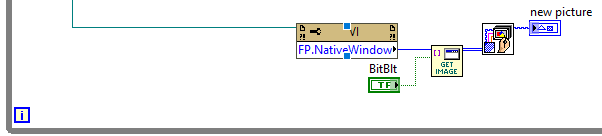
Since BitBlt is used, your PictureBox object should be visible and on screen completely, because when it's not, then black areas are captured. PrintWindow on the other side should deal with (partially) hidden windows better, but I have no idea why it doesn't work in your case. -
Using the DLL files of an application compiled with C# with labview
dadreamer replied to alvise's topic in LabVIEW General
Glad something finally worked for you 🙂 What about pressing that BitBlt button? And you don't need to cast the handle to U64 - just change ToInt32 method to ToInt64 and pass the wires to the VI. -
Using the DLL files of an application compiled with C# with labview
dadreamer replied to alvise's topic in LabVIEW General
There exists an easier callback variation, that doesn't involve calling PostLVUserEvent. I have used it few times in the projects with VLC video streaming from several cameras. It's an asynchronous method too, but it works for sure. The main point is that on the diagram we call DSNewPtr and pass new pointer to the library. When the callback is called, it just writes data by that pointer. In LabVIEW we just read the data by the pointer constantly and process it, if necessary. It's good for common video translation or for simple image processing, when not each video frame is required. Still needs the DLL to be written/compiled though. -
Using the DLL files of an application compiled with C# with labview
dadreamer replied to alvise's topic in LabVIEW General
I meant this part: It just makes no sense to capture Empty.vi window and a little sense to capture the whole main VI window, when a concrete .NET window region is wanted. Ok, when drawn onto Empty.vi panel, the whole window must be captured.
-
Using the DLL files of an application compiled with C# with labview
dadreamer replied to alvise's topic in LabVIEW General
I assumed, you would feed the PictureBox handle into Get Image By HWND.vi instead of feeding a panel window handle. No need to use FP.NativeWindow here. Just typecast the handle refnum to U64 and wire to that VI. -
Using the DLL files of an application compiled with C# with labview
dadreamer replied to alvise's topic in LabVIEW General
Share your VI or a snippet. -
Using the DLL files of an application compiled with C# with labview
dadreamer replied to alvise's topic in LabVIEW General
I'm not a big fan of Get Image method, because it has a whole load of disadvantages: runs in UI thread only; requires a front panel to be open (and visible to reflect the changes); redraws an image after the control modified it (i.e., scaling, cropping etc.), so if you have the original image of 1024*1280 pixels and it's rendered into the control of 10x10 pixels, you'll get those 10x10 pixels instead; draws control's label/caption additionally (sometimes it's wanted, sometimes not); doesn't work for some third party ActiveX/.NET controls (maybe, because they all use different rendering techniques); sometimes lags / doesn't capture the image. When it goes to capturing the window contents by its HWND, I prefer this self-written VI (based on WinAPI calls). Get Image By HWND.rar And I'm using it that way. Maybe in alvise's case it will suit as well - the chances are slim, but real. 🙂 Note also: the CLFN's in Get Image By HWND.vi are set to UI thread now, but it's safe to set them to any thread, if desired.
-
Using the DLL files of an application compiled with C# with labview
dadreamer replied to alvise's topic in LabVIEW General
Then it should be that HCNetSDK.dll draws on the window canvas directly, not dealing with any related objects. I don't see, how you could easily intercept the data. If you are serious about HikVision image processing in LabVIEW, you'll have to return to the callback attempts. -
Using the DLL files of an application compiled with C# with labview
dadreamer replied to alvise's topic in LabVIEW General
You forgot brown error wire. 🙂 -
Using the DLL files of an application compiled with C# with labview
dadreamer replied to alvise's topic in LabVIEW General
No actually. Only this piece.
-
Using the DLL files of an application compiled with C# with labview
dadreamer replied to alvise's topic in LabVIEW General
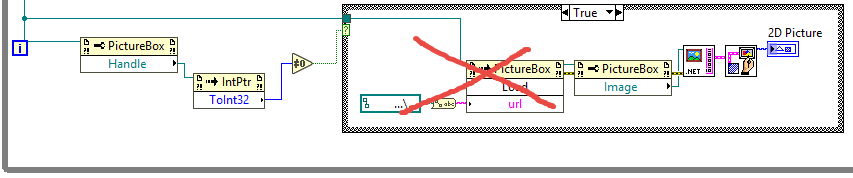
Ok, try then to replace this NULL Handle check with another one shown here: https://forums.ni.com/t5/LabVIEW/How-to-extract-image-from-VLC-active-x-to-LabVIEW-image-JPEG-or/m-p/4117244#M1187715 Take a look at the condition below "Check to see if the Image passed in exists." comment. If that also is of no help, then you need to search for another way of getting the image (say, save a snapshot to the drive first and read out the file second). -
Using the DLL files of an application compiled with C# with labview
dadreamer replied to alvise's topic in LabVIEW General
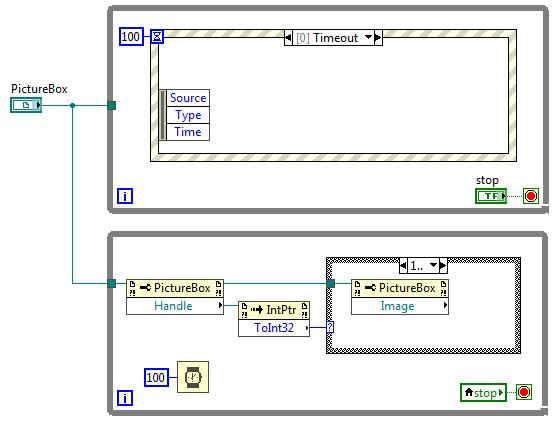
Your diagram still doesn't look like I'd like to see it. - You read the image in frame named "1", whereas it should be named "1.." (with two dots after 1), that means "greater than or equal to 1" - The other frame should be named as "..0" or "0, Default", that means it will proceed values other than positive ones. Do you receive the same error message after these modifications? -
Using the DLL files of an application compiled with C# with labview
dadreamer replied to alvise's topic in LabVIEW General
The OP uses LabVIEW 32-bit. -
Using the DLL files of an application compiled with C# with labview
dadreamer replied to alvise's topic in LabVIEW General
-
Using the DLL files of an application compiled with C# with labview
dadreamer replied to alvise's topic in LabVIEW General
You don't need this! This was just to demonstrate that when the Image object is initialized, no errors occur on reading after. My bad, I didn't realize that when answering 😃 Then you should move that PictureBox reading into a parallel While loop and see, what will happen. This way you're not synchronizing the threads and may miss some data frames though (due to different rates of the loops).
-
Using the DLL files of an application compiled with C# with labview
dadreamer replied to alvise's topic in LabVIEW General
You happen to read the Image object, when it's not instantiated yet, hence you receive 1172 error. You need to read it out only after your image data is loaded into the PictureBox control. Try to add your code piece into the Value Change frame plus add a simple NULL check. That should work, but if not, then you need to find a way to synchronize image write thread with image read thread (with callback that would be easier).
-
Was it ever browsable? As I recall I've never been able to browse softlib directory. Maybe because I often don't login to NI site or don't have a valid SSP, when trying to fetch the server content. They might introduce a hash system for the files as applied on many file sharing services (to force visitors to watch the ads). Then nobody would be able to browse through their servers. But it'll break many links, which are settled down in the manuals and other papers.
-
There's something with your browser/connection/cookies/firewall/etc., because I downloaded both archives right now and nothing interrupted me. Anyway even if the links go dead, you know who to ask about reupping. 😉