All Activity
- Past hour
-

LabVIEWs response time during editing becomes so long
Rolf Kalbermatter replied to MikaelH's topic in LabVIEW General
One thing I have seen in the past running really havoc with the LabVIEW editor and/or compiler were circular dependencies. Very easy to end up with even in moderately sized projects if one uses globals. Absolutely unavoidable without a proper design and avoiding globals almost entirely, except in very carefully chosen places, for large projects. The LabVIEW editor/precompiler does pretty much a full pass over the internal data graph for every edit operation. With circular dependencies the graph gets effectively infinite in length and while the system has checks in place to detect such circular references and abort the parsing at some point, it seems not able to do that safely just on the first occurrence without missing some paths, so goes on longer than is most of the times necessary. First sign usually shows up as frequent inability to build the project without obscure errors, especially for realtime targets. Things go ok much longer for builds on Windows, but drop the project code into a realtime target and builds and/or deploys will cause all kind of hard to explain errors. A 18k VI project! That's definitely a project having grown out into a mega pronto dinosaur monster. I can't imagine to even consider creating such a beast. My biggest projects were probably somewhere around 5000 and that was already getting very painful to do any work on. And caused me to modularize it eventually, with parts moved into realtime targets. The cost for the additional hardware were actually smaller than the time lost keep trying to get the monster to build and work, despite that NI realtime hardware is anything but cheap. But I inherited in the long ago past a project that consisted only of maybe 100 VIs. However it consisted of a main VI that was something like 15MB in size (the other VIs were mostly just simple accessors to drivers and ... shudder ... several dozen global variables), with the main VI being one huge loop with sequence structures inside case structures, inside loops, inside more sequence structures, inside even more case structures and loops and this continued for a few more levels like that. Not one shift register, everything was put in globals and written and read back 100ds of times. Editing that VI was a painful exercise, select a wire or node, wait 5 seconds, move the wire or node, wait 5 seconds ... . I have no idea how the original developer ever got this to that point without going insane, but more likely he was insane to begin with already. 😀 I was several days busy to just get the diagram a bit cleaned up by adding some shift registers to manage the actual data more efficiently, identify common code constructs that appeared all over the place over and over and place them into subVIs, and get everything to a state that was reasonably workable before I could really go and refactor that application. In the end I had maybe 500 or so VIs and a main VI that was well below 1MB with a proper state machine and almost no sequence structures anymore. And it run reliably and when you pushed the stop button you did not have to wait half an eternity before the application was able to detect that. The biggest irony was that the application actually was working with an enum state with some 100 or more states, maintained in a global and in almost every sequence frame there was a case structure that would have one or a few cases for a specific state and a default that was doing pretty much nothing. It was a state machine turned inside out and then put into a cascade of sequences! - Today
-
Libre Office/Open Office is an open source implementation of an Office suite of applications. It delivers similar application as the Microsoft Office package and they work in many ways similar but are not the same. If you are a seasoned Excel, Word or whatever user, they require a little bit of relearning and getting used to. They support a 3rd party interface similar to the Microsoft Office Active X interface but it's not the same and will not work with the Report Generation Toolkit (RPT). One would need to write extra RPT plugins for that, except that while NI made the RPT plugin based, they kind of borked the instantiation of plugins by not making it easily extendable. The available plugins are hardwired in the implementation and extending that would require modifications to the NI implementation, which is considered by most developers a no go as you have to modify the Toolkit on every installation and reapply the modification anytime the Toolkit is reinstalled/updated by NI, which might or might not break your modifications too.
-

LabVIEWs response time during editing becomes so long
ShaunR replied to MikaelH's topic in LabVIEW General
Ooooh. What have you been doing with the icon editor? -
 Akaio joined the community
 - Yesterday
-

LabVIEWs response time during editing becomes so long
crossrulz replied to MikaelH's topic in LabVIEW General
Yes, decoupling is a long process. I have been trying to do that with the Icon Editor. Not trying right now as other priorities with that project are more important. Do the process slowly and make deliberate efforts. You will eventually see the benefits. -

LabVIEWs response time during editing becomes so long
Thomas Robertson replied to MikaelH's topic in LabVIEW General
After consulting some co-workers I reverted recent changes to my project and now everything is fast again. They reported similar observations when they had similar problems. Our theory is that as things change something in the project gets out of whack, maybe it's sense of dependencies I don't know and gets saved into the project file. Anyway, I'm back to normal speed editing. As to breaking apart the 18K vi project, we've discussed it for a decade now. We have plans to try to decouple one part of the code from the rest because it seems to be a major culprit for why everything relies on everything else. But, this decoupling effort feels like trying to boil the ocean. We're dealing with a 30 year old code base and lots of the communication and subvi calling was defined long before there were libraries and public private concepts. If we can ever get them more isoltated we might consider PPL's. I feel like those had issues with cross platform compatibility (Windows/Mac) though. -

LabVIEWs response time during editing becomes so long
Softball replied to MikaelH's topic in LabVIEW General
Hi again The topic has been discussed in the past and is even mentioned in the manual : Discussion ( even AQ was active then in 2016 ) : https://forums.ni.com/t5/LabVIEW/Compiler-optimisations-and-IPE/m-p/3302614 Manual : https://www.ni.com/docs/en-US/bundle/labview/page/choosing-between-editor-responsiveness-and-vi-execution-speed.html My story about a slow editing experience and what was done over time may help others to either avoid creating large systems, or stick with LabVIEW versions that can handle that. Regards -
 Mari joined the community
 - Last week
-
 shniz joined the community
 -
 dcsmeltzer joined the community
 -
LabVIEWs response time during editing becomes so long
ShaunR replied to MikaelH's topic in LabVIEW General
I still use 2009 - by far the best version. Fast, stable and quick to compile. 2011 was the worst and 2012 not much better. If they had implemented a benevolent JSON primitive instead of the strict one we got, I would have upgraded to 2013. -
LabVIEWs response time during editing becomes so long
Softball replied to MikaelH's topic in LabVIEW General
Hi NI has always tried to 'optimize' the compiler so the code runs faster. In LabVIEW 2009 they introduced a version where the compiler would do extra work to try to inline whatever could be inlined. 2009 was a catastrophe with the compiler running out of memory with my complex code and NI only saved their reputation by introducing the hybrid compiler in 2010 SP1. Overall a smooth sailing thereafter up to and including 2018 SP1. NI changed something in 2015, but its effect could be ignored if this token was included in the LabVIEW.in file : EnableLegacyCompilerFallback=TRUE. In LabVIEW 2019 NI again decided to do something new. They ditched the hybrid compiler. It was too complex to maintain, they argued. 2019 reminded me somewhat of the 2009 version, except that the compiler now did not run out of memory, but editing code was so sloow and sometimes LabVIEW simply crashed. NI improved on things in the following versions, but they has yet to be snappy ( ~ useful ) with my complex code. Regards -

LabVIEWs response time during editing becomes so long
hooovahh replied to MikaelH's topic in LabVIEW General
My projects can be on that order of size and editing can be a real pain. I pointed out the difficulties to Darren in QD responsiveness and he suggested looking for and removing circular dependencies in libraries and classes. I think it helped but not by much. Going to PPLs isn't really an option since so many of the VIs are in reuse packages, and those packages are intended to be used across multiple targets, Windows and RT. This has a cascading affect and linking to things means they need to be PPLs, made for that specific target, and then the functions palette needs to be target specific to pull in the right edition of the dependencies. AQ mentioned a few techniques for target specific VI loading, but I couldn't get it to work properly for the full project. -

LabVIEWs response time during editing becomes so long
Neil Pate replied to MikaelH's topic in LabVIEW General
@Thomas Robertson 18k VIs? OK, that is quite a big project. Have you tried splitting things up, maybe introducing a few PPLs? -
LabVIEWs response time during editing becomes so long
Thomas Robertson replied to MikaelH's topic in LabVIEW General
Just wanted to chime in on this Zombie thread and say I have all of these problems and it's driving me crazy. LV2023, Roughly 18,000 vis in the project. -
What is the difference between libre office and MS office in labview ? Do you think that it will work correctly after this change ?
-
 Alonso Quintanilla joined the community
 -
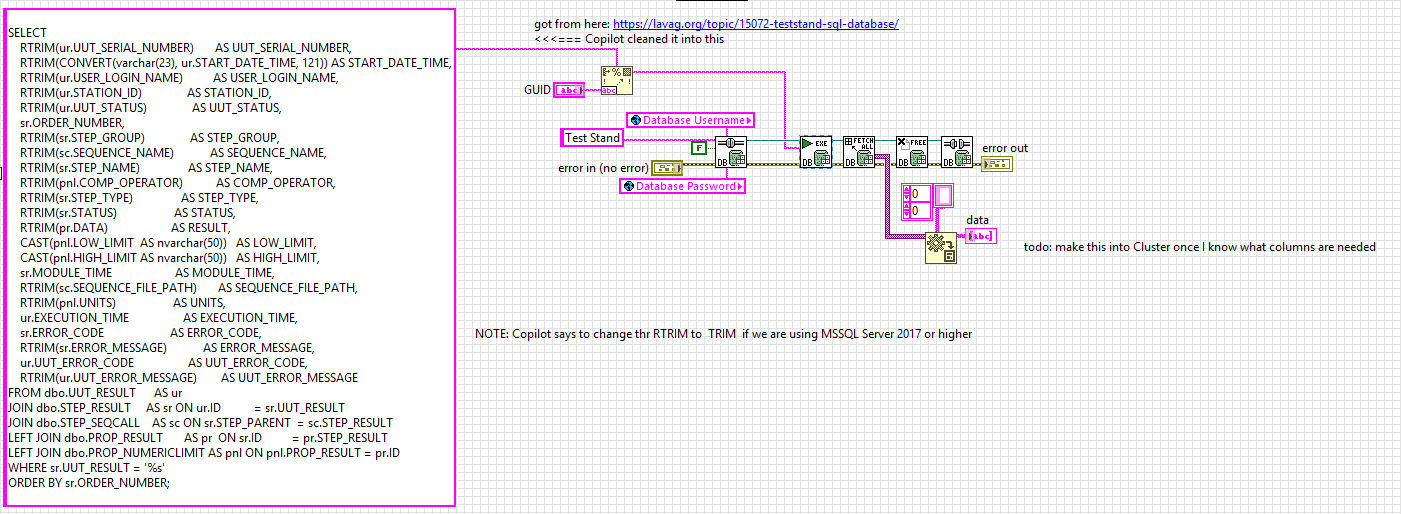
here is a version without the DECLARE, which LabVIEW's Database tool kit can execute using the "Conn Execute.vi" Here is how to use the query with LabVIEW's Database toolkit Here is the updated query SELECT RTRIM(ur.UUT_SERIAL_NUMBER) AS UUT_SERIAL_NUMBER, RTRIM(CONVERT(varchar(23), ur.START_DATE_TIME, 121)) AS START_DATE_TIME, RTRIM(ur.USER_LOGIN_NAME) AS USER_LOGIN_NAME, RTRIM(ur.STATION_ID) AS STATION_ID, RTRIM(ur.UUT_STATUS) AS UUT_STATUS, sr.ORDER_NUMBER, RTRIM(sr.STEP_GROUP) AS STEP_GROUP, RTRIM(sc.SEQUENCE_NAME) AS SEQUENCE_NAME, RTRIM(sr.STEP_NAME) AS STEP_NAME, RTRIM(pnl.COMP_OPERATOR) AS COMP_OPERATOR, RTRIM(sr.STEP_TYPE) AS STEP_TYPE, RTRIM(sr.STATUS) AS STATUS, RTRIM(pr.DATA) AS RESULT, CAST(pnl.LOW_LIMIT AS nvarchar(50)) AS LOW_LIMIT, CAST(pnl.HIGH_LIMIT AS nvarchar(50)) AS HIGH_LIMIT, sr.MODULE_TIME AS MODULE_TIME, RTRIM(sc.SEQUENCE_FILE_PATH) AS SEQUENCE_FILE_PATH, RTRIM(pnl.UNITS) AS UNITS, ur.EXECUTION_TIME AS EXECUTION_TIME, sr.ERROR_CODE AS ERROR_CODE, RTRIM(sr.ERROR_MESSAGE) AS ERROR_MESSAGE, ur.UUT_ERROR_CODE AS UUT_ERROR_CODE, RTRIM(ur.UUT_ERROR_MESSAGE) AS UUT_ERROR_MESSAGE FROM dbo.UUT_RESULT AS ur JOIN dbo.STEP_RESULT AS sr ON ur.ID = sr.UUT_RESULT JOIN dbo.STEP_SEQCALL AS sc ON sr.STEP_PARENT = sc.STEP_RESULT LEFT JOIN dbo.PROP_RESULT AS pr ON sr.ID = pr.STEP_RESULT LEFT JOIN dbo.PROP_NUMERICLIMIT AS pnl ON pnl.PROP_RESULT = pr.ID WHERE sr.UUT_RESULT = '%s' ORDER BY sr.ORDER_NUMBER;

-
I was unable to run the query in MSSQL... Copilot was able to rearrange a few things and resulted inn the following working query next step is to use the LabVIEW Database toolkit to execute the querry DECLARE @UGID nvarchar(50); SET @UGID = N'C0CFF9BF-A8A5-11F0-9E18-4CB04AE64A78'; SELECT RTRIM(ur.UUT_SERIAL_NUMBER) AS UUT_SERIAL_NUMBER, RTRIM(CONVERT(varchar(23), ur.START_DATE_TIME, 121)) AS START_DATE_TIME, -- ISO 8601 RTRIM(ur.USER_LOGIN_NAME) AS USER_LOGIN_NAME, RTRIM(ur.STATION_ID) AS STATION_ID, -- <-- moved to UUT_RESULT RTRIM(ur.UUT_STATUS) AS UUT_STATUS, sr.ORDER_NUMBER, -- keep numeric for sorting RTRIM(sr.STEP_GROUP) AS STEP_GROUP, RTRIM(sc.SEQUENCE_NAME) AS SEQUENCE_NAME, RTRIM(sr.STEP_NAME) AS STEP_NAME, RTRIM(pnl.COMP_OPERATOR) AS COMP_OPERATOR, RTRIM(sr.STEP_TYPE) AS STEP_TYPE, RTRIM(sr.STATUS) AS STATUS, RTRIM(pr.DATA) AS RESULT, CAST(pnl.LOW_LIMIT AS nvarchar(50)) AS LOW_LIMIT, CAST(pnl.HIGH_LIMIT AS nvarchar(50)) AS HIGH_LIMIT, sr.MODULE_TIME AS MODULE_TIME, RTRIM(sc.SEQUENCE_FILE_PATH) AS SEQUENCE_FILE_PATH, RTRIM(pnl.UNITS) AS UNITS, ur.EXECUTION_TIME AS EXECUTION_TIME, sr.ERROR_CODE AS ERROR_CODE, RTRIM(sr.ERROR_MESSAGE) AS ERROR_MESSAGE, ur.UUT_ERROR_CODE AS UUT_ERROR_CODE, RTRIM(ur.UUT_ERROR_MESSAGE) AS UUT_ERROR_MESSAGE FROM dbo.UUT_RESULT AS ur JOIN dbo.STEP_RESULT AS sr ON ur.ID = sr.UUT_RESULT JOIN dbo.STEP_SEQCALL AS sc ON sr.STEP_PARENT = sc.STEP_RESULT LEFT JOIN dbo.PROP_RESULT AS pr ON sr.ID = pr.STEP_RESULT LEFT JOIN dbo.PROP_NUMERICLIMIT AS pnl ON pnl.PROP_RESULT = pr.ID WHERE sr.UUT_RESULT = @UGID ORDER BY sr.ORDER_NUMBER;
-
 jiangxinxin joined the community
 -
There is a good chance that Microsoft eventually dropped support in Office for 32-bit applications. What I wrote above was true 2015 - 2020. Haven't ever tried to use Excel from LabVIEW since, and generally use Libre Office anyhow if I need an Office application.
-
 nutellina2000 joined the community
 -
 jfuell joined the community
 -
 PiotrG joined the community
 -
Hello, Yes I also check that there are no problem with ActiveX and I also try Repair Install but nothing happen, there are the same problem
-
Hello, When I try to debug I check the compatibility between the labview version and MS Office version there are no problem.
-
 JSchwochow joined the community
 -
Wow that is a great tool. My suggestion (which is not as good) is to use a NoSleep program. I made one in AutoIt scripting years ago and have been having it run on startup of test PCs for years. There are a couple versions, one would turn on and off the scroll lock every 30 seconds, but sometimes it did need a mouse jiggle to keep it awake. Here is one I found online that is similar to what I have used. One down side of this I did discover is that if you use remote desktop, and you remove into a machine that has a mouse jiggle no sleep, then it will do weird things in the host PC.
-

Preventing Windows going to Lock screen
AutoMeasure replied to AutoMeasure's topic in User Interface
I tried it, that Request Display function works in my test program. Looks like I just need to call it once and then keep the handle open. Thanks very much! -Joe -
Look at this new download on VIPM https://www.vipm.io/package/bjm_lib_request_power/
-
I have always used this library to prevent the screensaver and windows lock from occurring. Our IT locks down the computer so the screensaver, lock screen, cannot be changed. This library bascially tells Windows it's in Presentation mode, e.g., slideshow, watching a movie, etc, such that the screen will not got to screensaver or lock screen.
-
Hi folks - Do any of you know of a way to prevent Windows from going to lock screen during a long test run, by sending a command or doing some action periodically inside the Labview program? Assuming that the lock screen timeout setting is inaccessible due to access restriction. Telling the test operator to jiggle the mouse every couple of minutes is not always an option, ha ha. Thanks, -Joe
-
It could be made to work in the past. Basically the Office interfaces are all ActiveX based. ActiveX is very well able to invoke an ActiveX Automation Server out of process through an ActiveX proxy server process in the background. If the ActiveX Automation Server is properly registered this happens transparently in the background without extra user interactions. Unfortunately the so called Click to Run MS Office installers that are nowadays used, either forget to do the 32-bit registration of their Automation Server component or somehow bork it up. I have been in the past able to fix that on different machines by running a Repair Install from the Windows Applications control panel.
- Earlier
-
Make sure your office installation has the same bitness as LabVIEW. 64-bit office (most recent installations are 64 bits) won't work with LV 32bit.
-
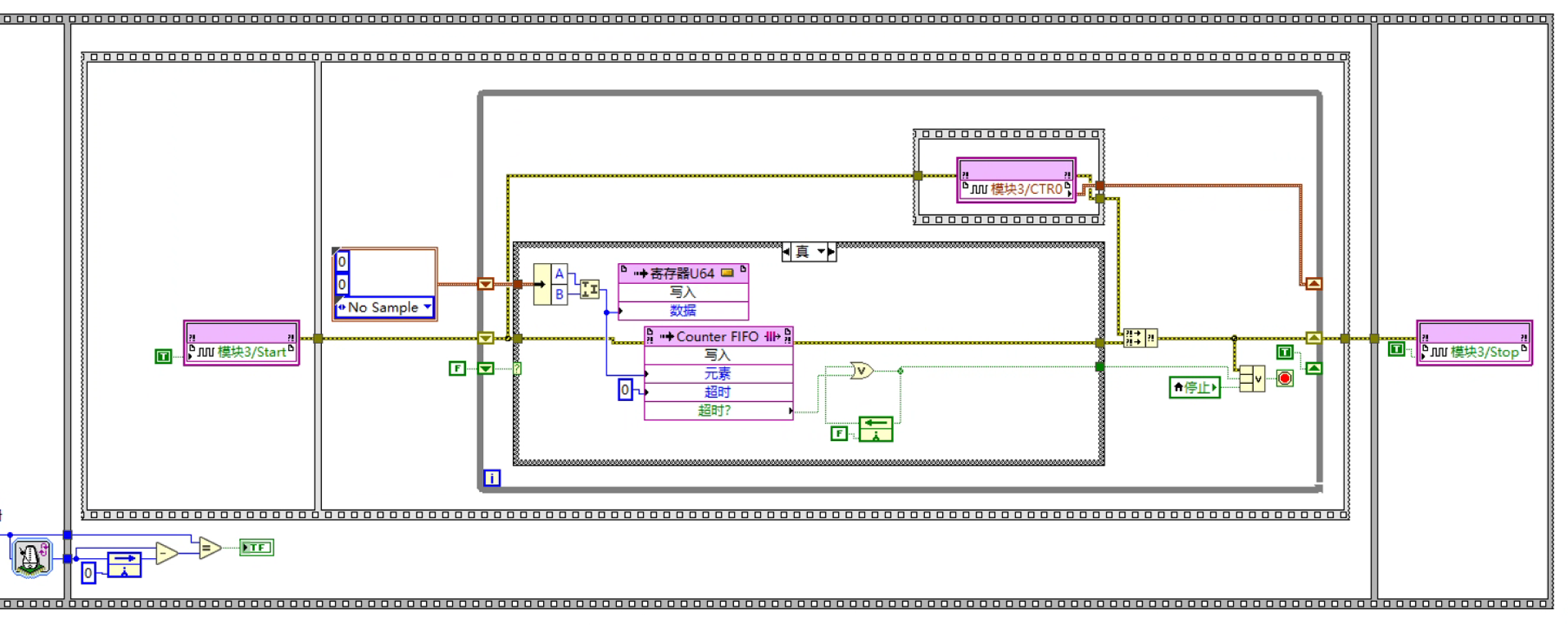
I’d like to ask you about reading quadrature encoder position signals in an FPGA environment using the NI-9361. In X4 mode, I followed the example program to write my code, but I still cannot get any data. I am using a loop timer together with a flat sequence structure to form a timed loop for acquiring the position signal.I’m very sorry that I only have a Chinese version. I hope to get help from everyone!