All Activity
- Past hour
-
 carsten19 joined the community
 - Today
-
 Using LV 2021 SP1, I am trying to release my source code but realized that, in addition to the problem described in this thread, I am missing .rtm files that I took great care to move over in their respective libraries (in order that they be included in the release). They are simply ignored during the source code distribution creation, as they would otherwise show up in the list of files generated during the build (which I am using in the script described in the quoted thread above). Note that it is not possible to see which files of a library are included in the Source Files tab of the source code distribution properties dialog, only that said library (XXX.lvlib) is included. I suppose a workaround would be to remove this type of files (and other non .vi(m), .ctl, etc, files) from libraries and individually mark them as always included, but that kind of defeats the purpose of using libraries to provide self-contained code and asset packages. Is that a described feature or a missing one?
 -
 By Evan joined the community
 - Last week
-
 Andre Aronis joined the community
 -
 DIDIER BEAUPERE joined the community
 -
 Fox joined the community
 -
 gammaray joined the community
 -
 ErikHaukvik joined the community
 -
It's a little more complicated than that. You do not just need an *.o file but in fact an *.o file for every c(pp) source file in that library and then link it into a *.so file (the Linux equivalent of a Windows dll). Also there are two different cRIO families the 906x which runs Linux compiled for an ARM CPU and the 903x, 904x, 905x, 908x which all run Linux compiled for a 64-bit Intel x686 CPU. Your *.so needs to be compiled for the one of these two depending on the cRIO chassis you want to run it on. Then you need to install that *.so file onto the cRIO. In addition you would have to review all the VIs to make sure that it still applies to the functions as exported by this *.so file. I haven't checked the h5F library but there is always a change that the library has difference for different platforms because of the available features that the platform provides. The thread you mentioned already showed that alignment was obviously a problem. But if you haven't done any C programming it is not very likely that you get this working in a reasonable time.
-
 Jaychen joined the community
 - Earlier
-
 bdlowe joined the community
 -
Hello I am using h5labview on a windows PC connected to a cRIO. This seems to work fine. I rather would like the file save be running on the cRIO though. Does anyone know if there is a howto on this subject? The most recent link I can find is this one: https://sourceforge.net/p/h5labview/discussion/general/thread/479d0cdf61/?limit=25#c81d the link is a few years old and if I would be able to compile and get a *.o file I would not know howto use it on the cRIO. I have some Linux experience I can setup a VM with Linux. I use Labview 2024. any help is appreciated thank you!
-
 SAntipov joined the community
 -

Ctl reedited is invalid after saved
ensegre replied to Vandy_Gan's topic in LabVIEW Community Edition
And must you really do it in a compiled executable? Cosmetic properties you can change programmatically on the fly even in an exe. -

Ctl reedited is invalid after saved
Rolf Kalbermatter replied to Vandy_Gan's topic in LabVIEW Community Edition
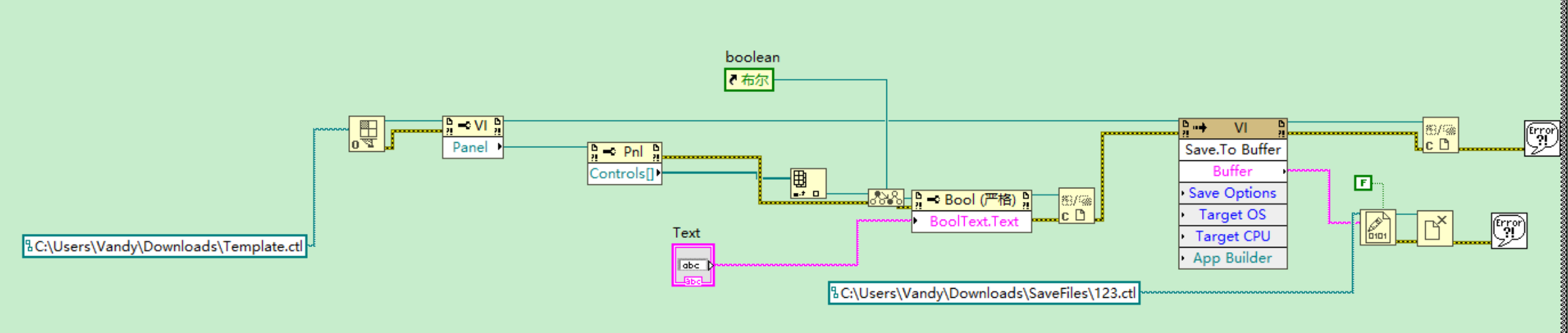
Many functions in LabVIEW that are related to editing VIs are restricted to only run in the editor runtime. That generally also involves almost all VI Server functions that modify things of LabVIEW objects except UI things (so the editing of your UI boolean text is safe) but the saving of such a control is not supported. And all the brown nodes are anyways private, this means they may work, or not, or stop working, or get removed in a future version of LabVIEW at NI's whole discretion. Use of them is fun in your trials and exercises but a no-go in any end user application unless you want to risk breaking your app for several possible reasons, such as building an executable of it, upgrading the LabVIEW version, or simply bad luck. -
Thanks from 2026 for that Dropbox-Link ! 🤩
-

Ctl reedited is invalid after saved
Vandy_Gan replied to Vandy_Gan's topic in LabVIEW Community Edition
@ensegreI had watch a video that demonstrate the function on the YouTube, but I did not remember the link of it -
Ctl reedited is invalid after saved
Vandy_Gan replied to Vandy_Gan's topic in LabVIEW Community Edition
@Zou Also I would modify text's property ,e.g. font ,size , position .Becuase I would like to achieve to modify batch more ctrls -
 A bit late, Check with your IT, they might be blocking HTTP access, and only allowing HTTPS.
 -
It's just boolean text. Do you really need to save it a file?
-
 What's with the text centering? I have 2012 (and 2009) running on a Windows 11 machine. I think I had to turn off the App and Browser Control in the Windows Security.
 -
 Checking with IT would be a good thing to do as they may have a solution already available. Older applications can be run using Windows Compatibility mode. That can be a bit of a crap shoot, particularly when you start including drivers into the mix. Virtual machines solve running older code by using older operating systems. This is great for some applications, but accessing hardware (like anything in a PCIe slot) can become an issue. Also this may not be an acceptable solution depending on IT security policies and that the virtual machine counts as a separate instance of Windows for licensing costs. This is the route I had to take to get LabVIEW 2012 and needed drivers to install on a WIn10 computer. If you have the source code (which sounds like you do) and can get a development license you can update the application which would resolve many compatibility issues. Depending on hours spent trying to make this work and how critical the nature is there may be a case this could be the cheapest option.
 -
 Hello LabVIEW Community, I'm facing challenges running a legacy LabVIEW 2012 SP1 application on Windows 11 and would appreciate guidance. Situation: Production system: LabVIEW 2012 SP1 program on Windows 7 Need to evaluate/extend program on Windows 11 development machine Have .vi, .ctl, .lvlps files but no deve I acceptlopment license Attempted Solutions: ( I assume ) Installed LabVIEW 2012 SP1 Runtime (patch files available, but installer blocked by Windows 11 security) Windows 11 blocks lvrunner.exe installation; only support files install .vi files associate with NILVWSPostInstallerScript instead of LabVIEW Newer Runtime versions (2022 Q3) blocked by company firewall Questions: Has anyone successfully run LabVIEW 2012 Runtime on Windows 11? Are there workarounds for Windows 11 security blocking older NI installers? Can LabVIEW 2022+ Runtime open 2012 .vi files in read-only mode? Alternative viewers or methods to examine .vi structure without full LabVIEW? ---------------------------------------------------------------------------------- Any insights would be greatly appreciated.
 -
Ctl reedited is invalid after saved
ensegre replied to Vandy_Gan's topic in LabVIEW Community Edition
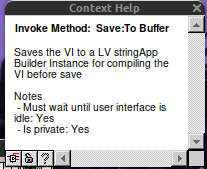
I would have said why don't you use Save.Instrument which is a public method, but I see that it is not supported in runtime, and that is stated expressly. A fortiori, a private method which "must wait until the user interface isidle" might be a completely IDE thing. -
Ctl reedited is invalid after saved
Vandy_Gan replied to Vandy_Gan's topic in LabVIEW Community Edition
ensegre, thank you for your reply, I want to achieve one application(exe) that has the function: edit a template boolean ctl's BoolText and save to new boolean ctl by programming. And the code works fine in development environment, but it is invaild at runtime when used the exe built. -
Ctl reedited is invalid after saved
ensegre replied to Vandy_Gan's topic in LabVIEW Community Edition
I do not know what is a LV stringApp instance, but I doubt that it is exactly a loadable control. What are you trying to achieve exactly?
-
Hi everyone, there was a code's picture that reedit ctl‘s Booltext and saved to new file, it workd ok in development environment,but new ctl could be invalid when it run as exe at runtime ,I did not how to solute it.Could you give me some suggestion. Thank you.
-

-
How to save preview version in runtime
ensegre replied to Vandy_Gan's topic in LabVIEW Community Edition
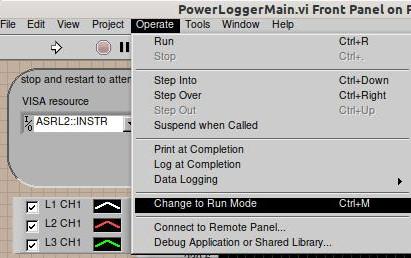
Ctrl-M?
-
Hi everyone, I want to save vi or ctl to preview version,but exe runned at runtime could not be ok, who can give me help? Thanks,good luck.
-

Help saving a newer LabVIEW project for an older version of LabVIEW
JBC replied to JBC's topic in LabVIEW General
Wow, that is good news. Maybe I will try to get it going again. -
agreed. and an openg feed would be pretty cool
-
Actually LabVIEW for Mac OS is again an official thing since 2025 Q3. Community Edition only, can't really buy it as a Professional Version but it's officially downloadable and supported. 2024Q3 and 2025Q1 was only a semi official thing that you had to download from the makerhub website. https://labviewwiki.org/wiki/LabVIEW_for_macOS
-
Help saving a newer LabVIEW project for an older version of LabVIEW
JBC replied to JBC's topic in LabVIEW General
@ensegreThanks! -
Help saving a newer LabVIEW project for an older version of LabVIEW
JBC replied to JBC's topic in LabVIEW General
@BryanThanks for the info, I tried multiple methods to get CE going again but none worked. This is CE on a MAC (my personal computer) which as far as I can tell is no longer supported. It sucks they force you to update the CE version and will not let you simply use the CE version you have. I have a work windows PC that I have a LV2021 perpetual license for though I have kept CE off that computer since that one is my commercial use dev machine and it works. I dont want NI to update packages (during CE install) on it that break my 2021 dev environment.