
smithd
-
Posts
764 -
Joined
-
Last visited
-
Days Won
42
Content Type
Profiles
Forums
Downloads
Gallery
Everything posted by smithd
-
 I've occasionally seen or heard from people wondering about hosting labview web services in other servers, like apache, microsoft IIS, or nginx. They may already have a server they just want to plug into, or maybe they want to use some of the more advanced features available in other servers -- for example LDAP/activedirectory authentication (http://httpd.apache.org/docs/2.2/mod/mod_authnz_ldap.html). However dynamic content still needs to be provided somehow, from LabVIEW. I've never really done too much with web services and I was curious how this stuff works in other languages. I'm fairly certain I'm 'rediscovering' some of this, but I couldn't find what I was looking for anywhere in labview-land....so I thought I'd share what I found out and what I did about it in case anyone else was curious about the same. What seems to be the case is that when people using other languages want to add code to the back end of a web server, they have a few basic options: Compile code into the web server. This option is more difficult to reuse, as you're making a plugin for a particular server, but some servers can use plugins for other servers. Apache has modules, for example mod_perl which is basically a dll which runs perl. IIS can run all sorts of .net code and scripts I *think* this is what LabVIEW has done for its web service, but can't confirm. Use a protocol between the front-end web server and the back-end application. The simplest version is CGI -- the web server runs an exe, passes any post data as standard in, and waits for data on standard out or standard error. This is slooooow as it runs an exe every time. This was improved with FastCGI where the web server launches N copies of the exe on boot and then leaves them running. These EXEs are sent packets which correspond to the CGI standard in data and respond with standard out and/or standard error packets. These packets can be sent through standard I/O (which is tough with lv) or through TCP (which is easy). Some people use a simpler HTTP server running in their program as the back-end. It can be simpler and less robust than, say, apache because in theory you're only getting well-formed packets from the front-end http server. Compared to FastCGI this can be even faster because the HTTP request doesn't have to be re-packaged into an FCGI request, but HTTP is single-threaded (for lack of a better term -- requests must be responded to in the order they were received). The other advantage is you can use a web browser or other http client to talk directly to the simple http server, which you can't do with FCGI (for debugging purposes). This is essentially a https://en.wikipedia.org/wiki/Reverse_proxy There are some custom protocols used like WSGI which seems to be python-only, or things like java applets. The point is, its pretty common to let something big and complicated like apache take care of the incoming requests on port 80 while letting one or more back-end servers handle specific requests as needed. This could handled by the standard labview web services (ie Apache reverse-proxies to the standard labview web service) but I was still interested in how this stuff works so I made some (rough) code, which I've posted here, a few weeks back: https://github.com/smithed/LVWebTools tl;dr: Built, monolithic web-service-code like what labview does seems to be pretty uncommon. Most (citation needed) languages seem to just use a protocol between the main, very separate web server responsible for authentication, security, and static file serving and the tiny backend exe responsible for everything else. I made some neat tools to do this, in LabVIEW. Also, the internet really is just a series of tubes. ----------------------------------------------------------------------------------------------------------- Note: the following is really into some of the weeds, if you don't want to try the code stop here. I started with FastCGI because it seemed simpler...but it turned out not to be. You're still responsible for adding most of the headers and response codes and such into your response, so it seemed like it had less structure but that structure was actually necessary anyway most of the time. If you want to take a look at it, FCGI/FCGI server.vi is the main VI and FCGI/default responder action.vi is the main VI I was using to test out different responses. With apache, you'd set it up using mod_proxy and mod_proxy_fcgi, but I'd actually recommend a new web server called Caddy (http://caddyserver.com/) because it is more developer friendly. The "caddyfile" you'd need would be as follows: "0.0.0.0:80 fastcgi /lvroot 127.0.0.1:9000" (adjusting the ports and such as needed of course). If you run the caddy server with that file, and then navigate to http://localhost/lvroot/anything it will invoke the labview code. With fastcgi, you manually add any headers you need to the top of the response, so as an example you'd have to write: "Content-Type: text/html <http><body>blah</body></http>" After that I decided to try out http, which I quickly learned was a really gross protocol. The core of it is nice and simple, but the issue to me is that the transport-related headers are mixed in with content-related headers, and oh by the way you can shove extra headers in the content section if you want to, oh and hey if you want to change protocols in the middle of operation thats supported too. Its weird. But I got a verrrrry basic server loop up and running and its located in http/http server.vi. This one I actually used for something (the Freeboard thing I mentioned in this thread: https://lavag.org/topic/19254-interactive-webpage-vi-options/) so I made a basic class to inject some behavior. That class is located in http/http responder and provides the "get.vi", "post.vi", "put.vi", and "delete.vi" you'd expect. Since I was 90% of the way there anyway, I added a protocol upgrade function in order to pass functionality off to (for example) a websocket handler. This was totally not worth it (the code got more complex), but its cool that it works. As above, I'd recommend caddy server and the appropriate line you'd want to add to your file is "proxy /lvhttp localhost:9001" Because HTTP allows sending partial results, my implementation uses a queue to send data back...I think most of the fields are pretty obvious, except to note that the headers field is a variant attribute look up table with a string/string implementation (header/value). If a response code isn't specified, 200 is assumed. Side note: Because I have a giant NI next to my name I feel the need to note that this is just a fun project, not intended in any way to replace the fully-supported in-product server which includes all the fancy things like authentication, URL routing, etc. My thought was that this could be handy for making really stupidly simple services that plug into big ones *already running* in apache, nginx, or IIS.
 -
Xnet is supported with the newer modules. The only CAN module which requires FPGA coding is the really old one. PXI only has XNet so you're safe there. As mentioned, serial can be done through RT/VISA-only, you just need the right driver. Also as mentioned, the general use for RT is to have a separate controller and HMI. This improves determinism but is also kind of freeing -- its a ton easier to separate work out to multiple developers so long as you all know what communication you're using to interact. And of course you can use whatever mechanism you want. Frequently I've seen the host side of the scada system written entirely in .net or java while the RT portion is labview, and that works nicely.
-
Interactive Webpage VI Options
smithd replied to hooovahh's topic in Remote Control, Monitoring and the Internet
Wow, that freeboard.io page is pretty sweet. I played around with it and made something simple using the CVT, might post a little tutorial for interested parties if I have time. I like that it just takes a json blob and then lets you display it. The only downside I can see (vs something like data dashboard) is you don't seem to have the ability to set values using it. Its probably not too hard to add some js to send value change events, but it'd be cool if it were baked in. Also, if anyone ever uses their own web server like apache or nginx or whatever, and have found that its annoyingly painful to use, I found a shiny new alternative: https://caddyserver.com/ Basically everything in the folder with the exe will be served up by default, and then you can put in a "caddyfile" which has additional instructions. For example if you wanted to host freeboard using the main server and forward requests to /lv to a labview web service called "myWebService", you'd put this one single line in the file: "proxy /lv localhost:8081/myWebService" -
For network comms I'd just read this: http://www.ni.com/pdf/products/us/criodevguidesec2.pdf Communication options are pretty numerous. There are stream-based mechanisms (TCP), message mechanisms (network streams, STM, web services), and tag based mechanisms (shared variables, OPC UA, modbus). The mechanisms are the same for cRIO and for PXI. Those are all examples, not the complete set. For a scada system, OPC UA is probably a great fit but you won't get waveforms for example. Many systems use multiple mechanisms.
-
Interactive Webpage VI Options
smithd replied to hooovahh's topic in Remote Control, Monitoring and the Internet
Is there a way to dynamically generate those non-value-change events? I was under the impression that was one of the roadblocks to UI testing automation. This thing seems to work around it but I dont know how. -
Interactive Webpage VI Options
smithd replied to hooovahh's topic in Remote Control, Monitoring and the Internet
Absolutely, and I've asked this question internally too. I'm really just curious, because I think its cool too and want to use it but haven't found a problem to throw it at -
PXI rt doesn't support full displays--in fact, at this exact moment you're better off with the new atom cRIOs for that purpose. You can plug in a displayport cable and most UI elements (please please check them first) will render correctly. The big example of something that doesn't is subpanels (last I heard). This does reduce determinism (the GPU is firing off interrupts) but not as much as you might think. There are specs out there, probably but I don't think it goes above maybe 50 or 100 usec of jitter. All the RTOSs use essentially a combo of preemptive scheduling (time critical, then scan engine, then timed loops, then normal loops) and round robin scheduling (between threads at the same priority). I'd recommend reading chapter 1, pg 24 (pdf pg 12) of this guide: ni.com/compactriodevguide Don't take this as gospel, but I'd approximate the differences as: -Pick cRIO if you need the ruggedness (shock, vibe, temp) features and you want a large number of distributed systems across a wider area. In exchange, you will lose some I/O count and variety vs PXI and you will lose most of your synchronization options vs PXI. Both of these limitations are slowly being hacked away at -- for example in the last few years we've gotten GPS, signal-based DSA sync, XNet CAN (vs manual make-your-own-frames-on-fpga-can) and so on. cRIO is even closing the CPU power gap. Can achieve deterministic I/O through scan engine or FPGA programming. If you have dlls, VxWorks is really hard to compile for and Linux is really easy, but in both cases you'd need the source to cross compile. Linux cRIOs can support security-enhanced linux, making them the more secure software option. -PXI is significantly more powerful even than the newest atom cRIOs and generally has better I/O counts and variety, if only because the power requirements are not as strict as they are on cRIO. If NI sells an I/O type we probably have it for PXI and may have it for cRIO. Can achieve deterministic I/O through hardware-timed single-point, available with DAQmx for certain (probably most, by now) cards. Since you can get the monster chassis, you can sometimes simplify your programming by having a ton of I/O in one spot, but then you may exchange that programming complexity for wiring complexity. If you have DLLs, pharlap may just run them out of box, depending on how many microsoft APIs they use, and which specific ones (pharlap is vaguely a derivative of windows, but very vaguely). All that having been said its more shades of gray at this point. For example if you need distributed I/O you can use an ethernet (non-deterministic) or ethercat (deterministic) expansion chassis from any RT controller with two ethernet ports (ie most PXI and half the cRIOs out there). You can do FPGA on both, and you could even use USB R-series to get deterministic I/O as an add-on to your windows system.
-
Interactive Webpage VI Options
smithd replied to hooovahh's topic in Remote Control, Monitoring and the Internet
I don't want to knock this because it really is pretty awesome (as are the many alternatives), but I'm curious for myself how often y'all end up actually needing tools like this? I feel like it should be a ton given how many different options there are, but I personally have only had a few people come to me and say they wanted this...and even then, they really only wanted to see a demo and then they promptly forgot about it. So...is this actually a common need and I just don't see it where I'm at, or is it more like "man look at this sweet thing I can do"? -
DVRs for accessing class private data
smithd replied to shansen1's topic in Object-Oriented Programming
The DVR is in the language for a reason and has high value, but don't use it just because you would use a pointer in other languages. The FGV is used for similar purposes but has disadvantages with regards to scalability, lifetime control, and code comprehension. But I also have a huge vendetta against the FGV. Other folks on the forum might say a DVR is just like an FGV with more annoying syntax and useless features. This can cause deadlocks more easily than a DVR and I believe I've seen aristos post elsewhere that fixing the SEQ is essentially the reason for adding the DVR to the language. The only advantage I know of for the SEQ is that you can make it non-blocking, but of course if its non-blocking you have to be really careful to manage state of the queue. However, I've never used an SEQ as I've only used LV for as long as DVRs have been around. --- For your situation, it seems like messaging would be a better solution. For example, you say you want to distribute changes from the UI to multiple loops performing similar operations. You could potentially use an event structure in those loops and register for the front panel events directly (http://zone.ni.com/reference/en-XX/help/371361K-01/lvhowto/dynamic_register_event/). Similarly, you could use (http://zone.ni.com/reference/en-XX/help/371361K-01/glang/set_ctrl_val_by_index/) to directly update the front panel from the different loops. (Note this could work well if you just want to interact with the UI, if the changes are coming from many different sources a more general messaging scheme would be better). -
Should File IO be handled by a central actor?
smithd replied to AlexA's topic in Database and File IO
Sorry, I don't think I was describing things properly. All I was saying is, lets say I want to do XYZ with a TDMS file. You could do all the TDMS VI calls directly but from the other thread and my own experience you end up doing a lot of metadata prep before you're ready to log data, and even then you probably have some specific format you want to use. Rather than directly making some QMH to do all these things, I personally would prefer to wrap that logic into a small library. I've tried to use 'off the shelf' processes in the past and have sometimes been unsuccessful because something I wanted wasn't exposed, the communication pipe was annoying to use, I had to use a new stop mechanism separate from the rest of my code, or similar. In these situations I either write a bunch of annoying code to work with the process, or I just go in and edit the thing directly until it does what I want. The 1 file/QMH was really just me agreeing with ned and shaun -- I don't know what optimizations can be done by the OS or by labview but I don't want to get in the way of those by trying to make a single QMH manage multiple files. -
You need to right click on the web service in the project and select start. Doing "publish" will have it run in the application web server context, while "start" runs in the project context (and I think probably doesn't show up in the WIF viewer).
-
Should File IO be handled by a central actor?
smithd replied to AlexA's topic in Database and File IO
Yeah thats true too, you could make a background service appear to be an API. I guess the difference to me is that with the service you're more likely to have to be concerned about some of the internal details like timing or, as in this thread, how it multiplexes. Its probably not a requirement, but maybe its just I feel like the complexity of a service is higher so I am less likely to trust that the developer of the service did a good job. For example, with a TCP service did they decide to launch a bunch of async processes or do they go through and poll N TCP connections at a specific rate? You do still have to be concerned about some things with a more low-level API/wrapper, but it feels like different ends of a sliding scale if that makes any sense. -
Should File IO be handled by a central actor?
smithd replied to AlexA's topic in Database and File IO
I didn't read through the entire thread, but I thought I could still throw my thoughts in. Generally I'd prefer to write a file API first, service second. I've repeatedly run into problems where services don't quite do what I want (either how they get the data to log or how they do timing or how they shut down or...) but the core API works well. I like the idea that the API is your reuse library and the service is part of a sample project, drop vi or other. As for whether I'd just use the API vs making a service, I usually end up with a service because I do a lot of RT. Offloading the file I/O to a low-priority loop is the first thing you (should) learn. If timing isn't too important I'll do the file I/O locally (for example critical error reporting) and this is where starting from an API saves time. Finally, having a service for each file vs multiple files handled by a single qmh/whatever...I'd tend towards 1 file/qmh for any synchronous or semi-synchronous file API as I'd rather let the OS multiplex than try to pump all my I/O through one pipe. This might be especially true if for example you want to log your error report to the C drive but then your waveform data to SD/USB cards. I'm guessing there are some OS level tricks for increasing throughput that I couldn't touch if it was N files/loop. -
Is it possible to pass a static VI reference into Start Asynchronous Call?
smithd replied to JKSH's topic in LabVIEW General
Also I think I remember reading the performance of this is better. More generally, is this something that could be Xnoded? I don't personally have the skills for it, but it seems like its a pretty straightforward adapt-to-type deal. -
its kind of hard to describe so I'm posting a picture: So the refnums are in fact different for all of the wires, but if you close the reference you get out of the inserted VI property, bad things happen. In this case, for example, the first VI never shows up past the first run and if you try to open that VI's front panel it points you at the subpanel, even when the main VI is stopped. Weird stuff.

-
Its worth pointing out that the property you're referring to seems to return a single VI reference for any subpanel (at least in 2013). That is, if you read it you'll always see 0x00111111 even if you just passed in 0x00222222 or changed it to 0x00333333. This is fine-- you can still figure out which VI was inserted, but don't close that reference.
-
The cloud compile is fine unless you need to use IP cores or ip builder. I just tried a Xilinx IP core in win10 with the 9607 target (so it should be using the newest Vivado) and it still doesn't work.
- 4 replies
-
- 2
-

-
- xilinx
- windows 10
- (and 1 more)
-
Insert Conditional Disable Structure around Call Library Nodes
smithd replied to ThomasGutzler's topic in VI Scripting
The way I've seen this done typically is to configure the path in on the diagram, and to use a separate (inlined) VI to store this path. The performance difference between hardcoded (in the node) and a path on the diagram is pretty minimal. It also makes it easy to update later on. That having been said there are certain patterns hardcoded into labview. Seems like the easier route is to use the wildcard options: http://zone.ni.com/reference/en-XX/help/371361H-01/lvexcodeconcepts/configuring_the_clf_node/#Configuring_Library_Name_or_Path The one in your post would be Filename**.* -
Array of ComboBoxes each Need a different dropdown list
smithd replied to ctr26's topic in User Interface
So far as I know this isn't possible to work around since its an array. However it should be possible to get a "Mouse Down?" or similar event on the combo box which would potentially allow you to figure out which index you are at and then fill in the elements programmatically. The values would still be identical for all combo boxes in the front panel, but the user wouldn't know because the values change every time they click. On the other hand, if you were just getting ready to manually edit each combo box's values by hand, it may be just as well if you simply make a cluster with all the combo boxes you need. -
The lavag json library (https://lavag.org/topic/16217-cr-json-labview/) is pretty good and seems to have the capability to avoid issues like this. If you need XML, GXML and jki easyxml would probably also handle the variant (although I haven't tried it which I have with the json library).
-
Definitely a small minority, since you'd have to have some way of creating a circular reference, but if you absolutely need that functionality I'm pretty sure everyone runs into it eventually. I hadn't thought of the semaphore but thats an interesting point. I don't know of any way to fix the issue. It gets especially tricky with property nodes on classes, since there isn't even an explicit IPE there. It just hangs
-
Channel Wires (Asynchronous Wires) Discussion
smithd replied to AutoMeasure's topic in LabVIEW General
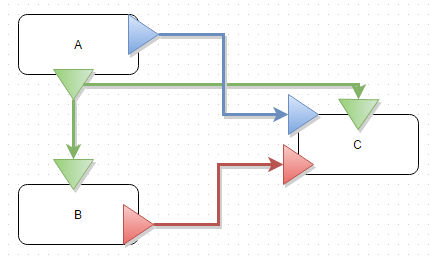
I don't think there are any special flags. If you think about it, in any other queue situation you have to create the queue outside of the loop and pass it into the loop. The same thing happens here, but the terminal is colored weird to make it seem more like what you intend than what is really happening. I'm actually not sure where the create happens though. And heres where I really just don't get the removal of wires. Why are we hardcoding the queues for A, B, and C? None of that code cares what queue it reads from. Just using the wires means that your (well written) top level VI documents the communication path:
-
Channel Wires (Asynchronous Wires) Discussion
smithd replied to AutoMeasure's topic in LabVIEW General
disclaimer for anyone who doesn't know me: despite the giant bright blue "NI" next to my name I am not in any way affiliated with R&D so don't take anything I say as a fact about the product. The story I've heard is that they're asynchronous dataflow, similar as I understand it to http://noflojs.org/ This makes sense to me, based on the wiki: So to me it sounds like the big thing that makes something dataflow is that you can explicitly visualize the routing and movement of data which is exactly the intent of these wires (as I understand it) Something else I agree with, but isn't so far as I can tell in the explicit definition, is that an important part of dataflow's simplicity advantage is that data isn't shared. You see how it flows between items but you don't usually share it. When you do (as with DVRs or FGVs), you 'break' dataflow or at least break a key value it provides. Note that this is different from a queue, user event, or the new wires. In all these cases a given section of code explicitly sends information to another section of code without retaining access to that data. The data is sent but not shared. But what if we had started 15 years ago (or whenever) with just these channel wires and queues had never been implemented as a separate concept? What if core 1 taught these wires? I don't really think it would be a problem for anyone experienced and it would reduce confusion for new developers (whats a sv? notifier? occurence? user event? queue? single element queue? rt fifo? who cares?). I personally have zero plans to use these wires in anything I work on, but I do think that if we had created them first there would probably be no need to have added many of the others. I'm curious what this looks like in your mind. Is it a more granular version of this (https://decibel.ni.com/content/docs/DOC-23262) or something else entirely? Something that I'm not a big fan of is the giant fanout of queue wires that occur in many applications. It seems like the async wires would help with this as you can draw the wires between the subVIs which are actually communicating (A->B) rather than the current situation (init->A; init->B). Also, I noticed your comment about shoving queues inside of subVIs and getting rid of the wires entirely. I've seen this many times before and never really understood it, but it seems related to how you want to visualize this stuff, so I'm curious how that concept ("vanishing wires") fits into your communication map concept. -
I do think its more than 5%, but from what you described I don't think you're in that X%. So...from a high level it sounds like what you want to do is spin up N workers, send them a UUT to work on, and then have the results recorded to disk. To be honest, I'm not sure why you need DVRs or any data sharing at all. Could you clarify? ->To me you'd have a QMH of some kind dealing out the work to your N workers (also qmhs) and then a QMH for logging which collects results from any of the N workers. You could do that with manually written QMHs, an API like AMC, a package like DQMH, or actor framework. Separating out worker functionality from logger functionality means (a) for those long running tests you could write intermediate results to a file without worrying about interfering with the test and (b) you can really really really easily switch it out for a database once you've decided you need to. As a side thought, it sounds like you are re-writing significant parts of teststand (parallel test sequencing, automatic database logging and report gen, etc.). The DQMH library mentioned above seems to be written to work pretty well with teststand (nice presentation at NI week and I believe its also posted on their community page). Just a thought. If I'm mistaken, or you can't use teststand for whatever reason the tools network does have a free sequencer which I think is pretty cool (although I do RT most of the time and never have a good chance to use this guy): http://sine.ni.com/nips/cds/view/p/lang/en/nid/212277. It looks like it could be a good fit for your workers.
-
Invalid Dynamic Shared Variable Performance Issue
smithd replied to Omar Mussa's topic in Application Design & Architecture
Ah yeah I see, the blocking behavior is annoying. Thats always been a bit of a downer for the SVE, the fact that its mostly single-threaded. Wouldn't help in this case, but there is a method for opening the variable connection in the background. This essentially sends a message to the SVE requesting that the connection get opened, and then you can use a property node on the last refnum in your set of connections to determine if the connections have finished opening. This is significantly faster than waiting for each connection to open individually.