
hooovahh
-
Posts
3,488 -
Joined
-
Last visited
-
Days Won
299
Content Type
Profiles
Forums
Downloads
Gallery
Everything posted by hooovahh
-
Hello all. I have an application. This application has an installer. During the install the EXE and the INI file are installed and the EXE uses the INI and can then write to the INI any settings changed in the application. If I have a new version of the application I make a new version of the installer. The problem (if it is one) is that during the install the new INI will replace the old one and all of the old settings will be lost. On the one side this is a good thing. This means that when version 2.0 is installed it comes with an INI file that is compatible with the 2.0 of the EXE and will have known good settings. On the other side this means that if there were any custom settings they will be lost. It is possible to run a EXE after an install, so I was thinking one possible solution could be to backup the old INI (sometime before deleting it) then after the install compare the two and any keys and sections that exist in the old and new INI, to be copied so the new INI has the same settings as the old. Any thoughts on this? Is this a non-issue and installing a new EXE with the new INI is the way to go, with the understanding that old INI settings will be lost? Thanks.
-
No worries. There are days where I come on here and probably say things out of emotion and say things I don't mean to try to get a point across. Password protection, IP protection, and low level LabVIEW secrets on this forum have been a hot topic, and people are very opinionated, which makes for some topics which seem to add nothing to the greater knowledge that this forum is intended for. I understand your position and feelings about IP and DRM. I also understand what flarn wants to do, and to an extent what drives him in his pursuit of all that is LabVIEW secrets. I too would like to know the dark secrets of LabVIEWs inner workings. I'm always interested in what there is to learn when it comes to LabVIEW, but at some point you cross the line and for everyone that line is different. Laws are intended to make that line the same but in many cases is still a grey area. In my opinion stating that "we need a new password cracker" goes too far, but at the same time I did not know that in 2012 the password scheme was changed to counteract previous flaws. And had it not been for this post I may have never known. Man I'm all over the place with this post. I congratulate anyone who understood the message I was trying to say.
-
This is just silly. Of course theres a difference. If there was no difference we would use the same word to describe both types of property. In the dictionary if you look up Intellectual Property it will not say "See Physical Property". I also don't condone releasing anything to break NI's password protection scheme, but I also think it isn't in your place to say that he "WILL get into trouble" if anything is released. What happened to the last guy that released a password cracker that works on all VIs between 7.x and 2011? Well I don't know for sure but his website is still up with the source code, and will even remove the password by uploading a VI.
-
It was kinda funny because I could see new posts, and my RSS showed new topics, but you couldn't go to the thread.
-
 Sorry you made a duplicate topic here and I replied in any case here is what I posted: I've attached my go at it. This uses two OpenG VIs Remove Duplicates and Search Array. Install the OpenG Array package to get these VIs. Average Rows Same First Column Hooovahh.vi 9.06K 29 Number of downloads
 -
It doesn't look like your attached any code. Yesterday there was some LAVA issues so this maybe this is to blame. In either case I've attached my go at it. This uses two OpenG VIs Remove Duplicates and Search Array. Install the OpenG Array package to get these VIs. Average Rows Same First Column Hooovahh.vi
-
Not the answer I was hoping for, but I'm not surprised. As tempting as it may be I will try to stay away from XNodes, and stick with 100 polymorphic instances, and OpenG code that can't adapt to every thing I need.
-
This won't work if the SubVI isn't being called in the code yet and is just in memory. I believe this is the situation Minh was describing. I've used several AbortVI functions in the past to be able to abort any VI running (not a close at the moment).
-
That does sound messy. The other solution I was tossing around in my head, was that each picture could be a separate running VI. Then you can register for a mouse enter/leave for interaction, and mouse down to know which was clicked. I did a quick test here which displays images, and each image is a VI. It's far from perfect, and it actually does resizing (which you wouldn't want to do) but it may give you a new approach.
-
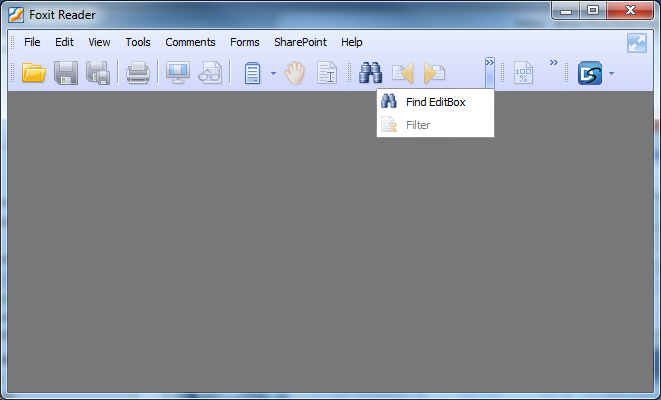
This is not a feature request by any means, but if you are thinking about making the tool look more native I would suggest having vertical separators and a function that allows for resizing the window, which would collapse buttons into a single button when they all can't fit in the display. See the image of Foxit Reader which collapses the buttons to a >> button which don't fit. Just a thought.

-
Okay so I've never really dipped my feet in when it comes to XNodes. At the moment I'm not looking to make XNodes just understand using them, and really just get others to tell me it's safe. The ones for discussion are the Array XNodes, and the OpenG Array XNode. I see the functions this code has and I love the idea of using it. But I know that there is no support from NI for using XNodes, and I've heard NI say that using them can be quite dangerous (without specifically saying what it could do or how to avoid it). So I want to pose this question. Is the Array XNodes in the Code Repository as safe to use as the normal OpenG array functions? Is there a compelling reason I should not be using XNodes of any kind in an application? I assume Lava would not certify code that was unstable, and I also see that people are using these functions (over 3000 downloads combined). So is there nothing to worry about here? And if these are so great and stable, should I exclusively use these instead of the real OpenG ones?
-
Amazing, the community again thanks you for your contribution. The case as you put it is quite undocumented, and needs work, but the concept is there and it works just well. Also it should be noted to get this to work you need to install the Array XNode library, which also requires the lava_lib_labview_api_scripting_tools package as well. ...However I feel the need to post a topic using XNodes, simply because all I've heard about it is how unsupported it is which makes me nervous. That being said NI said the same thing about Scripting before it was released and I was using it then too. EDIT: I made a post expressing my concerns with XNode usage.
-
So I had a thought. There are primitives in LabVIEW that aren't exposed, just like there are VIs in the vi.lib that aren't on the palette. But the thing about vi.lib VIs is I can navigate the the directory and find the VIs on disk. My question is how does one find primitives not exposed? I've seen a few instances where someone will post a VI with a primitive I've never seen before and I wonder how people find these, other then finding them on the block diagram of another VI. A few examples I can think of are the Text to UTF-8/UTF-8 to Text, and Coerce to Type. Again I understand the reason why these may not be exposed, and I understand the reason why someone would not want to use them. But I can't help but wonder, where are primitives on disk? Where is their information stored (VI description and help path for example). And how can someone find primitives not on the palette?
-
Skipping Events in Multiple Events Structures
hooovahh replied to Austin Lee's topic in LabVIEW General
Sorry I wasn't more clear. What I meant I put labels on the side of controls (right or left). An easy way to see what I mean is to activate quick drop (CTRL + Space) and then use Move Terminal Labels (press CTRL + T) when on the block diagram. -
Skipping Events in Multiple Events Structures
hooovahh replied to Austin Lee's topic in LabVIEW General
The solution is to architect the VI to only use one event structure. There is no need to poll in the timeout case of the first event structure, just handle all events the user can perform (like Panel Close ) in the one event structure and enqueue any states needed to handle the event. Another side effect of your code is I can't press new game, if a game is still going on. Again having one event structure handle everything the user can do is the way to go. Not sure how many pointers you are looking for but here are a few: The User Logon screen doesn't need the FP.Open or FP.Close (and then won't need the sequence structure) because the VI is configured to open when called, and close when done. If you want the logon screen to be seen first, why is this not the top level VI and then have it call the UI that the user plays with? The Logon screen doesn't allow the user to close, and I couldn't find a way to stop it other then the abort button. The Main screen doesn't allow the user to close. There is a button but using the normal close is more standard for users unfamiliar with your program. Get rid of the toolbar for the logon screen. There are tons of items in there that are just LabVIEW specific. Only show the toolbar if you have a custom toolbar with items for your program. Use more states in your QMH. You have alot of code in the Idle case (with the event structure). It helps to more easily follow the code if there are multiple states to call so they can be reused. You could have a state called "Draw UI" which can be called on startup, and every time the user or AI moves. Your sub VI's have error terminals in locations not seen often. This isn't bad exactly but error wires are usually on the bottom right and bottom left terminals. This borders on the line of style guide or preference not sure which. Control labels being on the right is a preference thing but I think looks nicer. You have some wires on top of other wires and going in the same direction. This makes it very difficult to know exactly where a wire is connected without have to triple click it. I saw some silver controls. As I've mentioned before I don't have them but it should be consistent. The ones I saw were the error wires by the way. I also saw some classic error controls. You are using the Value Signal property node but I don't see where the event is handling the value change. If you just want to change the value use a local variable. Or at least use the Value property. Value Signal indicates you are firing an event for a reason. Unneeded coercion dots. A coercion dot isn't necessarily a bad thing, but they can be so avoid them by giving the correct data type or perform an explicit conversion to the right type, knowing the possible consequences. That being said, you have nice labels, code description, and I like the tab solution for the UI. You are doing well for someone with a month of LabVIEW experience. -
Getting the Window Handle for a FP with No Title Bar
hooovahh replied to mje's topic in User Interface
I understand why they are private, I was just wondering if in a specific use case if there was any danger in using it. Say if I'm in a 32-bit Windows environment would there ever be a case where using "OS Window" would cause bad things to happen? I have very similar questions for a few other private methods too, and was hoping for some unofficial documentation is all. -
Getting the Window Handle for a FP with No Title Bar
hooovahh replied to mje's topic in User Interface
I may not have used the right words but what I meant is "NativeWindow" does not work with an application instance that was opened explicitly. It is just like the "All VIs in Memory" property. It will work if you don't wire anything to the reference in terminal. But if you open a new application instance the "NativeWindow" will not work but "OS Window" will. This may be better answered in a different thread, but is there a list of private methods/properties that are more stable than others? What I'm trying to ask is if I use either of these two methods what risk is there? Knowing these are unsupported functions. I found the wiki here, but was quite disappointed to find it so empty. I planned on using a few others like "All Context", and "Is Context Private?" (to get a list of non-private Contexts), and was wondering the risk of these as well. -
I know of no XControl that does this. Why is making it yourself "not the solution"? And neither is making an XControl?
-
Getting the Window Handle for a FP with No Title Bar
hooovahh replied to mje's topic in User Interface
So one thing that is worth mentioning that I noticed about these undocumented functions is that the "NativeWindow" method does not work for remote application instances, but the deprecated method "OS Window" does. -
Sorry to waste anyone's time. After I posted this I continued my search and I found this private property that works. http://lavag.org/topic/13803-getting-the-window-handle-for-a-fp-with-no-title-bar/
-
I'm looking for a way to get the HWND (handler window) of a front panel. The trick to this is I want to get this handle on a window without the VI running. The reason for this is I want to bring the VI to open the front panel and bring it to the front of all applications. The only way I know to do this is using a windows call using the HWND of the window to bring to the front. In the past I would get the VI's Front Panel Title (using the VI ref and property node) then get the HWND using this title. Problem is that is the title of the window when it is running. A possible solution is to attempt to figure out what the title of the window will be in the IDE then get the HWND of that. So is there any suggestions on how to bring a VI to the front of all windows, without running that VI? Attached is a test that shows the code working if the VI is running, and doesn't work if it isn't because the title is different. Bring to Front Test.zip
-
Yeah, I've also tried it with VIs as well (not as useful but I have a use case). From a users perspective I can see why this is extremely shady. I can have a VI that has an EXE that is a keylogger, or a virus, or whatever (I didn't just trust me you can MD5 the EXE). But it is more encapsulated so I don't need to make sure the EXE is in the same directory as the VI, and is included when making a LabVIEW EXE. @neil I guess you're right about the DLL example. In either case I don't do it much.
-
Do you want the crappy solution that works? Attached is a VI that will compress a folder into a zip file an it preserves characters like the one you posted in your post. It uses 7-Zip (woot!). It's just a command line call to add an archive. 7-Zip also provides a DLL but this was the quickest way to give you a solution. I embedded the 7zip EXE in the VI (a little shady I know) just so it is self contained. At one point I thought about wrapping all of the 7-zip commands into LabVIEW VIs but how do I need the added functionality that the LabVIEW native solution or the OpenG solution doesn't have. 7-Zip Zip Folder.vi
-
No problem, feel free to question things like this for clarification. I thought about leaving the Stop in the timeout case, and this is a valid way of handling it for a stop if timeout occurs often (and in this case it does). I wanted to properly handle the closing of the VI which is why I added the event structure and the "Panel Close?" event. For consistency I added the "Stop" Value change because it is parallel to the "Panel Close?" in functionality. Another thing to be aware of is not all applications have a timeout. Many VIs may only take action if the user performs some action, and in these cases wiring an Or to the Stop terminal is not a good idea, and instead you should have an event that handles the pressing of the stop button. As a quick example take a look at the VI attached. It shows three cases, enabled using the Disable Diagram Structure. It shows polling the stop button, then reading the stop button but without a timeout causes issues, and then no polling but instead using events. I added the Stop Value change because it is the more correct solution in many cases, but for your VI it didn't really matter. Stopping Test.vi
-
Oops you are right sorry.