Leaderboard


Popular Content
Showing content with the highest reputation since 10/14/2025 in Posts
-
So a couple of years ago I was reading about the ZLIB documentation on compression and how it works. It was an interesting blog post going into how it works, and what compression algorithms like zip really do. This is using the LZ77 and Huffman Tables. It was very education and I thought it might be fun to try to write some of it in G. The deflate function in ZLIB is very well understood from an external code call and so the only real ever so slight place that it made sense in my head was to use it on LabVIEW RT. The wonderful OpenG Zip package has support for Linux RT in version 4.2.0b1 as posted here. For now this is the version I will be sticking with because of the RT support. Still I went on my little journey trying to make my own in pure LabVIEW to see what I could do. My first attempt failed immensely and I did not have the knowledge, to understand what was wrong, or how to debug it. As a test of AI progression I decided to dig up this old code and start asking AI about what I could do to improve my code, and to finally have it working properly. Well over the holiday break Google Gemini delivered. It was very helpful for the first 90% or so. It was great having a dialog with back and forth asking about edge cases, and how things are handled. It gave examples and knew what the next steps were. Admittedly it is a somewhat academic problem, and so maybe that's why the AI did so well. And I did still reference some of the other content online. The last 10% were a bit of a pain. The AI hallucinated several times giving wrong information, or analyzed my byte streams incorrectly. But this did help me understand it even more since I had to debug it. So attached is my first go at it in 2022 Q3. It requires some packages from VIPM.IO. Image Manipulation, for making some debug tree drawings which is actually disabled at the moment. And the new version of my Array package 3.1.3.23. So how is performance? Well I only have the deflate function, and it only is on the dynamic table, which only gets called if there is some amount of data around 1K and larger. I tested it with random stuff with lots of repetition and my 700k string took about 100ms to process while the OpenG method took about 2ms. Compression was similar but OpenG was about 5% smaller too. It was a lot of fun, I learned a lot, and will probably apply things I learned, but realistically I will stick with the OpenG for real work. If there are improvements to make, the largest time sink is in detecting the patterns. It is a 32k sliding window and I'm unsure of what techniques can be used to make it faster. ZLIB G Compression.zip5 points
-
4 points
-
We're back again this year. Free 24 hours of virtual LabVIEW presentations. Come join us! https://www.glasummit.org/ We're also looking for presenters. I know some of you all have a lot of opinions...3 points
-
Are you seriously expecting anyone to install a random executable on their system from an unknown publisher, provided by an anonymous person on the web, where one can't even get a proper link in Google to the actual company page? Sorry, but anyone doing that should not be allowed near 5m of a computer system!3 points
-
You may not care @ShaunR, but I and others do. You favour pragmatism. I understand the appeal and the benefits of a "first interaction support" AI. My concerns center on the long-term, collective social and cognitive side effects of AI dependence and replacing human interactions with AI interactions. (AI can be used well or poorly) Are you interested in exploring this topic further?2 points
-
Being on-topic is easy for an LLM to achieve. Being useful is harder, and that definitely hasn't been achieved in this case. So it's just time-wasting slop. Probably. Same purpose(s) as all other spambots, just using new tools: Either they will edit their posts later to insert spam links, or they're just vandalizing for the sake of it. That would indeed be putting AI to much better use. This part has harmful side-effects. Software community forums everywhere are shrivelling up, and I bet that one big reason is because people now talk to bots more, and talk to each other less. Sure, this makes answers more readily accessible, but the costs are: The loss of motivation to learn how to ask questions well. The loss of opportunities to share our knowledge with others directly. The loss of human networking in general. These activities have intrinsic social value beyond just acquiring information.2 points
-
Hi all - sharing an open-source LabVIEW client we’ve been developing at Nominal. The idea is simple: keep LabVIEW doing what it does well on the test stand, while streaming the resulting data to Nominal for analysis, visualization, and collaboration. Instead of test data living on individual machines or desktop TDMS files, engineers can stream data directly from LabVIEW into a shared workspace, where it can be time-aligned with logs, video, and other data for analysis. Nominal's LabVIEW client supports real-time streaming, TDMS upload, and NI Linux RT. Install via VIPM LabVIEW client source on GitHub We're also building Instro, an open-source Python library for instrument control and test automation. For anyone running a mixed LabVIEW/Python test environment, we'd especially love feedback on where you draw that boundary today and what instruments you'd like to see supported. Instro source on GitHub Would love feedback from the LAVA community - on either project.2 points
-
This is the nine year-old link I've saved for this - Solved: Re: New VI - default window size - NI Community It behaves oddly in that if you change it and close it before saving, it won't prompt you to save. Anyone understand this?2 points
-
The recovery loop forcing is most likely related to the installation of DAQmx and other NI driver software that make under the hood use of NI-PAL and friends which is really part of the NI-PXI driver software stack. This driver goes fairly deep into the Windows PCI hardware driver stack and newer Windows versions tend to enable the newest features in the PCI chipsets. Some of these features did not even exist in the standard when DAQmx and NI-PAL that come with the standard install of LabVIEW 2020 were released. So if you want to install an older version of LabVIEW on a recent hardware, it is actually best to choose a custom install and disable installation of all hardware drivers and then install the latest version of the drivers you actually need that are still compatible with your LabVIEW version. That's of course cumbersome and the long term solution is indeed to move to a newer LabVIEW version altogether. But be aware that this problem will keep occurring. The times where hardware improvements were automatically always fully backwards compatible are definitely over. The PCI standard got so complicated over the years, and covers much more than just the traditional PCI slots that are almost unseen in modern computers. Pretty much every modern bus from USB3 and higher to Thunderbolt, all kinds of memory interfaces, and many more is nowadays using PCI technologies in one way or the other. Improving that without causing potential backwards compatibility problems got an almost impossible task. And each of the software component manufacturers from hardware firmware, to BIOS and chipset firmware to Windows drivers and vendor drivers such as NI-PAL would need to test their thing with everything else to be sure it still works. Which of course is impossible, so you end up with these issues. For LabVIEW itself I managed to install and use LabVIEW 2009 on Windows 11 without any real problems. I'm convinced that even LabVIEW 7.1 would be possible, although that most likely would require some careful hand holding and sweet talking to the installer to convince it to go fully through with it. And it might show some visual artefacts when running it under Windows 11. Hardware drivers on the other hand are a different story. The NI drivers go fairly deep into the system to allow high performance data acquisition and similar things and that has a big potential to run into compatibility trouble on newer hardware than what was available at the release date of the driver.2 points
-
Hi there ! If this subject interest you, I'm currently working on a new State Machine Toolkit for LabVIEW. You can find some shorts videos about it here : https://www.youtube.com/@EmmanuelGeveaux Or some posts about it here : https://www.linkedin.com/posts/emmanuel-geveaux-93836130a_labview-statemachines-ugcPost-746286803261... This toolkit will be Open-Source, free for students, education purpose and within LabVIEW Community Edition use. I'd be happy to ear any feedback on those videos and posts. Best regards Emmanuel
 2 points
 -
This year I went to NI Connect (the new NI Week) for the first time in 7 years. I thought I would be the exception and see all those that have gone year after year. But it turns out that many of us this was our first year back, or some last year was their first year back since COVID. In general I think this is a good sign, that things are moving in the right direction. NI has some new leadership that has a LabVIEW focus, and at least at the moment appear to want to push adoption. Reversing the subscription only is a welcome change, but for many it hurt the inertia of business. Once a ship starts moving in the wrong direction it takes a while to come back. Or put another way, respect is lost in buckets and gained in drops. Plenty of businesses have likely moved away from LabVIEW and NI because of poor decisions, that in my opinion, were so NI would look more valuable for an Emerson sale. I'm in the Detroit area, and plan to retire doing LabVIEW. At the moment I think I can do that. Not long ago I didn't think that would be the case. We were just blindly paying the SSP each year. The subscription only model, made management here reevaluated things. We took a few years off. Then perpetual licenses came back again so we renewed. I think we will likely get a new perpetual license every 4 years or so. This will hurt NI since this means less users on the newest release finding issues. Building back trust will take time here, and this will likely play out in a similar way around the world for other companies.2 points
-
It is not that LabVIEW MAY unregister the reference, but that it WILL unregister the reference as soon as the top level VI in whose hierarchy the reference was created goes idle. This is by design and the only way to prevent that is to either keep that hierarchy active until any other user of that refnum has finished or delegate creating of the refnum to the place where it is needed, for instance through a LV2 style global maintaining the reference in a shift register and when being called for the first time it will create the refnum if the shift register contains an invalid refnum. True Actor Framework design kind of mandates that all refnums are created in the context of where they are used not some other global instance that may or may not keep running for the time some Actor is using the refnum.2 points
-
Hi everyone, Just want to share our open source project "Labview Python Bridge". Connect labview apps with python apps in realtime with multi-processing data queues. https://github.com/jmor2000/labview_python_bridge If anyone has any questions or suggestions for new developments / features, let me know. Cheers Jeff2 points
-
Absolutely echo what Shaun says. Nobody banned them. But most who tried to use them have after some more or less short time run from them, with many hairs ripped out of their head, a few nervous tics from to much caffeine consume and swearing to never try them again. The idea is not really bad and if you are willing to suffer through it you can make pretty impressive things with them, but the execution of that idea is anything but ideal and feels in many places like a half thought out idea that was eventually abandoned when it was kind of working but before it was a really easily usable feature.2 points
-
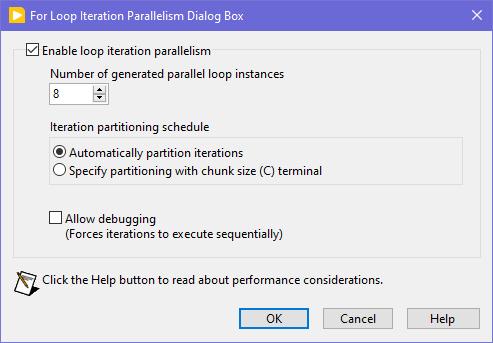
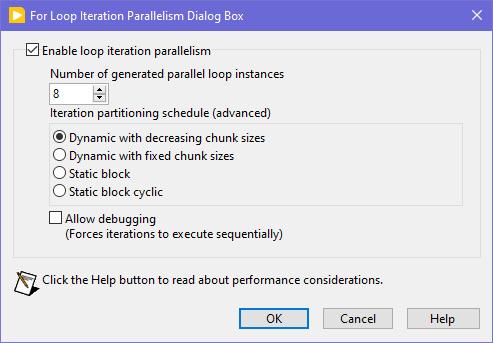
Seems like this one has "escaped everyone's grasp" too. ParallelLoop.ShowAllSchedules=True Because was only checked from the password-protected diagram of ParallelForLoopDialog.vi (LabVIEW 20xx\resource\dialog). Present since LabVIEW 2010. When activated, allows to apply more advanced iteration partitioning schedule. In other words, instead of this you will get this Сould this be useful? I can't say. Maybe in some very specific use-cases. In my quick tests I didn't manage to get increase in any productivity. It's easy to mess up with those options and make things worse, than by default. Also can be changed by this scripting counterpart.
2 points
-
Look at this new download on VIPM https://www.vipm.io/package/bjm_lib_request_power/2 points
-
You want an ability to override the Equality or Comparison operators? I'm unsure, whether it really existed in OpenG packages, but now you have those neat malleable VIs, that let you do that: Search Unsorted 1D Array , Sort 1D Array , Search Sorted 1D Array. They have an additional input to specify your own equals or less function in a form of a custom comparison class or a VI refnum. There's an article to help: Creating a Custom Sorting Function in LabVIEW2 points
-
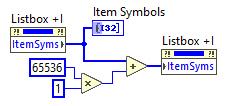
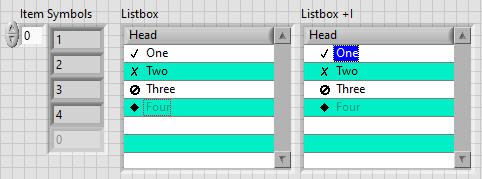
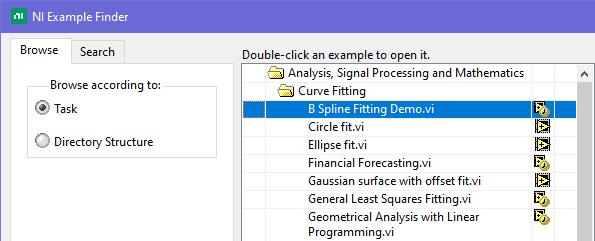
This is exactly what was said in that ancient thread: Tree control in labview. So if you add 65536*N to the Item Symbols property of the Listbox and have the "Enable Indentation" option activated, you shift the symbol/glyph and the text N levels to the right. Could be useful for simple 'parent-child' relationships, if you don't want to use a Tree. And still it's used in Find Examples / NI Example Finder window:
2 points
-
<LabVIEW>\resource\plugins\CreateSubVI\Additional Actions Template.vi This VI has (limited) instructions for how to run custom code when doing a Create SubVI action. You can search around for more details. I don't know if you'll be able to use a template, though. You might have to do all of the scripting code.1 point
-
2026 Q3 was released the other day by the way...1 point
-
2022 Q3 is still the large majority of our projects. Windows 11 support 64 bit RT, and things work fairly well. Yes like others have said some compile cache issues but very happy. We are migrating to 2025 Q1 as needed. I haven't used it as much as I have 2022 Q3, but it seems fairly good so far. I have seen a compile cache issue in 2025 Q1, and I have seen an RT related crash with XNet in development where the build was stable. So not all the confidence in the world but fine.1 point
-
My part of the world! Unfortunately, I don't have any connections to the realm you are talking about. But I would look at Northern Kentucky University (just across the Ohio river) as they have a good CS program (or at least used to). There is also Miami University (not to be confused with the one in Florida), Wright State University (where I got my MSE), and University of Dayton about an hour north of here in the Dayton area. University of Kentucky is about 2 hours south (Lexington, Kentucky), which is about the same distance from Ohio University (Athens) or THE Ohio State University (Columbus).1 point
-
@Rolf Kalbermatter my team and I still use in some systems here! In fact this very last week we have needed to add some lua stuff to an old project.1 point
-
You can 'renew' your LabVIEW CE license this way if you haven't tried it: Go to https://www.ni.com Hover over your user icon in the upper right and select "My Account". Scroll down to "Products and Services" and select "View my products". Scroll down to find your LabVIEW Community Edition and select "Renew" from the drop-down menu to the right. Apologies if you've already tried this and still had issues. Maybe someone else will find it useful.1 point
-
There should be a forum on the dark side for that, but anyway, here you go. LabGRAD_21.zip1 point
-
Reentrant execution may be a safe option. Have to check the function. The zlib library is generally written in a way that should be multithreading safe. Of course that does NOT apply to accessing for instance the same ZIP or UNZIP stream with two different function calls at the same time. The underlaying streams (mapping to the according refnums in the VI library) are not protected with mutexes or anything. That's an extra overhead that costs time to do even when it would be not necessary. But for the Inflate and Deflate functions it would be almost certainly safe to do. I'm not a fan of making libraries all over reentrant since in older versions they were not debuggable at all and there are still limitations even now. Also reentrant execution is NOT a panacea that solves everything. It can speed up certain operations if used properly but it comes with significant overhead for memory and extra management work so in many cases it improves nothing but can have even negative effects. Because of that I never enable reentrant execution in VIs by default, only after I'm positively convinced that it improves things. For the other ZLIB functions operating on refnums I will for sure not enable it. It should work fine if you make sure that a refnum is never accessed from two different places at the same time but that is active user restraint that they must do. Simply leaving the functions non-reentrant is the only safe option without having to write a 50 page document explaining what you should never do, and which 99% of the users never will read anyways. 😁 And yes LabVIEW 8.6 has no Separated Compiled code. And 2009 neither.1 point
-
A Timestamp is a 128 bit fixed point number. It consists of a 64-bit signed integer representing the seconds since January 1, 1904 GMT and a 64-bit unsigned integer representing the fractional seconds. As such it has a range of something like +- 3*10^11 years relative to 1904. That's about +-300 billion years, about 20 times the lifetime of our universe and long after our universe will have either died or collapsed. And the resolution is about 1/2*10^19 seconds, that's a fraction of an attosecond. However LabVIEW only uses the most significant 32-bit of the fractional part so it is "only" able to have a theoretical resolution of some 1/2*10^10 seconds or 200 picoseconds. Practically the Windows clock has a theoretical resolution of 100ns. That doesn't mean that you can get incremental values that increase with 100ns however. It's how the timebase is calculated but there can be bigger increments than 100ns between two subsequent readings (and no increment). A double floating point number has an exponent of 11 bits and 52 fractional bits. This means it can represent about 2^53 seconds or some 285 million years before its resolution gets higher than one second. Scale down accordingly to 285 000 years for 1 ms resolution and still 285 years for 1us resolution.1 point
-
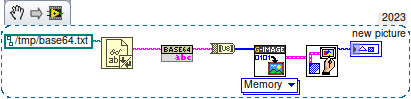
So in LV>=20, using OpenSerializer.Base64 and G-Image. That simple. Linux just does not have IMAQ. Well, who said that the result should be an IMAQ image?
1 point
-
😅 You might be waiting a while, I'm mostly interested in compression, not decompression. That being said in the post I made, there is a VI called Process Huffman Tree and Process Data - Inflate Test under the Sandbox folder. I found it on the NI forums at some point and thought it was neat but I wasn't ready to use it yet. It isn't complete obviously but does the walking through of bits of the tree, to bytes. EDIT: Here is the post on NI's forums I found it on.1 point
-
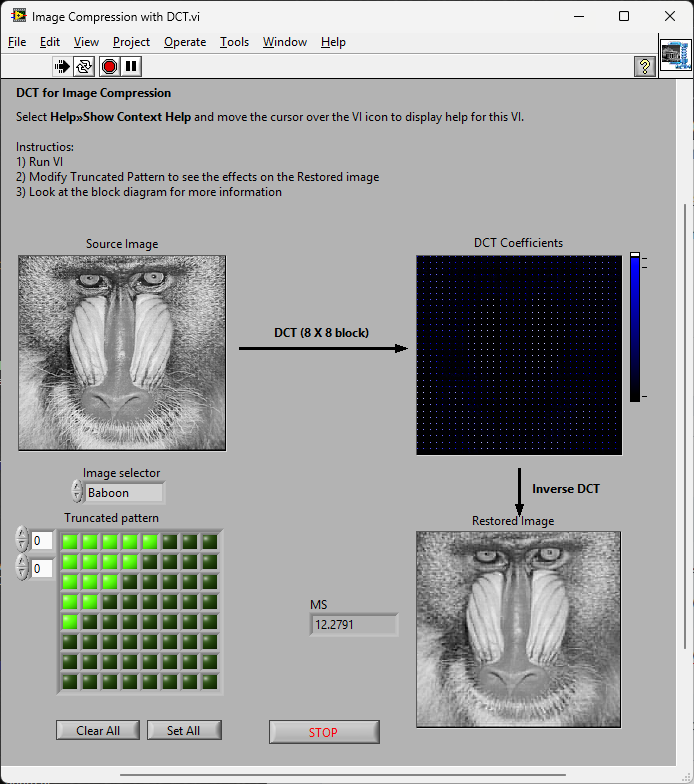
There is an example shipped with LabVIEW called "Image Compression with DCT". If one added the colour-space conversion, quantization and changed the order of encoding (entropy encoding) and Huffman RLE you'd have a JPG [En/De]coder. That'd work on all platforms Not volunteering; just saying
1 point
-
The Weather Station example that ships with LabVIEW shows a bit of this. but the data is not Base64, its just a pure characters,
1 point
-
From what I can remember, for LV 5.0.x and older RTE (i.e., a loader plus small subset of resources) was included into the EXE automatically during the build process. For LV 5.1.x there was a choice: to include RTE into the build or to use an external RTE. And since LV 6.0 only an external RTE was supposed. I could say more, such a trick is still possible for all modern versions on all three platforms (Win, Mac, Linux). The latest version I tested it on, was LV 2018, but I'm pretty sure, the technique hasn't changed much. I can't remember, from which version NI started to use Visual Studio 2015, but since then each EXE requires The Universal CRT, that is contained in Microsoft Visual C++ 2015 Redistributable. One could install such a distro on a clean machine or copy all these files from the machine, where such a CRT is already installed. Now besides of those the application will also require this minimal subset of folders/files (true for LV 2018 64-bit): On Linux it goes much easier (true for LV 2014 64-bit): For LV 2018 64-bit with a "dark" RTE it also wants And for Mac OS you can embed RTE into the application with this script: Standalone LabVIEW-built Mac Application with Post-Build Action. Of course (and I'm sure everyone understands that), the technique described above, is applicable to very simple 'a la calculator' apps and not very to not at all for more or less complex projects. The more functions are called, the more dependencies you get. If something from MKL is used, you need lvanlys.dll and LV##0000_BLASLAPACK.dll, if VISA is used, you need visa32.dll, NiViAsrl.dll and maybe others, and so on and so forth.1 point
-
The thing I loved about the original LabVIEW was that it was not namespaced or partitioned. You could run an executable and share variables without having to use things like memory maps. I used to to have a toolbox of executables (DVM, Power Supplies, oscilloscopes, logging etc. ) and each test system was just launching the appropriate executable[s] at the appropriate times. It was like OOP composition for an entire test system but with executable modules. Additionally, crashes were unheard of. In the 1990's I think I had 1 insane object in 18 months and didn't know what a GPF fault was until I started looking at other languages. We could run out of memory if we weren't careful though (remember the Bulldozer?). Progress!
1 point
-
I don't know what drivers are used under the hood, but I've recently used G-Audio to interface to the mic/speakers for a LabVIEW application I was working on.1 point
-
Thanks, I'll be honest, I'm allergic to Discord. Vehemently so. To the point where I refuse to use it. Just seems like a lot of unfiltered noise to this old man. I'm gonna play with NodeRed and see if it's the tool of choice. And oh, back in the day I was a National Instruments Alliance Member. Dunno if that's still a thing or not. Cheers,1 point
-
4. WinAPI version using ChooseColor function. NativeColors.rar Far from ideal, don't kick too hard. 🙂 Determine Clicked Array Element Index is from here.1 point
-
Technically it is a resource collector, but not exactly in the same way typical garbage collectors work. Normal garbage collectors work in a way where the runtime system somehow tracks variables usage at runtime by monitoring when they get out of runtime scope and then attempts to deallocate any variable that is not a value type in terms of the stack space or scope space it consumes. The LabVIEW resource collector works in a slightly different way in that whenever a refnum gets created, it is registered together with the current top level VI in the call chain and a destroy callback with a refnum resource manager. When a top level VI stops executing, both by being aborted or simply executing its last diagram element, it informs the refnum resource manager that it goes idle, and that will then make the refnum resource manager scan its registered refnums to see if any is associated with that top level VI and if so, call its destroy callback. So while it is technically not a garbage collector in the exact same way as what Java or .Net does, it still is for most practical purposes a garbage collector. The difference is, that a refnum can be passed to other execution hierarchies through globals and similar and as such might still be used elsewhere, so technically isn't really garbage yet. There are three main solutions for this: 1) Don't create the refnum in an unrelated VI hierarchy to be passed to another hierarchy for use 2) If you do create it in one VI hierarchy for use in another, keep the initial hierarchy non-idle (running) until you do not need that refnum anymore anywhere. 3) If the refnum is a resource that can be named (eg. Queues, Notifiers) obtain a seperate refnum to the named resource in each hierarchy. The underlying object will stay alive for as long as at least one refnum is still valid. Each obtained refnum is an independent reference to the object and destroying one (implicit or explicit) won't destroy any of the other refnums.1 point
-
In a previous life, I used to teach a CLD level class using this book, and enjoyed it a lot -- Some of it is certainly outdated at this point, but I think it still has a lot of solid info / strategies in it. I've attached the files as a .zip file to this post. Good luck! Effective LabVIEW Programming Files.zip1 point
-
I'm excited to release ViPER ViPER is an Object Oriented design Framework that supports dependency injection and recursive object creation. Systems are assembled at runtime from a collection of pre-built components defined by an Object Definition Document. Please visit the project on GitHub https://github.com/kurtafriday/ViPER I've presented this framework at several GLA Conferences, for an overview and guidance please view. GLA 2021 https://labviewwiki.org/wiki/GLA_Summit_2021/Open_Source_ViPER GLA 2020 https://labviewwiki.org/wiki/GLA_Summit_2020/ViPER_-_A_LabVIEW_Dependency_Injection_Framework This branch of ViPER has been used by us to develop systems in regulated industries for several years, it's solid and reliable, however its windows only. I'm working on ViPER_WinRT which is compatible with Windows and RT and we have already used it for several systems. I'll be releasing ViPER_WinRT in the coming months. I'll work to get ViPER onto the VIPM Tools Network soon. I'm looking forward to the feedback and I hope you enjoy and get value from this framework. Ping me if you have any questions. kurt@medulla.net1 point
-
New in LabVIEW 2020: C:\Program Files (x86)\National Instruments\LabVIEW 2020\vi.lib\picture\PNG\Draw Flattened Blended Pixmap.vi I didn't create this one. It is not in the palettes. I have asked that it be added in a future version.1 point
-
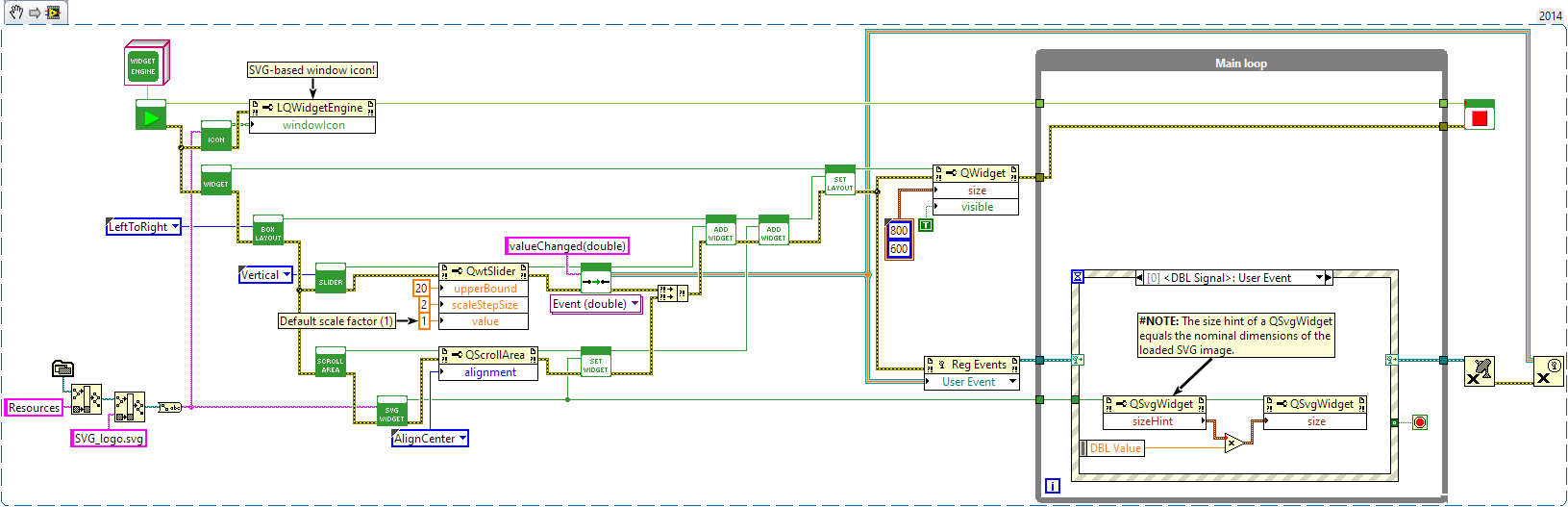
Not from NI, that I know of. I did make a similar API that wraps the Qt framework. That involves creating external windows though; your toolkit has the benefit of being integrated with VI front panels. Original LAVA post: https://lavag.org/topic/19611-utf-8-text-svg-images-inheritable-gui-components-dynamically-composed-guis-layout-management-splitters-in-tabs-mdis-taskbar-integration-and-much-more/ NIPM installation instructions: https://jksh.github.io/LQ-Bindings/docs/ As Mikael and Rolf said, class constants are not needed: Definitely! LabVIEW's built-in support for dynamic GUIs is very poor. NXG was starting to show some promise with dynamic controls, but that's now dead. So, community-built tools are sorely needed. Are you planning to make public releases of your work? Layouts are common concept in a wide variety of GUI toolkits. Makes it so much easier to create resizable GUIs and support a variety of screen resolutions.
1 point
-
Here is a VI that gets the title of the window that is active. You could then continually loop until the title you expect is active, then perform operations. https://forums.ni.com/t5/LabVIEW/Get-Current-Active-Window/m-p/3930389#M11169261 point
-
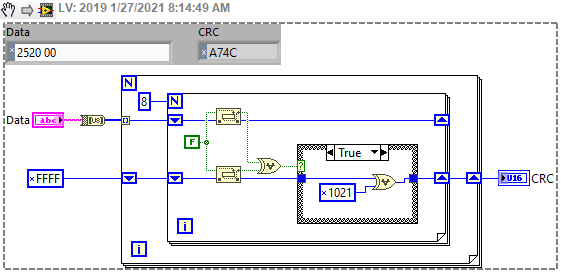
This seems to work... CRC16-CCITT-FALSE.vi
1 point
-
I don't have good examples to share, but here are a few helpful links for you: NI has an article dedicated to DVRs, which also explains the fundamental idea: http://www.ni.com/product-documentation/9386/en/ Here is a short video that explains how to use a DVR and some of the pitfalls: https://www.youtube.com/watch?v=VIWzjnkqz1Q Of course, you'll find lots of topics related to DVRs on this forum.1 point
-
Here is a quick and dirty edit. It allows for column separators to be moved, but I noticed that on resize it will set the column widths. So this means if you manually move the columns, and then resize the control it may change the columns in an unexpected way. But at that point you can manually move the separators again. I only have 2017 and 2018 so this is for 2017 and newer now. Variant_Probe-2.4.3-0.ogp1 point
-
I love the Picture Control, it's very fast if you use it correctly. I developmed the whole GDS UML modeller (http://opengds.github.io/) based on that. One performance issue is if you draw lot of text with a none default font size, then it becomes very slow. Make sure you use Smooth updates, and I always use Erase first. What does the shft register make it poorly? Do you have an exmaple where it's slow we can look at?1 point
-
Thanks Mads.1 point
-
You *can* use DETT on built applications, just enable VI server access and debugging in the build. Here is a description of it: http://digital.ni.com/public.nsf/allkb/A50A8BBFD737679186257D77006887571 point
-
Hi All, I'm looking for a good resource that explains LabVIEW's Execution System / Thread Allocation / Thread Priority system. As a background to the reason for my request: I have an application with over 50 parallel loops running at fixed but configurable times. Twenty of these loops are calling a .net Dll and are thus not in a Timed Loop (there is a known issue according to NI support with calling a .net dll in a timed loop where the call time is large ie. upwards of a second). The remaining loops are performing other data acquisition. Each loop is what I call a Task Controller - it looks after a specific piece of hardware, taking requests for data (via queues), performing data acquisition and then pumping the result back to the requester. In order to seperate the timing of the functionality (and allow multiple requesters access to the same data), this process is not sequential but occurs in parallel loops. So there is a lot of parallel activity going on. I notice that as more of these loops fire up, the slower the remaining loops are. The CPU usage tends to stay around 7-8% during this time irrespective of how many loops are executing. Note that the .net dll calls (up to 20) are reasonably slow calls and each could take up to 6 seconds to execute. The .net dll has been written to handle multi-threading. The PC is a hyper-threaded quad core (ie 8 logical cores) @ 3.3GHz. Kinda a meaty machine. I should also mention that the majority of the VIs are re-entrant. The only non-rentrant VIs are some FGVs and a few User Interface VIs that reference the data in these FGVs. And before you ask the FGVs are simply Get/Set for a handful of cluster points. So I figure it's a simple case of thread starvation. Every VI is currently set to the Standard Execution System (via Same as Caller) with Normal Priority. I figure that adjusting these settings on the top level Task Controller vis may assist in spreading the load to the remaining available, but not executing, threads. The SubVIs under each Task Controller will continue to use the Same As Caller setting, allowing me to seperate logically each Task into appropriate Execution Systems. Any thoughts?1 point
-
Start with NI's article "How Many Threads Does LabVIEW Allocate?" Also see the LabVIEW help for "Multitasking, Multithreading, and Multiprocessing." If you divide your code across execution systems instead of leaving them all at "Same as Caller" you should see the work distributed across more threads, and probably better performance and higher CPU use.1 point